





iPixel LED

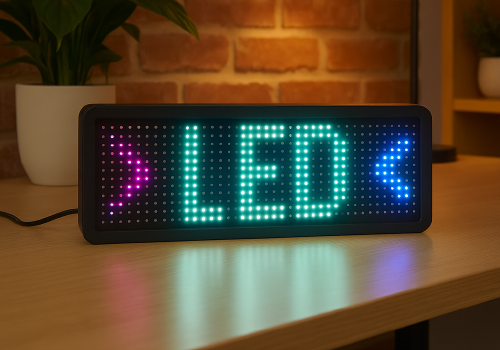
Display apps, clocks, notifications and media on iPixel-compatible LED displays.

Avertissement ! Cette appli peut ne pas fonctionner correctement.

Cette appli est en cours de test, et n’a jamais été revue. Il se peut qu’elle ne fonctionne pas comme attendu.
Prenez des précautions supplémentaires en installant cette appli.
« Retour à la version normale

Display apps, clocks, notifications and media on iPixel-compatible LED displays.

Lire plus ›

Appareils pris en charge

Cartes Flow

Cliquez sur un appareil ci-dessus pour afficher uniquement les cartes Flow associées.
Quand...

LED Display
Activé
LED Display
Désactivé
LED Display
Intensité lumineuse modifiée

Et...

LED Display
Est activé
LED Display
Clock mode is Mode

Alors...

LED Display
Activer
LED Display
Désactiver
LED Display
Alterner activé ou désactivé
LED Display
Mettre l'intensité lumineuse sur %
LED Display
Définir l'intensité lumineuse sur relative %
i
Diminuez ou augmentez la luminosité par rapport au niveau actuel de l'appareil.
LED Display
Dismiss the current notification
LED Display
Delete all apps, retry: Retry on connection failure
LED Display
Remove app App
LED Display
Set clock colour to Colour
LED Display
Set clock display style to Display style
i
On 32×32 displays, Horizontal uses a centered 14px HH:MM GIF and Vertical places hours above minutes. Selecting either style switches the clock to this fixed GIF layout.
LED Display
Set clock font to With font
i
Leave the field empty to use the bundled default font.
LED Display
Set clock mode to Mode
LED Display
Set clock scroll speed to Speed
LED Display
Show notification with icon Icon at Icon position and text Text in font With font, animation Text animation using Animation style, in Text colour at speed Text speed, important: Important, keep until dismissed: Keep until dismissed
i
Uses a PNG or animated GIF from your media library. GIF frames keep their original timing while the text scrolls. Normally it lasts one complete visual cycle; sticky mode keeps it visible until dismissed.
LED Display
Show notification with image Image, important: Important, keep until dismissed: Keep until dismissed
i
Shows a media-library image for 8 seconds, or until dismissed in sticky mode.
LED Display
Show notification with text Text, font With font, animation Animation, in Colour at speed Speed, important: Important, keep until dismissed: Keep until dismissed
LED Display
Set text app App name to Text with font With font in Colour with Animation at speed Speed
i
Using the same app name updates the existing app instead of creating another one.
LED Display
Set app App name to Icon at Icon position with Text in font With font and Text colour, Text animation using Animation style at speed Text speed
i
PNG and animated GIF icons imported from LaMetric or uploaded in iPixel Media appear in the icon picker. GIF frames keep their original timing while the text scrolls. Smooth text scrolling moves one pixel per frame; Default moves two.
LED Display
Set image app App name to Image for Display duration seconds
i
Displays a static PNG without text. The image is resized to fit the selected iPixel display.

Widgets

Vous pouvez ajouter les widgets de cette application à votre tableau de bord ou à votre écran d’accueil dans l’application mobile.

Virtual LED Screen
Virtual LED Screen

Assistance

Le développeur de cette appli ne propose pas d’assistance directe.

Nouveautés

Version 4.2.0 — Animated GIF icons are now supported in icon & text apps and notifications. Select GIFs from iPixel Media or imported LaMetric images; original frame timing is preserved while the text scrolls.

Afficher le journal des modifications

iPixel LED

iPixel LED n’est pas compatible avec le Homey sélectionné.

iPixel LED va s’installer sur Homey dans un instant.
Installer