





iPixel LED

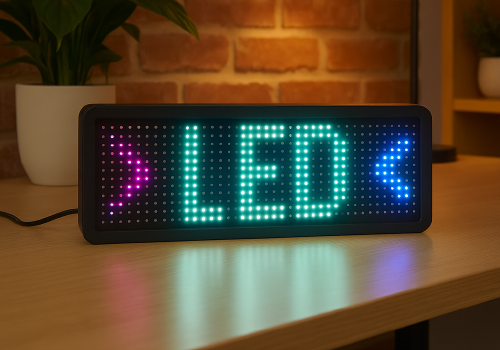
Display apps, clocks, notifications and media on iPixel-compatible LED displays.

¡Advertencia! Es posible que esta aplicación no funcione correctamente.

Esta aplicación se está probando y nunca se ha revisado. Puede que no funcione como se espera.
Ten mucho cuidado al instalar esta aplicación.
« Volver a la versión normal

Display apps, clocks, notifications and media on iPixel-compatible LED displays.

Leer más ›

Dispositivos compatibles

Tarjetas Flow

Haz clic en el dispositivo de arriba para mostrar solo las tarjetas Flow relacionadas.
Cuando...

LED Display
Encendido
LED Display
Apagado
LED Display
La intensidad de la luz ha cambiado

Y...

LED Display
Está encendido
LED Display
Clock mode is Mode

Entonces...

LED Display
Encender
LED Display
Apagar
LED Display
Encender o apagar
LED Display
Ajustar la intensidad de la luz a %
LED Display
Ajustar la intensidad de la luz como relativa %
i
Atenúa o ilumina con respecto al nivel de atenuación actual del dispositivo.
LED Display
Dismiss the current notification
LED Display
Delete all apps, retry: Retry on connection failure
LED Display
Remove app App
LED Display
Set clock colour to Colour
LED Display
Set clock display style to Display style
i
On 32×32 displays, Horizontal uses a centered 14px HH:MM GIF and Vertical places hours above minutes. Selecting either style switches the clock to this fixed GIF layout.
LED Display
Set clock font to With font
i
Leave the field empty to use the bundled default font.
LED Display
Set clock mode to Mode
LED Display
Set clock scroll speed to Speed
LED Display
Show notification with icon Icon at Icon position and text Text in font With font, animation Text animation using Animation style, in Text colour at speed Text speed, important: Important, keep until dismissed: Keep until dismissed
i
Uses a PNG or animated GIF from your media library. GIF frames keep their original timing while the text scrolls. Normally it lasts one complete visual cycle; sticky mode keeps it visible until dismissed.
LED Display
Show notification with image Image, important: Important, keep until dismissed: Keep until dismissed
i
Shows a media-library image for 8 seconds, or until dismissed in sticky mode.
LED Display
Show notification with text Text, font With font, animation Animation, in Colour at speed Speed, important: Important, keep until dismissed: Keep until dismissed
LED Display
Set text app App name to Text with font With font in Colour with Animation at speed Speed
i
Using the same app name updates the existing app instead of creating another one.
LED Display
Set app App name to Icon at Icon position with Text in font With font and Text colour, Text animation using Animation style at speed Text speed
i
PNG and animated GIF icons imported from LaMetric or uploaded in iPixel Media appear in the icon picker. GIF frames keep their original timing while the text scrolls. Smooth text scrolling moves one pixel per frame; Default moves two.
LED Display
Set image app App name to Image for Display duration seconds
i
Displays a static PNG without text. The image is resized to fit the selected iPixel display.

Widgets

Puedes añadir los widgets de esta aplicación a tu cuadro de mando o a la pantalla de inicio desde la aplicación móvil.

Virtual LED Screen
Virtual LED Screen

Asistencia

El desarrollador de esta aplicación no ofrece soporte directo.

Novedades

Versión 4.2.0 — Animated GIF icons are now supported in icon & text apps and notifications. Select GIFs from iPixel Media or imported LaMetric images; original frame timing is preserved while the text scrolls.

Ver registro de cambios

iPixel LED

iPixel LED no es compatible con el Homey seleccionado.

iPixel LED se instalará en Homey en breve.
Instalar