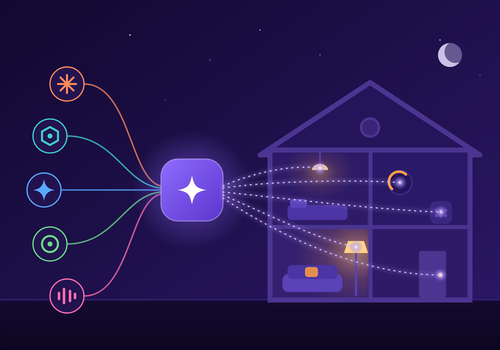
Pilotez votre Homey avec n'importe quel assistant IA, comme Claude, ChatGPT, Gemini, Copilot ou Cursor. Demandez simplement en langage courant : éteindre les lumières, vérifier la température, créer un nouveau Flow, ou gérer vos apps et vos appareils. Aucune programmation nécessaire.
Vous pouvez aussi construire vos propres automatisations avec l'IA dans l'éditeur de Flows de Homey. Créez des Flows qui réagissent quand votre IA appelle une commande personnalisée, et renvoyez une vraie réponse à l'IA à partir des valeurs de vos appareils et des tags de Flow.
Décrivez une automatisation en une phrase et votre assistant construit l'Advanced Flow pour vous, chaque carte à sa place. Demandez comment une température ou votre consommation d'énergie a évolué ces dernières semaines et il lit Homey Insights pour vous. Accéder à votre Homey depuis l'extérieur fonctionne sans ordinateur allumé jour et nuit.
Lire plus ›
Cartes Flow
Cliquez sur un appareil ci-dessus pour afficher uniquement les cartes Flow associées.
Quand...
MCP AI Bridge
L'alarme générique s'est activée
MCP AI Bridge
L'alarme générique s'est désactivée
MCP AI Bridge
Un agent IA se connecte
MCP AI Bridge
Un agent IA se déconnecte
MCP AI Bridge
L'IA pilote un appareil
MCP AI Bridge
Un Flow devient cassé
MCP AI Bridge
Un agent IA appelle un outil personnalisé
MCP AI Bridge
Un assistant demande une confirmation à Personne
MCP AI Bridge
Un assistant pose une question à Personne
MCP AI Bridge
Une tâche programmée du bridge échoue
MCP AI Bridge
Un événement de sécurité se produit
MCP AI Bridge
Le serveur MCP AI Bridge démarre
MCP AI Bridge
Un appel d'outil IA échoue
MCP AI Bridge
La parole avec la voix IA a échoué
Et...
MCP AI Bridge
L'alarme générique est en marche
MCP AI Bridge
Un agent IA est connecté
MCP AI Bridge
La dépense du modèle aujourd'hui est inférieure à Montant
MCP AI Bridge
Il y a un Flow cassé
MCP AI Bridge
Le modèle répond oui, sûr à au moins Au moins, en pourcentage %, à : Question Joindre Pièce ou appareil Web Délai en secondes S'il n'y a pas de réponse claire
MCP AI Bridge
Le modèle répond oui à : Question Joindre Pièce ou appareil Web Délai en secondes S'il n'y a pas de réponse claire
MCP AI Bridge
La valeur mémorisée Nom est Valeur
MCP AI Bridge
L'événement de sécurité est Événement
MCP AI Bridge
L'entrée de l'outil contient Texte à chercher
MCP AI Bridge
L'entrée de l'outil est vide
MCP AI Bridge
Le nom de l'outil est Nom de l'outil
MCP AI Bridge
C'est l'heure calme pour la voix IA
Alors...
MCP AI Bridge
Limiter le bridge à Mode
MCP AI Bridge
Remettre le bridge dans son mode d'accès normal
MCP AI Bridge
Laisser le modèle faire : Demande Conversation Délai en secondes S'il n'y a pas de réponse
Advanced
MCP AI Bridge
Dire Texte sur Enceinte Fournisseur Voix Volume, de 0 à 100 Vitesse Comment ça sonne Code de langue Son avant Pendant les heures calmes
Advanced
MCP AI Bridge
Créer la parole IA de Texte Fournisseur Voix Vitesse Comment ça sonne Code de langue
Advanced
MCP AI Bridge
Demander au modèle : Question Joindre Pièce ou appareil Web Délai en secondes S'il n'y a pas de réponse
Advanced
MCP AI Bridge
Laisser le modèle choisir parmi Options pour : Question Joindre Pièce ou appareil Web Délai en secondes S'il n'y a pas de réponse
Advanced
MCP AI Bridge
Interroger le modèle sur Caméra Question Délai en secondes S'il n'y a pas de réponse
Advanced
MCP AI Bridge
Décrire Caméra Question sur Enceinte Fournisseur Voix Volume, de 0 à 100 Son avant Pendant les heures calmes Délai en secondes S'il n'y a pas de réponse
Advanced
MCP AI Bridge
Demander au modèle un nombre de Minimum à Maximum : Question Joindre Pièce ou appareil Web Délai en secondes S'il n'y a pas de réponse
Advanced
MCP AI Bridge
Demander au modèle : Question Joindre Pièce ou appareil Web et dire la réponse sur Enceinte Fournisseur Voix Volume, de 0 à 100 Son avant Pendant les heures calmes Délai en secondes S'il n'y a pas de réponse
Advanced
MCP AI Bridge
Laisser le modèle démarrer un Flow parmi Flow 1 Flow 2 Flow 3 Flow 4 Flow 5 pour : Situation Joindre Pièce ou appareil Web Délai en secondes S'il n'y a pas de réponse claire
Advanced
MCP AI Bridge
Récupérer Nom dans la mémoire de l'IA
Advanced
MCP AI Bridge
Retenir Nom comme Valeur pour l'IA
MCP AI Bridge
Réponse Réponse à la demande Identifiant de la demande
MCP AI Bridge
Renvoyer l'erreur Message d'erreur à l'agent IA
MCP AI Bridge
Renvoyer Réponse à l'agent IA
MCP AI Bridge
Dire un point du jour Formulation sur Enceinte Ajouter à la fin Fournisseur Voix Volume, de 0 à 100 Son avant Pendant les heures calmes
Advanced
Assistance
Vous avez un problème avec cette appli ?
Contacter le développeur ici.
Nouveautés
Version 5.2.7 — Une carte agenda placée dans une pile, sous une autre carte au même endroit du tableau de bord, restait sur "Aucun agenda" : son adresse n'était jamais conservée. Elle fonctionne maintenant là comme partout ailleurs. Un agenda qui ne peut pas être récupéré écrit la raison dans le journal de l'app, pour qu'un rapport de diagnostic la montre.
Afficher le journal des modifications








 Cette appli peut gérer tout votre Homey.
 MCP AI Bridge va s’installer sur Homey dans un instant.
 Belgium
 Bulgaria
 Croatia
 Cyprus
 Czech Republic
 Estonia
 Finland
 Greece
 Hungary
 Iceland
 Ireland
 Latvia
 Lithuania
 Malta
Malta
 Moldova
 The Netherlands
 Portugal
 Romania
 Slovakia
 Slovenia
 Türkiye
 Ukraine
 United Kingdom


