




UNAS Monitor

Watch over the disks before one of them gives up.

Read more ›

Supported devices

Flow cards

Click on a device above to show related Flow cards only.

When...

Disk
The temperature changes
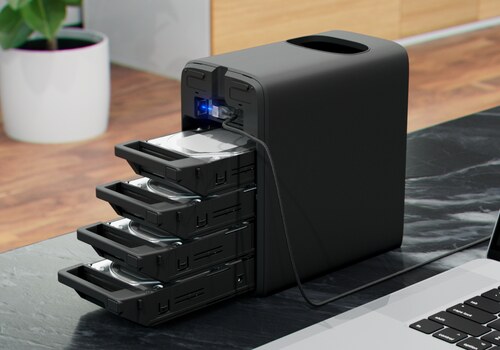
Disk
The disk leaves the optimal state
Disk
The disk rises above °C °C
i
Drive makers give fifty degrees as the usual ceiling.
Disk
A bad sector appears
i
A disk rarely dies all at once. The first bad sector is the warning.
Disk
The disk reports SMART errors
i
Uncorrectable sectors or read errors went up: back up, and plan a replacement.
Disk array
The temperature changes
Disk array
The array leaves the fully operational state
i
Degraded, rebuilding, or any state that is not fully operational. This is the one alert worth waking up for.
Disk array
Array usage rises above % %
Disk array
The processor rises above °C °C
Disk array
The array starts rebuilding
i
A disk failed or was replaced: the array is at its most fragile until the rebuild ends.
Disk array
The array finishes rebuilding
Disk array
A data integrity check starts
i
The NAS reads every disk to find silent errors, and is slower meanwhile.
Disk array
The data integrity check ends
Disk array
The NAS has restarted
Disk array
The NAS firmware has been updated
Disk array
A network port changes state
i
Connected, disconnected, or a link speed that changes, such as a 10 GbE port falling back to 1 GbE.
Disk array
The NAS stops responding
i
After three missed readings, or at once when the API key is refused.
Disk array
The NAS responds again

And...

Disk
The disk is optimal
Disk
The disk is hotter than °C °C
Disk array
The array is fully operational
Disk array
Array usage is above % %
Disk array
The array is rebuilding
Disk array
A data integrity check is running
Disk array
The NAS responds

Then...

Disk array
Refresh now
i
Reads the console at once and updates the array and its disks, before a condition for instance.

Widgets

You can add this app’s widgets to your dashboard or homescreen in the mobile app.

Disk activity
Disk activity
Disks
Disks
NAS front panel
NAS front panel
Disk array
Disk array
Event log
Event log
Processor and memory
Maintenance
Maintenance
Fill trend
Fill trend
Network
Network
Overview
Overview
Disk temperatures
Disk temperatures

Support

Having an issue with this app? Contact the developer via email.

What’s new

Version 1.3.0 — Every indicator now has its own icon, and each NAS model its own device icon. New Flow cards warn when a rebuild or a consistency check starts or ends, when the NAS restarts, updates its firmware, loses a network link or stops responding, and when a disk reports SMART errors; an action refreshes the readings on demand. The NAS shows its uptime, ongoing maintenance and next check, and model and versions appear in the device settings. Three new widgets: the front panel with one drawer per bay, maintenance, and an overview.

View changelog

UNAS Monitor

UNAS Monitor is not compatible with the selected Homey.

UNAS Monitor will install on Homey shortly.
Install App