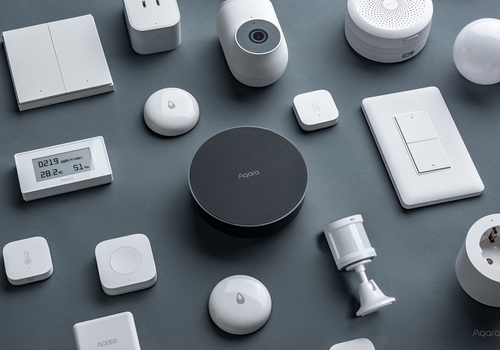
Aqara Community App brings local Zigbee support for a wide range of Aqara and Xiaomi devices. Connect lights, switches, plugs, sensors, remotes, curtains, thermostats and other devices directly to Homey.
Use the devices in Flows and control them locally without relying on a cloud connection. The app is maintained by the community and focuses on broad device compatibility and practical support for Aqara Zigbee products.
Dim or brighten with respect to the device's current dim-level.
Aqara Nebula H1 light
Set a temperature %
i
Adjusts the temperature of the light. A higher value means a warmer color.
Aqara Nebula H1 light
Change color temperature by %
i
Positive steps make the light warmer, negative steps cooler. The target stays within 0–100%. One card controls one light.
Aqara Shutter Switch H2 EU
Set the position to %
i
Change the position to open (100%), closed (0%), or a value in between.
Aqara Track Floodlight V1
Turn on
Aqara Track Floodlight V1
Turn off
Aqara Track Floodlight V1
Toggle on or off
Aqara Track Floodlight V1
Dim to %
Aqara Track Floodlight V1
Set relative dim-level %
i
Dim or brighten with respect to the device's current dim-level.
Aqara Track Floodlight V1
Set a temperature %
i
Adjusts the temperature of the light. A higher value means a warmer color.
Aqara Track Floodlight V1
Change color temperature by %
i
Positive steps make the light warmer, negative steps cooler. The target stays within 0–100%. One card controls one light.
Ceiling light L1-350
Turn on
Ceiling light L1-350
Turn off
Ceiling light L1-350
Toggle on or off
Ceiling light L1-350
Dim to %
Ceiling light L1-350
Set relative dim-level %
i
Dim or brighten with respect to the device's current dim-level.
Ceiling light L1-350
Set a temperature %
i
Adjusts the temperature of the light. A higher value means a warmer color.
Ceiling light L1-350
Change color temperature by %
i
Positive steps make the light warmer, negative steps cooler. The target stays within 0–100%. One card controls one light.
Ceiling light T1 / T1M
Turn on
Ceiling light T1 / T1M
Turn off
Ceiling light T1 / T1M
Toggle on or off
Ceiling light T1 / T1M
Dim to %
Ceiling light T1 / T1M
Set relative dim-level %
i
Dim or brighten with respect to the device's current dim-level.
Ceiling light T1 / T1M
Set a temperature %
i
Adjusts the temperature of the light. A higher value means a warmer color.
Ceiling light T1 / T1M
Change color temperature by %
i
Positive steps make the light warmer, negative steps cooler. The target stays within 0–100%. One card controls one light.
Ceiling light T1 / T1M
Configure ring effect: Animation, palette Palette, speed Speed, %%
i
Select the main ceiling light. The palette supplies only colors; animation and speed are independent. The action turns on the ring automatically; control brightness separately on the ring device.
Ceiling light T1 / T1M
Start ring effect Effect
i
Select the main ceiling light. The action turns on its LED ring automatically; brightness is controlled on the ring device.
Curtain controller
Set the position to %
i
Change the position to open (100%), closed (0%), or a value in between.
Curtain controller
Set state ...
Curtain controller B1
Set state ...
Curtain controller C2
Set the position to %
i
Change the position to open (100%), closed (0%), or a value in between.
Curtain controller C2
Set state ...
Curtain controller C3
Set state ...
Curtain driver E1
Set the position to %
i
Change the position to open (100%), closed (0%), or a value in between.
Curtain driver E1
Set state ...
Dimmer switch H2 EU
Turn on
Dimmer switch H2 EU
Turn off
Dimmer switch H2 EU
Toggle on or off
Dimmer switch H2 EU
Dim to %
Dimmer switch H2 EU
Set relative dim-level %
i
Dim or brighten with respect to the device's current dim-level.
Dimmer Switch H2 US
Turn on
Dimmer Switch H2 US
Turn off
Dimmer Switch H2 US
Toggle on or off
Dimmer Switch H2 US
Dim to %
Dimmer Switch H2 US
Set relative dim-level %
i
Dim or brighten with respect to the device's current dim-level.
Dual relay module
Turn on
Dual relay module
Turn off
Dual relay module
Toggle on or off
Dual relay module T2
Turn on
Dual relay module T2
Turn off
Dual relay module T2
Toggle on or off
E27 / E26 CCT led bulb
Turn on
E27 / E26 CCT led bulb
Turn off
E27 / E26 CCT led bulb
Toggle on or off
E27 / E26 CCT led bulb
Dim to %
E27 / E26 CCT led bulb
Set relative dim-level %
i
Dim or brighten with respect to the device's current dim-level.
E27 / E26 CCT led bulb
Set a temperature %
i
Adjusts the temperature of the light. A higher value means a warmer color.
E27 / E26 CCT led bulb
Change color temperature by %
i
Positive steps make the light warmer, negative steps cooler. The target stays within 0–100%. One card controls one light.
E27 / E26 RGB led bulb
Turn on
E27 / E26 RGB led bulb
Turn off
E27 / E26 RGB led bulb
Toggle on or off
E27 / E26 RGB led bulb
Dim to %
E27 / E26 RGB led bulb
Set relative dim-level %
i
Dim or brighten with respect to the device's current dim-level.
E27 / E26 RGB led bulb
Set a temperature %
i
Adjusts the temperature of the light. A higher value means a warmer color.
E27 / E26 RGB led bulb
Set the hue °
i
Select a color from the hue scale, for example red (0°/360°), yellow (60°), or blue (180°).
E27 / E26 RGB led bulb
Set a color ...
E27 / E26 RGB led bulb
Set a random color
E27 / E26 RGB led bulb
Set the saturation %
E27 / E26 RGB led bulb
Change color temperature by %
i
Positive steps make the light warmer, negative steps cooler. The target stays within 0–100%. One card controls one light.
Floor heating thermostat W500
Set the temperature °C
Floor heating thermostat W500
Set the thermostat mode to ...
Floor heating thermostat W500
Set heating preset: Value
Floor heating thermostat W500
Set setpoint hold: Value
GU10 CCT led bulb
Turn on
GU10 CCT led bulb
Turn off
GU10 CCT led bulb
Toggle on or off
GU10 CCT led bulb
Dim to %
GU10 CCT led bulb
Set relative dim-level %
i
Dim or brighten with respect to the device's current dim-level.
GU10 CCT led bulb
Set a temperature %
i
Adjusts the temperature of the light. A higher value means a warmer color.
GU10 CCT led bulb
Change color temperature by %
i
Positive steps make the light warmer, negative steps cooler. The target stays within 0–100%. One card controls one light.
GU10 RGB led bulb
Turn on
GU10 RGB led bulb
Turn off
GU10 RGB led bulb
Toggle on or off
GU10 RGB led bulb
Dim to %
GU10 RGB led bulb
Set relative dim-level %
i
Dim or brighten with respect to the device's current dim-level.
GU10 RGB led bulb
Set a temperature %
i
Adjusts the temperature of the light. A higher value means a warmer color.
GU10 RGB led bulb
Set the hue °
i
Select a color from the hue scale, for example red (0°/360°), yellow (60°), or blue (180°).
GU10 RGB led bulb
Set a color ...
GU10 RGB led bulb
Set a random color
GU10 RGB led bulb
Set the saturation %
GU10 RGB led bulb
Change color temperature by %
i
Positive steps make the light warmer, negative steps cooler. The target stays within 0–100%. One card controls one light.
LED Strip T1
Turn on
LED Strip T1
Turn off
LED Strip T1
Toggle on or off
LED Strip T1
Dim to %
LED Strip T1
Set relative dim-level %
i
Dim or brighten with respect to the device's current dim-level.
LED Strip T1
Set a temperature %
i
Adjusts the temperature of the light. A higher value means a warmer color.
LED Strip T1
Set the hue °
i
Select a color from the hue scale, for example red (0°/360°), yellow (60°), or blue (180°).
LED Strip T1
Set a color ...
LED Strip T1
Set a random color
LED Strip T1
Set the saturation %
LED Strip T1
Change color temperature by %
i
Positive steps make the light warmer, negative steps cooler. The target stays within 0–100%. One card controls one light.
Light bulb
Turn on
Light bulb
Turn off
Light bulb
Toggle on or off
Light bulb
Dim to %
Light bulb
Set relative dim-level %
i
Dim or brighten with respect to the device's current dim-level.
Light bulb
Set a temperature %
i
Adjusts the temperature of the light. A higher value means a warmer color.
Light bulb
Change color temperature by %
i
Positive steps make the light warmer, negative steps cooler. The target stays within 0–100%. One card controls one light.
Light bulb T1
Turn on
Light bulb T1
Turn off
Light bulb T1
Toggle on or off
Light bulb T1
Dim to %
Light bulb T1
Set relative dim-level %
i
Dim or brighten with respect to the device's current dim-level.
Light bulb T1
Set a temperature %
i
Adjusts the temperature of the light. A higher value means a warmer color.
Light bulb T1
Change color temperature by %
i
Positive steps make the light warmer, negative steps cooler. The target stays within 0–100%. One card controls one light.
Light switch H2 EU (double rocker)
Turn on
Light switch H2 EU (double rocker)
Turn off
Light switch H2 EU (double rocker)
Toggle on or off
Light switch H2 EU (single rocker)
Turn on
Light switch H2 EU (single rocker)
Turn off
Light switch H2 EU (single rocker)
Toggle on or off
Light Switch H2 US (2 Buttons, 2 Channels)
Turn on
Light Switch H2 US (2 Buttons, 2 Channels)
Turn off
Light Switch H2 US (2 Buttons, 2 Channels)
Toggle on or off
Light Switch H2 US (double rocker)
Turn on
Light Switch H2 US (double rocker)
Turn off
Light Switch H2 US (double rocker)
Toggle on or off
Light Switch H2 US (quadruple rocker)
Turn on
Light Switch H2 US (quadruple rocker)
Turn off
Light Switch H2 US (quadruple rocker)
Toggle on or off
Mi smart plug
Turn on
Mi smart plug
Turn off
Mi smart plug
Toggle on or off
Mi smart plug EU
Turn on
Mi smart plug EU
Turn off
Mi smart plug EU
Toggle on or off
Mi smart plug TW
Turn on
Mi smart plug TW
Turn off
Mi smart plug TW
Toggle on or off
Opple MX480
Turn on
Opple MX480
Turn off
Opple MX480
Toggle on or off
Opple MX480
Dim to %
Opple MX480
Set relative dim-level %
i
Dim or brighten with respect to the device's current dim-level.
Opple MX480
Set a temperature %
i
Adjusts the temperature of the light. A higher value means a warmer color.
Opple MX480
Change color temperature by %
i
Positive steps make the light warmer, negative steps cooler. The target stays within 0–100%. One card controls one light.
Opple MX650
Turn on
Opple MX650
Turn off
Opple MX650
Toggle on or off
Opple MX650
Dim to %
Opple MX650
Set relative dim-level %
i
Dim or brighten with respect to the device's current dim-level.
Opple MX650
Set a temperature %
i
Adjusts the temperature of the light. A higher value means a warmer color.
Opple MX650
Change color temperature by %
i
Positive steps make the light warmer, negative steps cooler. The target stays within 0–100%. One card controls one light.
Opple MX960
Turn on
Opple MX960
Turn off
Opple MX960
Toggle on or off
Opple MX960
Dim to %
Opple MX960
Set relative dim-level %
i
Dim or brighten with respect to the device's current dim-level.
Opple MX960
Set a temperature %
i
Adjusts the temperature of the light. A higher value means a warmer color.
Opple MX960
Change color temperature by %
i
Positive steps make the light warmer, negative steps cooler. The target stays within 0–100%. One card controls one light.
Pro track light
Turn on
Pro track light
Turn off
Pro track light
Toggle on or off
Pro track light
Dim to %
Pro track light
Set relative dim-level %
i
Dim or brighten with respect to the device's current dim-level.
Pro track light
Set a temperature %
i
Adjusts the temperature of the light. A higher value means a warmer color.
Pro track light
Change color temperature by %
i
Positive steps make the light warmer, negative steps cooler. The target stays within 0–100%. One card controls one light.
Radiator thermostat W600
Set the thermostat mode to ...
Radiator thermostat W600
Set the temperature °C
Radiator thermostat W600
Set external temperature to °C °C
i
Pushes a temperature value to the TRV as if measured by an external sensor. Requires the external temperature sensor setting to be enabled.
Roller shade controller
Set the position to %
i
Change the position to open (100%), closed (0%), or a value in between.
Roller shade controller
Set state ...
Roller shade controller T1C
Set the position to %
i
Change the position to open (100%), closed (0%), or a value in between.
Roller shade driver E1
Set the position to %
i
Change the position to open (100%), closed (0%), or a value in between.
Roller shade driver E1
Set state ...
Single switch module T1 (no neutral)
Turn on
Single switch module T1 (no neutral)
Turn off
Single switch module T1 (no neutral)
Toggle on or off
Single switch module T1 (no neutral), CN
Turn on
Single switch module T1 (no neutral), CN
Turn off
Single switch module T1 (no neutral), CN
Toggle on or off
Single switch module T1 (with neutral)
Turn on
Single switch module T1 (with neutral)
Turn off
Single switch module T1 (with neutral)
Toggle on or off
Single switch module T1 (with neutral), CN
Turn on
Single switch module T1 (with neutral), CN
Turn off
Single switch module T1 (with neutral), CN
Toggle on or off
Smart bathroom heater T1
Turn on
Smart bathroom heater T1
Turn off
Smart bathroom heater T1
Toggle on or off
Smart bathroom heater T1
Dim to %
Smart bathroom heater T1
Set relative dim-level %
i
Dim or brighten with respect to the device's current dim-level.
Smart bathroom heater T1
Set a temperature %
i
Adjusts the temperature of the light. A higher value means a warmer color.
Smart bathroom heater T1
Set the temperature °C
Smart bathroom heater T1
Enable Oscillation
Smart bathroom heater T1
Disable Oscillation
Smart bathroom heater T1
Toggle Oscillation on or off
Smart bathroom heater T1
Change color temperature by %
i
Positive steps make the light warmer, negative steps cooler. The target stays within 0–100%. One card controls one light.
Smart bathroom heater T1
Start heating
Smart bathroom heater T1
Start ventilation
Smart bathroom heater T1
Turn heater off
Smart color temperature light controller
Turn on
Smart color temperature light controller
Turn off
Smart color temperature light controller
Toggle on or off
Smart color temperature light controller
Dim to %
Smart color temperature light controller
Set relative dim-level %
i
Dim or brighten with respect to the device's current dim-level.
Smart color temperature light controller
Set a temperature %
i
Adjusts the temperature of the light. A higher value means a warmer color.
Smart color temperature light controller
Change color temperature by %
i
Positive steps make the light warmer, negative steps cooler. The target stays within 0–100%. One card controls one light.
Smart dimmer controller T1 Pro
Turn on
Smart dimmer controller T1 Pro
Turn off
Smart dimmer controller T1 Pro
Toggle on or off
Smart dimmer controller T1 Pro
Dim to %
Smart dimmer controller T1 Pro
Set relative dim-level %
i
Dim or brighten with respect to the device's current dim-level.
Smart dimmer controller T1 Pro
Set a temperature %
i
Adjusts the temperature of the light. A higher value means a warmer color.
Smart dimmer controller T1 Pro
Change color temperature by %
i
Positive steps make the light warmer, negative steps cooler. The target stays within 0–100%. One card controls one light.
Smart LED controller
Turn on
Smart LED controller
Turn off
Smart LED controller
Toggle on or off
Smart LED controller
Dim to %
Smart LED controller
Set relative dim-level %
i
Dim or brighten with respect to the device's current dim-level.
Smart lightstrip driver (2 CCT)
Turn on
Smart lightstrip driver (2 CCT)
Turn off
Smart lightstrip driver (2 CCT)
Toggle on or off
Smart lightstrip driver (2 CCT)
Dim to %
Smart lightstrip driver (2 CCT)
Set relative dim-level %
i
Dim or brighten with respect to the device's current dim-level.
Smart lightstrip driver (2 CCT)
Set a temperature %
i
Adjusts the temperature of the light. A higher value means a warmer color.
Smart lightstrip driver (2 CCT)
Change color temperature by %
i
Positive steps make the light warmer, negative steps cooler. The target stays within 0–100%. One card controls one light.
Smart lightstrip driver (RGBW)
Turn on
Smart lightstrip driver (RGBW)
Turn off
Smart lightstrip driver (RGBW)
Toggle on or off
Smart lightstrip driver (RGBW)
Dim to %
Smart lightstrip driver (RGBW)
Set relative dim-level %
i
Dim or brighten with respect to the device's current dim-level.
Smart lightstrip driver (RGBW)
Set the hue °
i
Select a color from the hue scale, for example red (0°/360°), yellow (60°), or blue (180°).
Smart lightstrip driver (RGBW)
Set a color ...
Smart lightstrip driver (RGBW)
Set a random color
Smart lightstrip driver (RGBW)
Set the saturation %
Smart lightstrip driver (RGBW)
Set a temperature %
i
Adjusts the temperature of the light. A higher value means a warmer color.
Smart lightstrip driver (RGBW)
Change color temperature by %
i
Positive steps make the light warmer, negative steps cooler. The target stays within 0–100%. One card controls one light.
Smart pet feeder C1
Dispense food
Smart plug
Turn on
Smart plug
Turn off
Smart plug
Toggle on or off
Smart plug EU
Turn on
Smart plug EU
Turn off
Smart plug EU
Toggle on or off
Smart plug T1, CN
Turn on
Smart plug T1, CN
Turn off
Smart plug T1, CN
Toggle on or off
Smart plug US
Turn on
Smart plug US
Turn off
Smart plug US
Toggle on or off
Smart radiator thermostat E1
Set the temperature °C
Smart radiator thermostat E1
Set the thermostat mode to ...
Smart radiator thermostat E1
Set external temperature to °C °C
i
Pushes a temperature value to the TRV as if measured by an external sensor. Requires the external temperature sensor setting to be enabled.
Smart RGBW light controller
Turn on
Smart RGBW light controller
Turn off
Smart RGBW light controller
Toggle on or off
Smart RGBW light controller
Dim to %
Smart RGBW light controller
Set relative dim-level %
i
Dim or brighten with respect to the device's current dim-level.
Smart RGBW light controller
Set the hue °
i
Select a color from the hue scale, for example red (0°/360°), yellow (60°), or blue (180°).
Smart RGBW light controller
Set a color ...
Smart RGBW light controller
Set a random color
Smart RGBW light controller
Set the saturation %
Smart rotary knob H1 (with neutral)
Turn on
Smart rotary knob H1 (with neutral)
Turn off
Smart rotary knob H1 (with neutral)
Toggle on or off
Smart touch panel S1
Turn on
Smart touch panel S1
Turn off
Smart touch panel S1
Toggle on or off
Smart wall outlet
Turn on
Smart wall outlet
Turn off
Smart wall outlet
Toggle on or off
Smart wall outlet H1 (USB)
Turn on
Smart wall outlet H1 (USB)
Turn off
Smart wall outlet H1 (USB)
Toggle on or off
Smart wall outlet H2 (USB)
Turn on
Smart wall outlet H2 (USB)
Turn off
Smart wall outlet H2 (USB)
Toggle on or off
Smart wall outlet H2 EU
Turn on
Smart wall outlet H2 EU
Turn off
Smart wall outlet H2 EU
Toggle on or off
Smart wall outlet T1
Turn on
Smart wall outlet T1
Turn off
Smart wall outlet T1
Toggle on or off
Smart wall switch (no neutral, double rocker)
Turn on
Smart wall switch (no neutral, double rocker)
Turn off
Smart wall switch (no neutral, double rocker)
Toggle on or off
Smart wall switch (no neutral, double rocker), US
Turn on
Smart wall switch (no neutral, double rocker), US
Turn off
Smart wall switch (no neutral, double rocker), US
Toggle on or off
Smart wall switch (no neutral, single rocker)
Turn on
Smart wall switch (no neutral, single rocker)
Turn off
Smart wall switch (no neutral, single rocker)
Toggle on or off
Smart wall switch (no neutral, single rocker), US
Turn on
Smart wall switch (no neutral, single rocker), US
Turn off
Smart wall switch (no neutral, single rocker), US
Toggle on or off
Smart wall switch (with neutral, double rocker)
Turn on
Smart wall switch (with neutral, double rocker)
Turn off
Smart wall switch (with neutral, double rocker)
Toggle on or off
Smart wall switch (with neutral, double rocker), US
Turn on
Smart wall switch (with neutral, double rocker), US
Turn off
Smart wall switch (with neutral, double rocker), US
Toggle on or off
Smart wall switch (with neutral, single rocker)
Turn on
Smart wall switch (with neutral, single rocker)
Turn off
Smart wall switch (with neutral, single rocker)
Toggle on or off
Smart wall switch (with neutral, single rocker), US
Turn on
Smart wall switch (with neutral, single rocker), US
Turn off
Smart wall switch (with neutral, single rocker), US
Dim or brighten with respect to the device's current dim-level.
Spotlight T2
Set a temperature %
i
Adjusts the temperature of the light. A higher value means a warmer color.
Spotlight T2
Change color temperature by %
i
Positive steps make the light warmer, negative steps cooler. The target stays within 0–100%. One card controls one light.
Spotlight T2 Pro
Turn on
Spotlight T2 Pro
Turn off
Spotlight T2 Pro
Toggle on or off
Spotlight T2 Pro
Dim to %
Spotlight T2 Pro
Set relative dim-level %
i
Dim or brighten with respect to the device's current dim-level.
Spotlight T2 Pro
Set a temperature %
i
Adjusts the temperature of the light. A higher value means a warmer color.
Spotlight T2 Pro
Change color temperature by %
i
Positive steps make the light warmer, negative steps cooler. The target stays within 0–100%. One card controls one light.
Spotlight T3
Turn on
Spotlight T3
Turn off
Spotlight T3
Toggle on or off
Spotlight T3
Dim to %
Spotlight T3
Set relative dim-level %
i
Dim or brighten with respect to the device's current dim-level.
Spotlight T3
Set a temperature %
i
Adjusts the temperature of the light. A higher value means a warmer color.
Spotlight T3
Change color temperature by %
i
Positive steps make the light warmer, negative steps cooler. The target stays within 0–100%. One card controls one light.
Spotlight V1
Turn on
Spotlight V1
Turn off
Spotlight V1
Toggle on or off
Spotlight V1
Dim to %
Spotlight V1
Set relative dim-level %
i
Dim or brighten with respect to the device's current dim-level.
Spotlight V1
Set a temperature %
i
Adjusts the temperature of the light. A higher value means a warmer color.
Spotlight V1
Change color temperature by %
i
Positive steps make the light warmer, negative steps cooler. The target stays within 0–100%. One card controls one light.
T1 light strip controller
Turn on
T1 light strip controller
Turn off
T1 light strip controller
Toggle on or off
T1 light strip controller
Dim to %
T1 light strip controller
Set relative dim-level %
i
Dim or brighten with respect to the device's current dim-level.
T1 light strip controller
Set a temperature %
i
Adjusts the temperature of the light. A higher value means a warmer color.
T1 light strip controller
Change color temperature by %
i
Positive steps make the light warmer, negative steps cooler. The target stays within 0–100%. One card controls one light.
Valve controller T1
Turn on
Valve controller T1
Turn off
Valve controller T1
Toggle on or off
Widgets
You can add this app’s widgets to your dashboard or homescreen in the mobile app.
FP400 map
Support
The developer of this app does not offer direct support.
What’s new
Version 2.1.2 — FP300: Added Custom settings for the temperature and humidity sampling period, humidity change threshold and illuminance reporting interval. Reduced the temperature reporting threshold from 1°C to 0.2°C. Remove the sensor from Homey and add it again to apply the new threshold.
General: Updated the app libraries.








 Aqara Community App is not compatible with the selected Homey.
 Aqara Community App will install on Homey shortly.
 Belgium
 Bulgaria
 Croatia
 Cyprus
 Czech Republic
 Estonia
 Finland
 Greece
 Hungary
 Iceland
 Ireland
 Latvia
 Lithuania
 Malta
 Moldova
 The Netherlands
 Portugal
 Romania
 Slovakia
 Slovenia
 Türkiye
 Ukraine
 United Kingdom


