


Take the power back with Powerbaas! This app connects your Powerbaas devices to Homey.
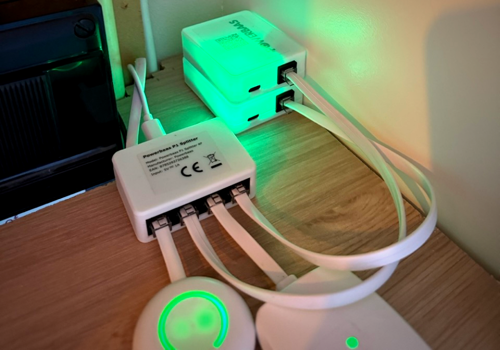
With the Powerbaas P1 Meter, you gain insight into your energy usage: your current consumption and return, meter readings, gas usage, voltage and current per phase, and dynamic tariff prices, updated every second and available in Homey Energy. Home batteries reported by the P1 Meter can be added as their own device.
The Powerbaas Boiler Controller uses your extra solar power to heat your boiler instead of sending it back to the grid. In Auto mode it follows the power you return, measured by the P1 Meter or provided through flows.
The Powerbaas Airco Bridge controls your existing air conditioner via IR as a Homey thermostat, and the Powerbaas RGB LED ring follows your live power usage or works as a regular Homey light.
Devices are found automatically on your network, or can be added by IP address.
Klikk på en enhet ovenfor for å kun vise relaterte Flow-kort.
Når …
Airco Bridge
Aktivert
Airco Bridge
Deaktivert
Airco Bridge
Ønsket temperatur ble endret
Airco Bridge
Viftemodusen ble endret til ...
Airco Bridge
Signalstyrken ble endret
Airco Bridge
Device came back online
i
Fires on the first successful status poll after the device was marked offline.
Airco Bridge
Device went offline
i
Fires when the device hasn't responded to 5 consecutive status polls and is marked unavailable.
Boiler Controller
Strømmen ble endret
Boiler Controller
Temperaturen endres
Boiler Controller
Strømmåleren ble endret
Boiler Controller
Signalstyrken ble endret
Boiler Controller
Device came back online
i
Fires on the first successful status poll after the device was marked offline.
Boiler Controller
Device went offline
i
Fires when the device hasn't responded to 5 consecutive status polls and is marked unavailable.
Home Battery
Strømmen ble endret
Home Battery
Batterinivået ble endret
Home Battery
Device came back online
i
Fires on the first successful status poll after the device was marked offline.
Home Battery
Device went offline
i
Fires when the device hasn't responded to 5 consecutive status polls and is marked unavailable.
P1 Meter
Strømmen ble endret
P1 Meter
Gassmåleren ble endret
P1 Meter
Signalstyrken ble endret
P1 Meter
Device came back online
i
Fires on the first successful status poll after the device was marked offline.
P1 Meter
Device went offline
i
Fires when the device hasn't responded to 5 consecutive status polls and is marked unavailable.
RGB
Aktivert
RGB
Deaktivert
RGB
Dempingsnivået ble endret
RGB
Strømmen ble endret
RGB
Signalstyrken ble endret
RGB
Device came back online
i
Fires on the first successful status poll after the device was marked offline.
RGB
Device went offline
i
Fires when the device hasn't responded to 5 consecutive status polls and is marked unavailable.
Og …
Airco Bridge
Er slått på
Airco Bridge
Viftemodusen er ...
RGB
Er slått på
Så …
Airco Bridge
Slå på
Airco Bridge
Slå av
Airco Bridge
Veksle mellom på og av
Airco Bridge
Innstill temperaturen °C
Airco Bridge
Sett viftemodusen til ...
Airco Bridge
Set fan speed to Fan speed
Airco Bridge
Set IR protocol to Protocol
Boiler Controller
Set control mode to Mode
Boiler Controller
Set max heating power to Watts
i
Safety ceiling for heating power - match this to your meter cupboard's breaker.
Boiler Controller
Set minimum heating power to Watts W
i
Floor applied only in Auto mode - useful for boilers that need to stay powered even without solar surplus.
Boiler Controller
Set SSR relay State
Boiler Controller
Set target power to Watts W
i
Sets the boiler's target power in watts. Only works while Control Mode is Manual.
Boiler Controller
Set net grid power to Net power (W) W
i
Use with a combined (net) energy meter: positive = consuming from grid, negative = returning to grid. Only needed if this Boiler Controller isn't already auto-linked to a Powerbaas P1 Meter in this app - see the device's settings.
Boiler Controller
Set solar return to Return power (W) W and usage to Usage power (W) W
i
Use when return and usage come from two separate readings. Auto mode uses return minus usage as the surplus, so it can also throttle down while the house is importing. Only needed if this Boiler Controller isn't already auto-linked to a Powerbaas P1 Meter in this app - see the device's settings.
Boiler Controller
Set solar return power to Return power (W) W
i
Use with a return-only energy meter that is always positive (e.g. solar return). Only needed if this Boiler Controller isn't already auto-linked to a Powerbaas P1 Meter in this app - see the device's settings.
RGB
Slå på
RGB
Slå av
RGB
Veksle mellom på og av
RGB
Demp til %
RGB
Innstill relativt dempingsnivå %
i
Demp eller gjør lysere i forhold til enhetens gjeldende dimmingsnivå.
RGB
Innstill fargetone °
i
Velg en farge fra fargeskalaen, for eksempel rød (0°/360°), gul (60°) eller blå (180°).
RGB
Innstill fargetone ...
RGB
Innstill en tilfeldig farge
RGB
Innstill metningen %
RGB
Set application mode to Mode
RGB
Set effect to Effect
Kontrollprogrammer
Du kan legge kontrollprogrammene for denne appen til dashboard eller startskjermen i mobilappen.
Airco Bridge
Boiler Controller
P1 Meter
RGB
Støtte
Har du et problem med denne appen?
Kontakt utvikleren her.
Nyheter
Versjon 2.0.1 — Rebuilt on the Homey Apps SDK v3. The P1 Meter driver now uses proper voltage/current capabilities instead of misusing the energy meter capability for them — existing devices migrate automatically, no need to re-pair. Added support for the Boiler Controller, the Airco Bridge (control an air conditioner via IR as a Homey thermostat) and the RGB LED ring (as a standard Homey light). New: home batteries reported by the P1 Meter can be added as a Home Battery device and show up in Homey Energy; devices can be added by IP address when they aren't found automatically; "Device went offline" / "came back online" flow triggers; on/off for the Airco Bridge; and for the Boiler Controller a choice between the P1 Meter and flow actions as Auto power source, a flow action for separate return and usage meters, and a "Calibrating" indicator. Plus many reliability fixes: failed commands now show an error, address and poll interval changes apply immediately, and Auto mode no longer overshoots on stale readings.