


Take the power back with Powerbaas! This app connects your Powerbaas devices to Homey.
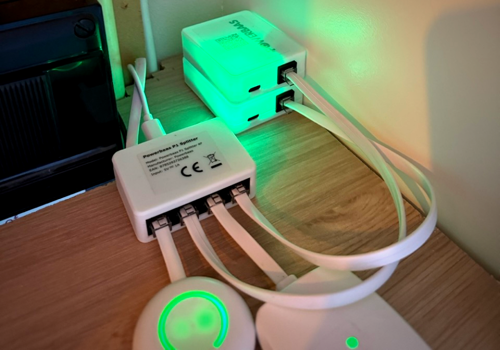
With the Powerbaas P1 Meter, you gain insight into your energy usage: your current consumption and return, meter readings, gas usage, voltage and current per phase, and dynamic tariff prices, updated every second and available in Homey Energy. Home batteries reported by the P1 Meter can be added as their own device.
The Powerbaas Boiler Controller uses your extra solar power to heat your boiler instead of sending it back to the grid. In Auto mode it follows the power you return, measured by the P1 Meter or provided through flows.
The Powerbaas Airco Bridge controls your existing air conditioner via IR as a Homey thermostat, and the Powerbaas RGB LED ring follows your live power usage or works as a regular Homey light.
Devices are found automatically on your network, or can be added by IP address.
Klicke oben auf ein Gerät, um nur verwandte Flow-Karten anzuzeigen.
Wenn ...
Airco Bridge
Angeschaltet
Airco Bridge
Ausgeschaltet
Airco Bridge
Die Ziel-Temperatur hat sich geändert
Airco Bridge
Der Lüftermodus wurde geändert auf ...
Airco Bridge
Die Signalstärke hat sich geändert
Airco Bridge
Device came back online
i
Fires on the first successful status poll after the device was marked offline.
Airco Bridge
Device went offline
i
Fires when the device hasn't responded to 5 consecutive status polls and is marked unavailable.
Boiler Controller
Die Stromversorgung wurde geändert
Boiler Controller
Die Temperatur hat sich geändert
Boiler Controller
Der Gesamtverbrauch hat sich geändert
Boiler Controller
Die Signalstärke hat sich geändert
Boiler Controller
Device came back online
i
Fires on the first successful status poll after the device was marked offline.
Boiler Controller
Device went offline
i
Fires when the device hasn't responded to 5 consecutive status polls and is marked unavailable.
Home Battery
Die Stromversorgung wurde geändert
Home Battery
Der Batteriestand hat sich geändert
Home Battery
Device came back online
i
Fires on the first successful status poll after the device was marked offline.
Home Battery
Device went offline
i
Fires when the device hasn't responded to 5 consecutive status polls and is marked unavailable.
P1 Meter
Die Stromversorgung wurde geändert
P1 Meter
Der Gaszähler hat sich geändert
P1 Meter
Die Signalstärke hat sich geändert
P1 Meter
Device came back online
i
Fires on the first successful status poll after the device was marked offline.
P1 Meter
Device went offline
i
Fires when the device hasn't responded to 5 consecutive status polls and is marked unavailable.
RGB
Angeschaltet
RGB
Ausgeschaltet
RGB
Dimm-Niveau geändert
RGB
Die Stromversorgung wurde geändert
RGB
Die Signalstärke hat sich geändert
RGB
Device came back online
i
Fires on the first successful status poll after the device was marked offline.
RGB
Device went offline
i
Fires when the device hasn't responded to 5 consecutive status polls and is marked unavailable.
Und ...
Airco Bridge
Ist an
Airco Bridge
Der Lüftermodus ist ...
RGB
Ist an
Dann ...
Airco Bridge
Einschalten
Airco Bridge
Ausschalten
Airco Bridge
Ein- oder ausschalten
Airco Bridge
Die Temperatur setzen °C
Airco Bridge
Stelle den Lüftermodus auf ...
Airco Bridge
Set fan speed to Fan speed
Airco Bridge
Set IR protocol to Protocol
Boiler Controller
Set control mode to Mode
Boiler Controller
Set max heating power to Watts
i
Safety ceiling for heating power - match this to your meter cupboard's breaker.
Boiler Controller
Set minimum heating power to Watts W
i
Floor applied only in Auto mode - useful for boilers that need to stay powered even without solar surplus.
Boiler Controller
Set SSR relay State
Boiler Controller
Set target power to Watts W
i
Sets the boiler's target power in watts. Only works while Control Mode is Manual.
Boiler Controller
Set net grid power to Net power (W) W
i
Use with a combined (net) energy meter: positive = consuming from grid, negative = returning to grid. Only needed if this Boiler Controller isn't already auto-linked to a Powerbaas P1 Meter in this app - see the device's settings.
Boiler Controller
Set solar return to Return power (W) W and usage to Usage power (W) W
i
Use when return and usage come from two separate readings. Auto mode uses return minus usage as the surplus, so it can also throttle down while the house is importing. Only needed if this Boiler Controller isn't already auto-linked to a Powerbaas P1 Meter in this app - see the device's settings.
Boiler Controller
Set solar return power to Return power (W) W
i
Use with a return-only energy meter that is always positive (e.g. solar return). Only needed if this Boiler Controller isn't already auto-linked to a Powerbaas P1 Meter in this app - see the device's settings.
RGB
Einschalten
RGB
Ausschalten
RGB
Ein- oder ausschalten
RGB
Dimmen auf %
RGB
Relatives Dimm-Niveau setzen %
i
Dimmen oder Aufhellen in Bezug auf die aktuelle Dimmstufe des Geräts.
RGB
Den Farbton setzen °
i
Wähle eine Farbe aus der Farbtonskala aus, zum Beispiel Rot (0°/360°), Gelb (60°) oder Blau (180°).
RGB
Eine Farbe setzen ...
RGB
Eine zufällige Farbe setzen
RGB
Die Sättigung setzen %
RGB
Set application mode to Mode
RGB
Set effect to Effect
Widgets
Du kannst die Widgets dieser App zu deinem Dashboard oder Startbildschirm in der mobilen App hinzufügen.
Airco Bridge
Boiler Controller
P1 Meter
RGB
Support
Hast du Probleme mit dieser App?
Kontaktiere den Entwickler hier.
Was ist neu?
Version 2.0.1 — Rebuilt on the Homey Apps SDK v3. The P1 Meter driver now uses proper voltage/current capabilities instead of misusing the energy meter capability for them — existing devices migrate automatically, no need to re-pair. Added support for the Boiler Controller, the Airco Bridge (control an air conditioner via IR as a Homey thermostat) and the RGB LED ring (as a standard Homey light). New: home batteries reported by the P1 Meter can be added as a Home Battery device and show up in Homey Energy; devices can be added by IP address when they aren't found automatically; "Device went offline" / "came back online" flow triggers; on/off for the Airco Bridge; and for the Boiler Controller a choice between the P1 Meter and flow actions as Auto power source, a flow action for separate return and usage meters, and a "Calibrating" indicator. Plus many reliability fixes: failed commands now show an error, address and poll interval changes apply immediately, and Auto mode no longer overshoots on stale readings.