🖤 Save € 50 on Homey Pro and up to 29% on everything else No code needed • Discount automatically applied at checkout

Powerbaas

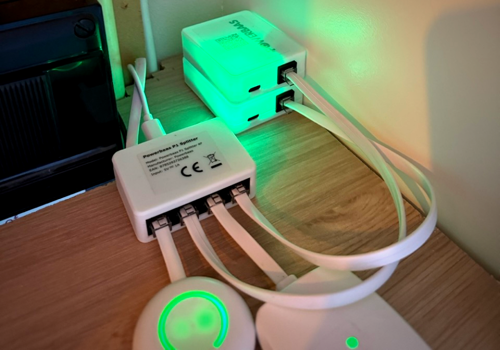
Be the boss of your own energy

자세히 읽기 ›

지원되는 디바이스

Flow 카드

위의 디바이스를 클릭하면 관련 Flow 카드만 표시됩니다.

언제...

Airco Bridge
켜지면
Airco Bridge
꺼지면
Airco Bridge
희망 온도가 변경되면
Airco Bridge
팬 모드가 다음으로 변경되면 ...
Airco Bridge
신호 세기가 변경되면
Airco Bridge
Device came back online
i
Fires on the first successful status poll after the device was marked offline.
Airco Bridge
Device went offline
i
Fires when the device hasn't responded to 5 consecutive status polls and is marked unavailable.
Boiler Controller
소비 전력이 변경되면
Boiler Controller
온도가 변경되면
Boiler Controller
전력량이 변경되면
Boiler Controller
신호 세기가 변경되면
Boiler Controller
Device came back online
i
Fires on the first successful status poll after the device was marked offline.
Boiler Controller
Device went offline
i
Fires when the device hasn't responded to 5 consecutive status polls and is marked unavailable.
Home Battery
소비 전력이 변경되면
Home Battery
배터리 수준이 변경되면
Home Battery
Device came back online
i
Fires on the first successful status poll after the device was marked offline.
Home Battery
Device went offline
i
Fires when the device hasn't responded to 5 consecutive status polls and is marked unavailable.
P1 Meter
소비 전력이 변경되면
P1 Meter
가스량이 변경되면
P1 Meter
신호 세기가 변경되면
P1 Meter
Device came back online
i
Fires on the first successful status poll after the device was marked offline.
P1 Meter
Device went offline
i
Fires when the device hasn't responded to 5 consecutive status polls and is marked unavailable.
RGB
켜지면
RGB
꺼지면
RGB
밝기가 변경되면
RGB
소비 전력이 변경되면
RGB
신호 세기가 변경되면
RGB
Device came back online
i
Fires on the first successful status poll after the device was marked offline.
RGB
Device went offline
i
Fires when the device hasn't responded to 5 consecutive status polls and is marked unavailable.

그리고...

Airco Bridge
켜지면
Airco Bridge
팬 모드가 다음이면 ...
RGB
켜지면

그러면...

Airco Bridge
켜기
Airco Bridge
끄기
Airco Bridge
켬/끔 상태 전환하기
Airco Bridge
희망 온도 설정 °C
Airco Bridge
팬 모드를 다음으로 설정 ...
Airco Bridge
Set fan speed to Fan speed
Airco Bridge
Set IR protocol to Protocol
Boiler Controller
Set control mode to Mode
Boiler Controller
Set max heating power to Watts
i
Safety ceiling for heating power - match this to your meter cupboard's breaker.
Boiler Controller
Set minimum heating power to Watts W
i
Floor applied only in Auto mode - useful for boilers that need to stay powered even without solar surplus.
Boiler Controller
Set SSR relay State
Boiler Controller
Set target power to Watts W
i
Sets the boiler's target power in watts. Only works while Control Mode is Manual.
Boiler Controller
Set net grid power to Net power (W) W
i
Use with a combined (net) energy meter: positive = consuming from grid, negative = returning to grid. Only needed if this Boiler Controller isn't already auto-linked to a Powerbaas P1 Meter in this app - see the device's settings.
Boiler Controller
Set solar return to Return power (W) W and usage to Usage power (W) W
i
Use when return and usage come from two separate readings. Auto mode uses return minus usage as the surplus, so it can also throttle down while the house is importing. Only needed if this Boiler Controller isn't already auto-linked to a Powerbaas P1 Meter in this app - see the device's settings.
Boiler Controller
Set solar return power to Return power (W) W
i
Use with a return-only energy meter that is always positive (e.g. solar return). Only needed if this Boiler Controller isn't already auto-linked to a Powerbaas P1 Meter in this app - see the device's settings.
RGB
켜기
RGB
끄기
RGB
켬/끔 상태 전환하기
RGB
다음 밝기로 조절 %
RGB
상대 밝기 설정 %
i
제품의 현재 디밍 수준에 따라 어둡게 또는 밝게 설정돼요.
RGB
색조 설정 °
i
색조 스케일에서 색상을 선택하세요. 빨간색은 (0°/360°), 노란색은 (60°), 파란색은 (180°)이에요.
RGB
색상 설정 ...
RGB
무작위 색상 설정
RGB
채도 설정 %
RGB
Set application mode to Mode
RGB
Set effect to Effect

위젯

모바일 앱 내 대시보드 또는 홈 화면에 이 앱의 위젯을 추가할 수 있습니다.

Airco Bridge
Airco Bridge
Boiler Controller
Boiler Controller
P1 Meter
P1 Meter
RGB
RGB

지원

이 앱에 문제가 있습니까? 개발자에게 문의하려면 여기를 클릭하세요..

새로운 기능

버전 2.0.1 — Rebuilt on the Homey Apps SDK v3. The P1 Meter driver now uses proper voltage/current capabilities instead of misusing the energy meter capability for them — existing devices migrate automatically, no need to re-pair. Added support for the Boiler Controller, the Airco Bridge (control an air conditioner via IR as a Homey thermostat) and the RGB LED ring (as a standard Homey light). New: home batteries reported by the P1 Meter can be added as a Home Battery device and show up in Homey Energy; devices can be added by IP address when they aren't found automatically; "Device went offline" / "came back online" flow triggers; on/off for the Airco Bridge; and for the Boiler Controller a choice between the P1 Meter and flow actions as Auto power source, a flow action for separate return and usage meters, and a "Calibrating" indicator. Plus many reliability fixes: failed commands now show an error, address and poll interval changes apply immediately, and Auto mode no longer overshoots on stale readings.

업데이트 로그 보기

Powerbaas

선택하신 Homey에 Powerbaas이(가) 호환되지 않습니다.

Powerbaas이(가) 곧 Homey에 설치됩니다.
앱 설치