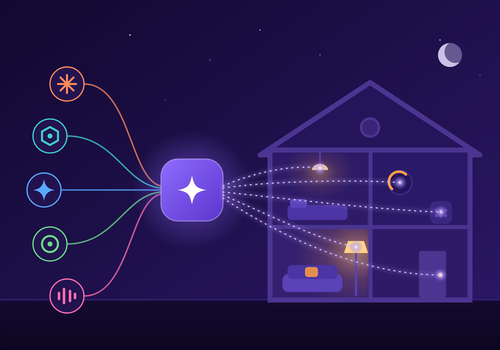
Bedien je Homey met elke AI-assistent, zoals Claude, ChatGPT, Gemini, Copilot of Cursor. Geef opdrachten in gewone taal: zet de lampen uit, check de temperatuur, maak een nieuwe flow of beheer je apparaten. Geen programmeerkennis nodig.
Je kunt ook eigen AI-gestuurde automatiseringen bouwen in de Homey flow-editor. Maak flows die reageren wanneer je AI een aangepaste opdracht geeft, en stuur een echt antwoord terug met apparaatwaarden en flow-tokens.
Beschrijf een automatisering in één zin en je assistent bouwt de Advanced Flow voor je, met elke kaart op zijn plaats. Vraag hoe een temperatuur of je energieverbruik de voorbije weken veranderde en hij leest Homey Insights voor je. Je Homey van buitenaf bereiken lukt zonder computer die dag en nacht draait.
Lees meer ›
Flow-kaarten
Klik op een apparaat hierboven om gerelateerde Flow-kaarten te zien.
Als...
MCP AI Bridge
Het algemene alarm gaat aan
MCP AI Bridge
Het algemene alarm ging uit
MCP AI Bridge
Een AI-agent verbindt
MCP AI Bridge
Een AI-agent verbreekt de verbinding
MCP AI Bridge
De AI stuurt een apparaat aan
MCP AI Bridge
Een flow raakt kapot
MCP AI Bridge
AI-agent roept een aangepaste tool aan
MCP AI Bridge
Een assistent vraagt Persoon om bevestiging
MCP AI Bridge
Een assistent vraagt Persoon iets
MCP AI Bridge
Een geplande bridge-taak mislukt
MCP AI Bridge
Er treedt een beveiligingsgebeurtenis op
MCP AI Bridge
MCP AI Bridge-server start op
MCP AI Bridge
Een AI-toolaanroep mislukt
MCP AI Bridge
Spreken met de AI-stem mislukte
En...
MCP AI Bridge
Het algemene alarm is aan
MCP AI Bridge
Er is een AI-agent verbonden
MCP AI Bridge
Modeluitgaven vandaag zijn onder Bedrag
MCP AI Bridge
Er is kapotte flow
MCP AI Bridge
Het model antwoordt ja, minstens Minstens, in procent% zeker, op: Vraag Meesturen Kamer of toestel Web Tijdslimiet in seconden Als er geen duidelijk antwoord is
MCP AI Bridge
Het model antwoordt ja op: Vraag Meesturen Kamer of toestel Web Tijdslimiet in seconden Als er geen duidelijk antwoord is
MCP AI Bridge
Onthouden Naam is Waarde
MCP AI Bridge
De beveiligingsgebeurtenis is Gebeurtenis
MCP AI Bridge
De tool-invoer bevat Tekst om op te zoeken
MCP AI Bridge
De tool-invoer is leeg
MCP AI Bridge
De toolnaam is Toolnaam
MCP AI Bridge
Het is stille tijd voor de AI-stem
Dan...
MCP AI Bridge
Beperk de bridge tot Modus
MCP AI Bridge
Zet de bridge terug op de normale toegangsmodus
MCP AI Bridge
Laat het model doen: Vraag Gesprek Tijdslimiet in seconden Als er geen antwoord is
Advanced
MCP AI Bridge
Zeg Tekst op Speaker Aanbieder Stem Volume, 0 tot 100 Snelheid Hoe het klinkt Taalcode Eerst een signaal Tijdens stille uren
Advanced
MCP AI Bridge
Maak AI-spraak van Tekst Aanbieder Stem Snelheid Hoe het klinkt Taalcode
Advanced
MCP AI Bridge
Vraag aan het model: Vraag Meesturen Kamer of toestel Web Tijdslimiet in seconden Als er geen antwoord is
Advanced
MCP AI Bridge
Laat het model kiezen uit Opties voor: Vraag Meesturen Kamer of toestel Web Tijdslimiet in seconden Als er geen antwoord is
Advanced
MCP AI Bridge
Vraag het model naar Camera Vraag Tijdslimiet in seconden Als er geen antwoord is
Advanced
MCP AI Bridge
Beschrijf Camera Vraag op Speaker Aanbieder Stem Volume, 0 tot 100 Eerst een signaal Tijdens stille uren Tijdslimiet in seconden Als er geen antwoord is
Advanced
MCP AI Bridge
Vraag het model een getal van Laagste tot Hoogste: Vraag Meesturen Kamer of toestel Web Tijdslimiet in seconden Als er geen antwoord is
Advanced
MCP AI Bridge
Vraag aan het model: Vraag Meesturen Kamer of toestel Web en zeg het antwoord op Speaker Aanbieder Stem Volume, 0 tot 100 Eerst een signaal Tijdens stille uren Tijdslimiet in seconden Als er geen antwoord is
Advanced
MCP AI Bridge
Laat het model een van Flow 1 Flow 2 Flow 3 Flow 4 Flow 5 starten voor: Situatie Meesturen Kamer of toestel Web Tijdslimiet in seconden Als er geen duidelijk antwoord is
Advanced
MCP AI Bridge
Haal Naam op uit het geheugen van de AI
Advanced
MCP AI Bridge
Onthoud Naam als Waarde voor de AI
MCP AI Bridge
Antwoord Antwoord op vraag Vraagnummer
MCP AI Bridge
Stuur fout Foutmelding terug naar de AI-agent
MCP AI Bridge
Stuur Antwoord terug naar de AI-agent
MCP AI Bridge
Zeg een Verwoording briefing op Speaker Achteraan toevoegen Aanbieder Stem Volume, 0 tot 100 Eerst een signaal Tijdens stille uren
Advanced
Ondersteuning
Heb je een probleem met deze app?
Neem contact op met de ontwikkelaar, klik hier.
Wat is nieuw
Versie 5.2.7 — Een agendakaart in een stack, onder een andere kaart op dezelfde plek van het dashboard, bleef op "Geen agenda" staan: het adres werd nooit bewaard. Die werkt daar nu zoals overal. Een agenda die niet op te halen is, schrijft de reden in het log van de app, zodat een diagnostisch rapport ze toont.
Bekijk changelog









 Deze app kan je hele Homey beheren.
 MCP AI Bridge wordt op Homey geïnstalleerd.
 Belgium
 Bulgaria
 Croatia
 Cyprus
 Czech Republic
 Estonia
 Finland
 Greece
 Hungary
 Iceland
 Ireland
 Latvia
 Lithuania
 Malta
Malta
 Moldova
 The Netherlands
 Portugal
 Romania
 Slovakia
 Slovenia
 Türkiye
 Ukraine
 United Kingdom


