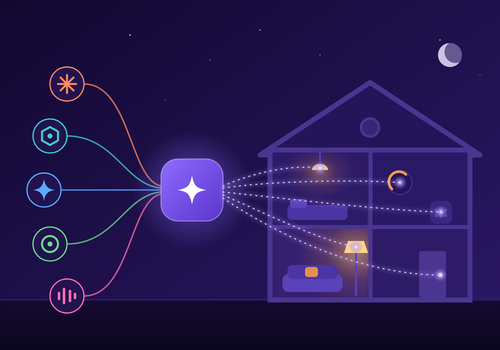
Control your Homey with any AI assistant, like Claude, ChatGPT, Gemini, Copilot or Cursor. Just ask in plain language: turn off the lights, check the temperature, create a new flow, or manage your apps and devices. No programming required.
You can also build your own AI-powered automations in the Homey flow editor. Create flows that respond when your AI calls a custom command, and send a real answer back to the AI using device values and flow tokens.
Describe an automation in one sentence and your assistant builds the Advanced Flow for you, with every card in its place. Ask how a temperature or your energy use changed over the past weeks and it reads Homey Insights for you. Reaching your Homey from outside works without a computer running day and night.
Read more ›
Flow cards
Click on a device above to show related Flow cards only.
When...
MCP AI Bridge
The generic alarm turned on
MCP AI Bridge
The generic alarm turned off
MCP AI Bridge
An AI agent connects
MCP AI Bridge
An AI agent disconnects
MCP AI Bridge
The AI controls a device
MCP AI Bridge
A flow becomes broken
MCP AI Bridge
AI agent calls a custom tool
MCP AI Bridge
An assistant asks Person to confirm
MCP AI Bridge
An assistant asks Person something
MCP AI Bridge
A scheduled bridge job fails
MCP AI Bridge
A security event occurs
MCP AI Bridge
MCP AI Bridge server starts
MCP AI Bridge
An AI tool call fails
MCP AI Bridge
Speaking with the AI voice failed
And...
MCP AI Bridge
The generic alarm is on
MCP AI Bridge
An AI agent is connected
MCP AI Bridge
Model spend today is below Amount
MCP AI Bridge
There is a broken flow
MCP AI Bridge
The model answers yes, at least At least, in percent% sure, to: Question Include Room or device Web Time limit in seconds If there is no clear answer
MCP AI Bridge
The model answers yes to: Question Include Room or device Web Time limit in seconds If there is no clear answer
MCP AI Bridge
Remembered Name is Value
MCP AI Bridge
The security event is Event
MCP AI Bridge
The tool input contains Text to look for
MCP AI Bridge
The tool input is empty
MCP AI Bridge
The tool name is Tool name
MCP AI Bridge
It is quiet time for the AI voice
Then...
MCP AI Bridge
Limit the bridge to Mode
MCP AI Bridge
Return the bridge to its normal access mode
MCP AI Bridge
Let the model do: Request Conversation Time limit in seconds If there is no answer
Advanced
MCP AI Bridge
Say Text on Speaker Provider Voice Volume, 0 to 100 Speed How it sounds Language code Tone first During quiet hours
Advanced
MCP AI Bridge
Make AI speech of Text Provider Voice Speed How it sounds Language code
Advanced
MCP AI Bridge
Ask the model: Question Include Room or device Web Time limit in seconds If there is no answer
Advanced
MCP AI Bridge
Let the model choose from Options for: Question Include Room or device Web Time limit in seconds If there is no answer
Advanced
MCP AI Bridge
Ask the model about Camera Question Time limit in seconds If there is no answer
Advanced
MCP AI Bridge
Describe Camera Question on Speaker Provider Voice Volume, 0 to 100 Tone first During quiet hours Time limit in seconds If there is no answer
Advanced
MCP AI Bridge
Ask the model for a number from Lowest to Highest: Question Include Room or device Web Time limit in seconds If there is no answer
Advanced
MCP AI Bridge
Ask the model: Question Include Room or device Web and say the answer on Speaker Provider Voice Volume, 0 to 100 Tone first During quiet hours Time limit in seconds If there is no answer
Advanced
MCP AI Bridge
Let the model start one of Flow 1 Flow 2 Flow 3 Flow 4 Flow 5 for: Situation Include Room or device Web Time limit in seconds If there is no clear answer
Advanced
MCP AI Bridge
Recall Name from the AI's memory
Advanced
MCP AI Bridge
Remember Name as Value for the AI
MCP AI Bridge
Answer Answer to request Request id
MCP AI Bridge
Return error Error message to the AI agent
MCP AI Bridge
Return Response to the AI agent
MCP AI Bridge
Say a Wording briefing on Speaker Add at the end Provider Voice Volume, 0 to 100 Tone first During quiet hours
Advanced
Support
Having an issue with this app?
Contact the developer via the developer website.
What’s new
Version 5.2.2 — When an action needs a Personal Access Token, such as creating a room, the bridge now says which scope it needs instead of Homey's bare "Missing Scopes". And when a token is set but Homey refused it, it says so, with the reason and how to make a new one.
View changelog








 This app can manage your entire Homey.
 MCP AI Bridge will install on Homey shortly.
 Belgium
 Bulgaria
 Croatia
 Cyprus
 Czech Republic
 Estonia
 Finland
 Greece
 Hungary
 Iceland
 Ireland
 Latvia
 Lithuania
 Malta
Malta
 Moldova
 The Netherlands
 Portugal
 Romania
 Slovakia
 Slovenia
 Türkiye
 Ukraine
 United Kingdom


