








What is WiFi?
WiFi is the wireless network technology that connects your phone, laptop, TV, and (increasingly) your smart home devices to your home network — and often to the internet. Instead of running cables through your house, WiFi uses radio waves to move data between a WiFi router (or access point) and your devices.
And here’s a fun bit of local pride: a key part of WiFi’s origin story is tied to Twente in The Netherlands. University of Twente alumnus Cees Links played an important role in the early development and global breakthrough of wireless LAN technology — with strong roots in the Enschede region.
That’s the same place where Homey was born — in Enschede, at the heart of a region that clearly likes turning ambitious connectivity ideas into real-life products.
WiFi in short
- Wireless networking for internet and local connections (home network)
- Commonly uses 2.4 GHz and 5 GHz (and sometimes 6 GHz on WiFi 6E/7 hardware)
- Great for high-bandwidth devices like smart cameras, smart doorbells, speakers, and TVs
- Often depends on a router and good coverage (walls and distance matter)
- Typically higher power use than low-energy smart home networks like Zigbee or Thread (often used with Matter)
- Many smart home devices use WiFi directly, or use Matter over WiFi to standardize control
How does WiFi work?
At the center is your router (or access point). It creates a wireless network name (SSID) and manages who can join. Devices connect by authenticating with a password, then they receive a local IP address so they can communicate inside your home network — and reach the internet through your router.
Most smart home WiFi devices fall into one of two categories:
WiFi devices that use cloud control
These connect to the manufacturer’s servers. Your app sends commands through the cloud, which can be convenient for remote access, but it means your smart home experience can depend on the internet and that vendor’s platform.
WiFi devices that support local control (LAN)
These can be controlled within your home network, often faster and more resilient. This is also where features like local discovery (mDNS/SSDP) can matter — and why smart home platforms differ in what they can detect locally.

WiFi in the smart home: why it’s popular and where it can struggle
WiFi is everywhere, so it’s the “default choice” for many manufacturers. That makes it easy to find smart cameras, smart doorbells, speakers, robot vacuums, and appliances that work over WiFi.
But there are trade-offs in a smart home context:
Strengths
- Bandwidth: perfect for video, audio, and frequent data (think smart cameras and speakers).
- No extra hub required (sometimes): many WiFi products can work with just a router.
- Great for IP-based standards: Matter can run over WiFi, bringing more consistent interoperability.
Limitations
- Coverage is everything: one weak corner of the house can mean unreliable devices.
- Power usage: WiFi is usually not ideal for tiny battery sensors that should run for years.
- Network congestion: lots of WiFi devices can crowd the airwaves, especially on 2.4 GHz.
In practice, WiFi is often best for “big” devices, while low-power networks (Zigbee, Z-Wave, Thread) shine for sensors, switches, and long battery life.
WiFi vs Zigbee, Z-Wave, Thread, and Matter

In Homey’s wiki, Zigbee and Z-Wave are often described as “a bit like WiFi, but made specifically for home automation.” That comparison is useful: WiFi is a general-purpose network; Zigbee and Z-Wave are designed for reliable, low-power device communication (often with mesh networking).
Thread is another modern option: it’s IP-based like WiFi, but optimized for low-power mesh networking and it’s commonly used as a transport for Matter.
And Matter is the key that ties this together: it’s not a new radio by itself, but a shared “language” that can run over WiFi, Thread, or Ethernet.
So when you’re choosing smart home devices, it’s often less about “Is WiFi good or bad?” and more about: Is WiFi the right tool for this device?
Range comparison: WiFi vs Zigbee vs Z-Wave vs Bluetooth and what each is best at
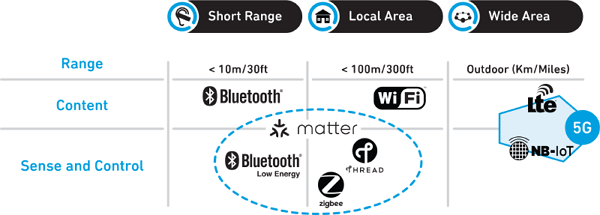
WiFi, Zigbee, and Z-Wave can all cover a typical home, but they do it in different ways. WiFi usually has strong range in the same room and nearby rooms, but its reliability drops faster through thick walls and floors unless you add extra access points or a mesh system.
Zigbee and Z-Wave are built for smart homes and often feel “longer range” in practice because they can form a mesh network: mains-powered devices like plugs, switches, and bulbs pass messages along, extending coverage room by room. Between the two, Z-Wave often reaches a bit farther per hop and tends to handle walls well, while Zigbee can be very solid too when you have enough powered devices acting as repeaters.
The sweet spot for coverage is usually a mix: WiFi for high-bandwidth devices like smart cameras and Zigbee/Z-Wave for sensors and switches that need to be reliable in every corner of the house.
Bluetooth is great for nearby control and quick pairing, while WiFi is for high-bandwidth devices, and Zigbee/Z-Wave are for low-power devices that need whole-home reliability via mesh.
How WiFi fits into Homey (and your Homey products)
Homey doesn’t replace your WiFi. It builds on top of it, bringing your devices together so they can cooperate — regardless of brand or connection type.
Here’s what that means in practice:
Homey Pro includes WiFi (2.4 & 5 GHz) and can connect a wide mix of technologies locally — plus it supports Matter, including Matter-over-WiFi devices.
Homey Pro mini connects via Ethernet, but still works with WiFi devices through your router — and it also supports Matter.
Homey Cloud lets you control and automate many devices, and can work with WiFi devices that are cloud-connected. However, some types of local WiFi discovery are not available in the same way on Homey Cloud or Homey Bridge setups.
The big advantage is coordination: WiFi devices can become part of the same automations as your Zigbee sensors, Z-Wave switches, infrared-controlled devices, and more — so your home behaves like one system instead of a stack of separate apps.
Conclusion
WiFi is the familiar, flexible backbone of the connected home — especially for high-bandwidth devices and IP-based standards like Matter.
In a smart home, WiFi is at its best when it’s combined with the right mix of technologies — and brought together in one place, so everything can work together automatically.
Smart home technologies and platforms supported by Homey
Smart homes often use multiple wireless technologies and platforms. As a powerful smart home hub, Homey supports a wide range of communication standards, including Zigbee, Z-Wave, Matter, Thread, KNX, 433 MHz, Wi-Fi, Bluetooth and Infrared.
Homey also integrates with popular smart home platforms such as Amazon Alexa, Google Home and Apple Home. By combining multiple technologies and platforms in one system, Homey allows devices from different ecosystems to work together in one flexible smart home setup.


