


Advarsel! Denne appen fungerer kanskje ikke som den skal.
Denne appen er under testing, og har aldri blitt anmeldt. Den fungerer kanskje ikke som forventet.
Vær ekstra forsiktig når du installerer denne appen.

« Tilbake til standardversjonen
Monitor live travel times, traffic delays and road incidents for your regular routes. Get smarter commute insights, route alternatives and Flow-ready traffic alerts powered by TomTom.
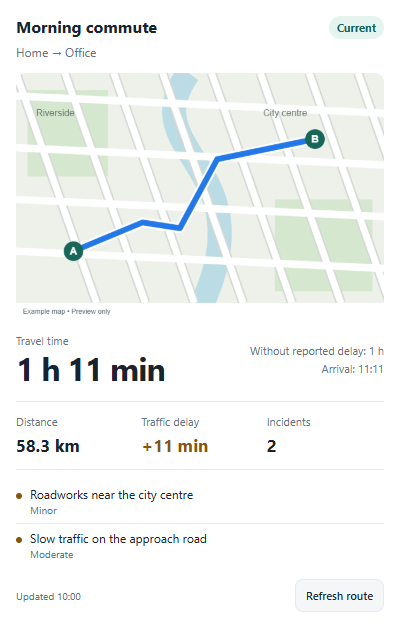
Each route can show a camera image of its path on a map with start/end markers. It is generated on the first route refresh and when the path changes; viewing the image does not make API calls. Images are held in memory and regenerated after an app restart. Enable Map Display API on your TomTom key and use the route's Show route map setting to enable or disable the image.
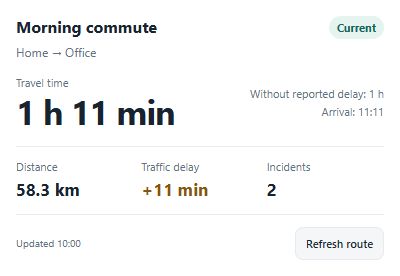
Add Route overview or Route status to your Homey dashboard and select one of your route devices. Route overview shows the cached map, travel time, distance, traffic delay, arrival time and up to three reported incidents. Route status provides a compact view of the same travel metrics and incident count. Add multiple widget instances to follow different routes. Times under an hour use minutes; longer times use hours and minutes.
Widgets read cached device data every 30 seconds while visible, without making TomTom API calls. Refresh route requests a fresh observation through the app's existing request limits; generating a changed route map can also use the configured maps budget. Last-known and incomplete values are marked explicitly. Traffic delay is the delay reported by TomTom; Without reported delay subtracts that delay from the travel time and is not your personal historical average. Widgets follow the app's summary language setting (English or Czech).
The TomTom API usage device tracks this app's requests and remaining local budgets, including map images and attribution requests. Configure the maps budget in app settings; these counters do not include calls made by other applications.
Les mer ›
Flow-kort
Klikk på en enhet ovenfor for å kun vise relaterte Flow-kort.
Når …
Route
Incident event in category category
Route
service data became transition
Route
Route information was updated
Route
metric crossed direction threshold minutes
Og …
Route
service data is fresher than max age minutes minutes
Route
At least minimum count incidents of category with severity minimum severity
Route
Route monitoring is enabled
Route
metric is operator minutes minutes
Så …
Route
Get current route incidents
Advanced
Route
Get route information in style style
Advanced
Route
Refresh route information
Route
Set monitoring to enabled
TomTom Traffic & Travel Time
Calculate origin to destination, details, style; Route optimization, Vehicle engine, Alternative routes alternatives
Advanced
TomTom Traffic & Travel Time
Calculate Origin to Destination, details, style; Route optimization, Vehicle engine, Alternative routes alternatives
Advanced
Støtte
Har du et problem med denne appen?
Kontakt utvikleren her.
Nyheter
Versjon 1.0.2 — Added per-route dashboard widgets with maps, travel times, distance, traffic delays, incidents and manual refresh.
Vis endringslogg