








433 MHz Reliability & Troubleshooting
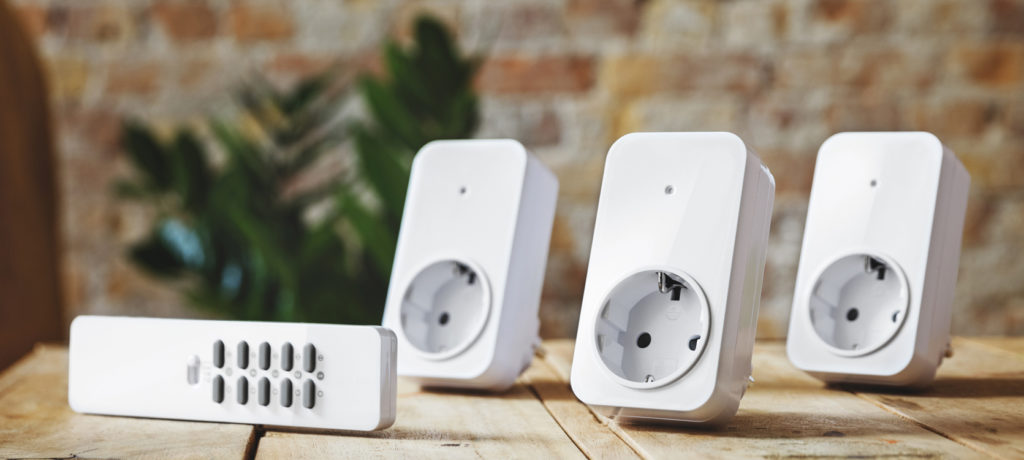
433 MHz is simple. That simplicity is both its strength and its weakness. On a good day, a single command from your hub reaches plugs, blinds and switches all over the house. On a bad day, one blind doesn’t move, one plug ignores you and a door sensor seems to have fallen silent.
Because 433 MHz is usually one-way and doesn’t confirm delivery, reliability becomes a matter of radio physics, timing and expectations. The good news: with a bit of understanding, you can make 433 MHz feel much more predictable.
Note: The content here applies to both 433 MHz (Europe) and 434 MHz (North America). These bands are functionally compatible in Homey and follow the same setup steps. Read more about 434 MHz.
What “Reliable Enough” Means for 433 MHz
It’s important to be honest about what you’re asking of the system. 433 MHz is not designed to guarantee that every packet arrives. It aims for “works almost always under normal conditions”. For many uses — a lamp, a garden plug, a blind — that’s fine. You can press again if you must.
For alarm triggers, door locks or anything safety-critical, “almost always” is not acceptable. That’s why the recommendation is always to use 433 MHz for convenience, and use more robust protocols for critical tasks.
Once you see 433 MHz through that lens, troubleshooting becomes about nudging it into the most stable version of itself.
Weak Spots: Range, Obstacles and Interference
When a 433 MHz device is flaky, the usual culprits are:
- Distance: the device is near the edge of what your hub can reach.
- Obstacles: concrete walls, metal cabinets, fridges, boilers and mirror wardrobes in the signal path.
- Interference: other 433 MHz devices, electrical noise or very strong signals nearby.
Small changes can have big effects. Moving Homey half a meter away from metal or placing a plug slightly differently can raise signal strength just enough to turn “sometimes” into “always”.
A practical way to think about it: imagine a cone of signal leaving Homey. Anything dense and metallic inside that cone weakens the signal. Anything that reflects or scatters the signal can create dead spots. Your job is not to redesign the house — just to put hub and devices in more forgiving positions.
Device Behavior and Timing
433 MHz commands are brief and stateless, which means timing matters. If you send multiple commands too quickly, some may collide or be ignored. If a device is still busy processing one command, it may miss the next.
In Homey Flows, it often helps to:
- Space consecutive 433 MHz commands by a small delay.
- Avoid sending dozens of 433 commands at exactly the same time at the top of the hour.
- Consider sending critical commands twice, a second apart, where occasional duplicates are harmless.
This feels less “clean” than reliable, acknowledged protocols, but it’s a pragmatic way to make one-way RF behave more like you want.
When to Re-Pair or Replace
If one device remains stubborn while others are fine, ask three questions:
- Has anything changed in the room? New wardrobe, fridge, shelves?
- Does repositioning the device (even temporarily) improve behavior?
- Has the device always been unreliable, or did it get worse over time?
If environment changes fix it, you know it’s mostly RF. If nothing helps and other devices behave, that one receiver or remote may simply be poor hardware. In that case, replacing it or moving that use case to a Zigbee/Z-Wave device is often better than fighting it indefinitely.
Re-pairing can help when the pairing process itself was marginal or when a device supports multiple codes and ended up slightly out of sync with your hub.
Conclusion: Accept the Limits, Optimize the Experience
You can’t turn 433 MHz into TCP/IP with guarantees, but you can shape its behavior. Central placement, avoiding obstacles, intelligent timing and a realistic sense of what 433 is for can make it feel surprisingly solid for the right jobs.
Homey helps by letting you see which devices misbehave, by giving you a Flow engine where you can introduce small delays and redundancy, and by letting you offload truly critical tasks to more capable protocols. Reliability then becomes an architectural choice, not a gamble.
FAQ
Why do my 433 MHz plugs sometimes ignore commands?
Usually because the signal is marginal or obstructed. Slight changes in placement or adding a delay between commands can help.
Is it normal that 433 MHz never confirms actions?
Yes. Most 433 MHz systems are one-way. The hub doesn't know if the device actually acted.
Can Homey show me signal strength for 433 MHz devices?
Not in the same way as Wi-Fi. You mostly infer health from behaviour: how consistently devices respond.
Why does a handheld remote work better than my hub?
The remote may be closer, held at a different angle or use slightly different timings. Moving the hub often narrows the gap.
Should I send commands twice to be safe?
For non-critical loads like lamps or blinds, sending the same command twice with a small delay can improve perceived reliability.
Can interference from neighbours affect 433 MHz?
Yes, especially if they also have cheap 433 MHz systems. It's another reason why 433 MHz is best for non-critical tasks.
Why did reliability drop when I moved my hub to a cabinet?
Metal and dense materials around the hub can significantly attenuate the signal. Keeping it in the open helps.
Is there a way to "heal" a 433 MHz network like Zigbee?
No. There is no mesh to heal. All you can do is adjust locations and replace weak devices.
What if a sensor just stops triggering?
First suspect the battery, then the placement. If both are fine, the device itself may be failing.
When should I stop tweaking and switch to another protocol?
If a device is important to you and remains unreliable after basics are fixed, it's better to move that function to Zigbee, Z-Wave or Matter.
Glossary
Marginal Signal
A signal that is just strong enough to sometimes work but weak enough to fail under small changes. Marginal signals are the main source of "works sometimes" behaviour.
Line of Sight (LoS)
An unobstructed path between transmitter and receiver. 433 MHz does not require LoS, but LoS usually improves reliability.
Dead Spot
An area where useful signal is unexpectedly weak or absent due to reflections, absorption or destructive interference.
Interference
Unwanted signals that overlap in frequency or time with your desired transmission. In 433 MHz, cheap transmitters and environmental noise can create interference.
Collision
When two transmissions overlap in time and frequency so that neither can be decoded properly. 433 MHz has no central coordination, so collisions are possible.
Redundancy
Sending information more than once or through different paths to increase the chance it is received. In 433 MHz, sending a command twice is an example.
RF Path
The effective route that radio waves take between transmitter and receiver, including reflections and obstacles.
Obstruction Loss
Signal loss caused by obstacles like walls, floors or furniture. Higher at higher frequencies, but still relevant at 433 MHz.
Duty Cycle
The fraction of time a transmitter is active. High duty cycles can increase collisions; low duty cycles reduce channel usage.
Best Effort
A communication style where the system tries to deliver messages but offers no strict guarantees. 433 MHz is inherently best-effort.


