Open AIR Mini for Homey
Control your Open AIR Mini ventilation system directly from Homey.
About
-----
The Open AIR Mini is an open-source, ESP32-based controller designed to bring smart
control to DucoBox Silent and Orcon MVS-15xx ventilation systems. It runs ESPHome
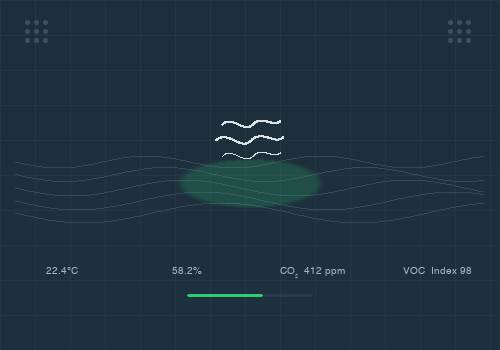
firmware and supports environmental sensors including CO2, temperature, humidity,
VOC, and NOx.
Hardware: https://github.com/Flamingo-tech/Open-AIR/tree/main/Open%20AIR%20Mini
Buy on Tindie: https://www.tindie.com/products/theflamingo/open-air-mini/
Why this app?
-------------
As a proud owner of an Open AIR Mini and starting to fiddle with Homey, I wanted to
see if I could build a modern, dedicated app that would enable the integration without
relying on the generic ESPHome app for Homey, which is barely maintained anymore — its
original developer no longer owns a Homey. This app talks directly to the Open AIR Mini
over the ESPHome native API, with auto-discovery, sensor auto-detection, and support for
both modern encryption and legacy authentication.
Features:
- Turn ventilation on/off
- Adjust fan speed (0-100%)
- Monitor fan RPM
- View temperature readings
- View humidity readings
- View CO2 levels (ppm) — dynamically added when SCD-40 or Senseair S8 is detected
- View VOC Index — dynamically added when SGP-41 is detected
- View NOx Index — dynamically added when SGP-41 is detected
- Multi-sensor slot support: two physical sensor slots (SENSOR 1 and SENSOR 2) are detected
automatically. Slot 2+ sensors get sub-capabilities (e.g. "Temperature 2", "Humidity 2").
Setup:
1. Add the Open AIR Mini device in Homey
2. Select your device from the discovered list, or enter the IP address manually
3. Enter your ESPHome encryption key or password (if configured)
4. The device will be added to your Homey
iOS pairing note (Homey mobile app):
- The pairing flow runs inside a persistent `/pair/?webview=1` wrapper webview. Pairing views (like `credentials.html`)
are injected dynamically after the wrapper is already loaded.
- Because of this, `window.onHomeyReady` is typically fired *before* a driver view is injected, so view code should not
depend on `onHomeyReady` to start.
- In this app, the credentials view waits until `window.Homey.emit` (or `window.Homey._cf.emit`) becomes available before
enabling “Connect” and calling `getCredentials/setCredentials/createDevice`.
Tested with:
- ESPHome 2023.6.5: working (password, encryption key, or both)
- ESPHome 2026.1.4: working (encryption key only; password auth was removed in ESPHome 2026.1.0)
- Open AIR Mini v1.4.1 board
- Temperature/Humidity sensor: SHT-20 (SHT2x) in slot 1 — tested and confirmed working
- Only single-sensor (slot 1) configurations have been tested so far.
Dual-sensor (slot 1 + slot 2) is implemented but not yet tested with real hardware.
Supported but not yet tested (sensors not available at hand):
- SCD-40: CO2, Temperature, Humidity sensor — implemented, not tested
- SGP-41: VOC Index and NOx Index sensor — implemented, not tested
- Senseair S8: CO2 sensor — implemented, not tested
- SHT-31: Temperature/Humidity sensor — implemented, not tested
- SHT-4X: Temperature/Humidity sensor — implemented, not tested
- Slot 2 sub-capabilities (e.g. "Temperature 2") — implemented, not tested with hardware
Note: ESPHome 2026.x removed API password authentication. Only encryption key is supported
for ESPHome 2026.x and newer. The app automatically detects the ESPHome version and uses
the appropriate protocol library.
Not supported:
- Open AIR Valve is currently not supported and not planned to be developed.
Requirements:
- Open AIR Mini device with ESPHome firmware
- Device must be on the same network as your Homey
For more information about Open AIR Mini, visit: https://github.com/RemingtonDev/Homey-Open-AIR
Läs mer ›





 Open AIR Mini är inte kompatibelt med vald Homey.
 Open AIR Mini installeras på Homey inom kort.
 Belgium
 Bulgaria
 Croatia
 Cyprus
 Czech Republic
 Estonia
 Finland
 Greece
 Hungary
 Iceland
 Ireland
 Latvia
 Lithuania
 Malta
Malta
 Moldova
 The Netherlands
 Portugal
 Romania
 Slovakia
 Slovenia
 Türkiye
 Ukraine
 United Kingdom


