





Thuisbord

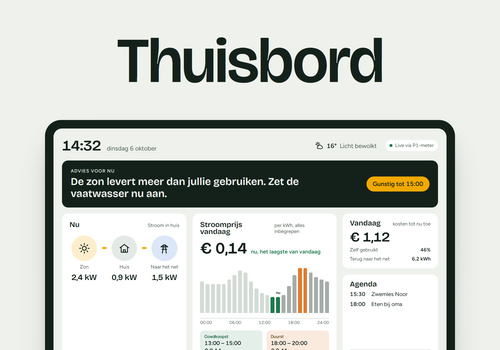
Your power and gas, live on the screen on your wall

Läs mer ›

Flow-kort

Då...

Thuisbord
Send home battery to Thuisbord: charge level Charge level %, battery power in Battery power unit Battery power, positive means Positive means, charge level limit Charge level limit %, capacity Capacity kWh
i
Fill in Charge level and Battery power with your home battery's tags, and under Battery power unit choose W or kW, as the tag gives power; empty means W. Homey gives a home battery's power as positive while charging and negative while discharging. If the tag gives it the other way round, choose discharging under Positive means; empty means charging. Charge level limit and Capacity, in kWh, may stay empty; if one of them is wrong, only that one is left out. Put this card in your P1 meter's Flow, below Send power to Thuisbord: that Flow keeps running while the battery is idle. If the battery is offline, only this card fails and the readings go on as usual. It sends nothing itself: the battery goes along with the next readings, as long as it is at most 20 minutes old. Thuisbord shows the battery and never controls it.
Thuisbord
Send combined meter totals to Thuisbord: import Import total kWh, export Export total kWh
i
For a meter that gives no totals per tariff: fill in Import total and Export total with your P1 meter's tags, in kWh, both tariffs together. Both are needed. Put this card in the same Flow as Send power to Thuisbord, below it. It sends nothing itself: the totals go along with the next readings, as long as they are at most 5 minutes old. If the Flow also sends totals per tariff, Thuisbord uses those.
Thuisbord
Send gas total to Thuisbord: Gas total m³
i
Fill in Gas total with your smart meter's tag, in m³. Put this card in the same Flow as Send power to Thuisbord, below it. It sends nothing itself: the gas total goes along with the next readings, as long as it is at most 2 hours old. A smart meter passes on the gas total once an hour or every 5 minutes.
Thuisbord
Send power in Power unit to Thuisbord: power Power, or import Power import and export Power export
i
This card makes the reading. Put it in a Flow that starts with your P1 meter's card that fires when its power changes, at the top under Then. Fill in Power with a tag of the meter, or leave it empty and fill in both Power import and Power export. Under Power unit, choose W or kW, as the tag gives power; empty means W. The other Thuisbord cards add their meter totals, solar production and gas total to this reading. The app passes on at most one reading every 10 seconds and never controls a device.
Thuisbord
Send solar production to Thuisbord, solar power in Solar power unit: Solar power, solar total Solar total kWh
i
Fill in Solar power with your inverter's tag, and under Solar power unit choose W or kW, as the tag gives it; empty means W. Solar total, in kWh, may stay empty. Put this card in a Flow of its own that starts with your inverter's card, or in the P1 meter's Flow below Send power to Thuisbord. If the inverter is offline, only this card fails and the readings go on as usual. It sends nothing itself: solar power goes along with the next readings, as long as it is at most 20 minutes old.
Thuisbord
Send meter totals per tariff to Thuisbord: import tariff 1 Import tariff 1 kWh and tariff 2 Import tariff 2 kWh, export tariff 1 Export tariff 1 kWh and tariff 2 Export tariff 2 kWh, active tariff Active tariff
i
Fill in the four meter totals with your P1 meter's tags, in kWh; all four are needed. Active tariff, 1 or 2, may stay empty: Thuisbord then uses your low-tariff hours. Put this card in the same Flow as Send power to Thuisbord, below it. It sends nothing itself: the totals go along with the next readings, as long as they are at most 5 minutes old. If your meter gives no totals per tariff, use Send combined meter totals to Thuisbord.

Support

Har du problem med den här appen? Kontakta utvecklaren här.

Vad är nytt?

Version 2.1.0 — New card: Send home battery to Thuisbord, with your home battery's charge level and power, and if you like its charge level limit and capacity. Put it in your P1 meter's Flow, below Send power to Thuisbord. Thuisbord shows the battery and never controls it. Your Flows keep working.

Visa ändringslogg

Thuisbord

Thuisbord är inte kompatibelt med vald Homey.

Thuisbord installeras på Homey inom kort.
Installera