


Dashboard Buttons

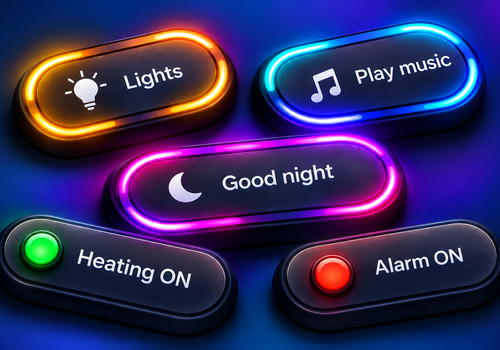
Create dashboard buttons and use them in a Flow.

자세히 읽기 ›

Flow 카드

언제...

Dashboard Buttons
Action button Button is pressed
i
The Action value configured for the button is available in this Flow as a text tag.
Dashboard Buttons
Yes/No button Button is pressed
i
The 'Button Yes/No' tag contains the new status of the button. Use this tag in the Flow to change the linked Yes/No variable using a Logic Flow card.

그러면...

Dashboard Buttons
Set Button to Status
i
Sets the Yes/No status of a button that uses 'Flow - no variable' as its status source.
Dashboard Buttons
Set Button to Status
Dashboard Buttons
Set permanent color of Button to Permanent color in Color
i
Only available for action buttons. Yes/No buttons use the status indicator.
Dashboard Buttons
Fill Button for Duration (seconds) seconds in Fill color
i
Only action buttons. Duration: 5–20 seconds for narrow buttons, 5–45 seconds for wide buttons. The fill disappears automatically at the end; the light loop stops when filling begins.
Dashboard Buttons
Start light loop around Button for Duration (seconds) seconds in Color
i
Only available for action buttons. Yes/No buttons use the status indicator. Start light run stop ongoing fill animation.
Dashboard Buttons
Stop fill animation of Button
i
Stops the fill animation immediately and clears the fill. Only for action buttons.

위젯

모바일 앱 내 대시보드 또는 홈 화면에 이 앱의 위젯을 추가할 수 있습니다.

Button
Button

지원

이 앱에 문제가 있습니까? 개발자 연락 방법 이메일 보내기.

새로운 기능

버전 1.3.0 — Added an animated fill for action buttons, controllable through Flow cards with adjustable duration and fill color. The fill animation and rotating light effect automatically stop each other when the other starts. Added the option to choose between fully rounded (pill-shaped) buttons and buttons with rounded corners.

업데이트 로그 보기

Dashboard Buttons

이 앱으로 Homey 전체를 관리할 수 있습니다.

선택하신 Homey에 Dashboard Buttons이(가) 호환되지 않습니다.

Dashboard Buttons이(가) 곧 Homey에 설치됩니다.
앱 설치