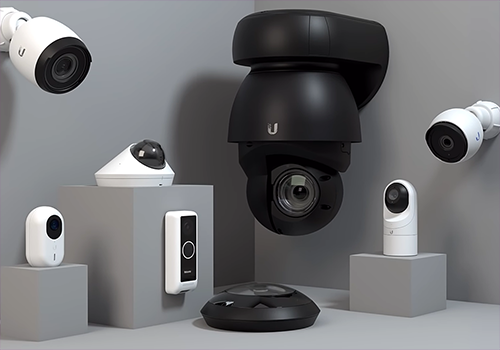
The Homey Unifi Protect App integrates your Ubiquiti Unifi Protect system with Homey, enabling you to monitor and control your Unifi cameras directly from your Homey environment. With this app, you can:
- View camera images within Homey.
- Trigger Homey flows based on motion detection or other camera events.
- Access snapshots and camera status for automation and security purposes.
- This integration helps you create a smarter, more secure home by combining the power of Unifi Protect with Homey’s automation capabilities.
Need help or want to share ideas? Join the discussion on the Homey Community Forum.
For professional assistance, troubleshooting, or custom integration services, click on Contact Developer to reach out to Monkeysoft.
More Apps from Monkeysoft
Explore our other Homey integrations for a complete smart home experience:
- Homey Unifi Access – Manage Unifi Access devices with Homey.
- Homey Unifi Network – Monitor and control your Unifi Network environment.
- Homey TvOverlay – Display useful overlays on your TV for notifications and status updates.
Triggered when a camera detects an audio event such as glass break, smoke alarm, or baby cry
Ubiquiti UniFi Protect & Access
Connection status of camera has changed
Ubiquiti UniFi Protect & Access
A door acces event is detected
i
Triggered when a door is openend by UniFi Access
Ubiquiti UniFi Protect & Access
A doorbell is ringing
Ubiquiti UniFi Protect & Access
A fingerprint was identified
Ubiquiti UniFi Protect & Access
An unknown fingerprint was detected
Ubiquiti UniFi Protect & Access
A FOB button event was detected
Ubiquiti UniFi Protect & Access
A FOB button event for FOB was detected
Ubiquiti UniFi Protect & Access
A NFC card was scanned
Ubiquiti UniFi Protect & Access
An unknown NFC card was scanned
Ubiquiti UniFi Protect & Access
The NVR is accessed
i
Triggered when a user logs in to or accesses the UniFi Protect controller (NVR) itself
Ubiquiti UniFi Protect & Access
A object was detected
Ubiquiti UniFi Protect & Access
A animal was detected
Ubiquiti UniFi Protect & Access
Un rilevamento intelligente è terminato
Ubiquiti UniFi Protect & Access
A face was detected
Ubiquiti UniFi Protect & Access
A license plate was detected
Ubiquiti UniFi Protect & Access
A package was detected
Ubiquiti UniFi Protect & Access
A person was detected
Ubiquiti UniFi Protect & Access
A vehicle was detected
Ubiquiti UniFi Protect & Access
A snapshot was created from the package camera
Ubiquiti UniFi Protect & Access
A snapshot was created
UniFi OS
La temperatura è cambiata
UniFi Protect Meteo
La temperatura è cambiata
UniFi Protect Meteo
Meteo aggiornato per [[location]]
Viewport
Attivato
Viewport
Disattivato
E...
AI Port
È attivato
Campanello
È attivato
Campanello
L'allarme di movimento è acceso
Citofono Access
L'allarme di contatto è acceso
Citofono Access
Una serratura è chiusa
Gestore allarme NVR
Lo stato è ...
Gestore allarme NVR
L'allarme generico è acceso
Horn Speaker
È attivato
Luce
È attivato
Luce
L'allarme di movimento è acceso
Porta garage di accesso
È chiuso
Porta garage di accesso
La porta del garage è aperta
Porta garage di accesso
La porta del garage è chiusa
Relay
È attivato
Relay
Garage is open
Relay
Garage is closed
Relay
Relay status is open
Relay
Relay status is closed
Sensore
L'allarme di movimento è acceso
Sensore
L'allarme di contatto è acceso
Sensore
L'allarme fumo è acceso
Sensore
L'allarme CO è acceso
Sensore
L'allarme manomissione è acceso
Sensore
L'allarme della batteria è acceso
Sensore di movimento zona telecamera
L'allarme di movimento è acceso
Serratura di accesso
L'allarme di contatto è acceso
Serratura di accesso
Una serratura è chiusa
Serratura di accesso
La porta è aperta
Serratura di accesso
La porta è chiusa
Telecamera
L'allarme di movimento è acceso
Ubiquiti UniFi Protect & Access
FOB button is Button
Ubiquiti UniFi Protect & Access
FOB press type is Press type
Viewport
È attivato
Poi...
AI Port
Attiva
AI Port
Disattiva
AI Port
Attiva o disattiva
Campanello
Attiva
Campanello
Disattiva
Campanello
Attiva o disattiva
Campanello
Imposta il volume a %
Campanello
Imposta il volume relativo %
i
Modifica il volume rispetto al volume attuale del dispositivo.
Campanello
Set chime Enabled with volume Volume
Campanello
Set doorbell status LED Enabled
Campanello
Set doorbell status sound Enabled
Campanello
Set LCD message Message
Campanello
Set Night Vision mode Night Vision
Campanello
Set recording mode Recording mode
Campanello
Take a snapshot with an width from Width in pixels
Campanello
Riproduci tono di test
Campanello
Set doorbell status LED Enabled
Campanello
Set doorbell status sound Enabled
Campanello
Take a snapshot from the package camera with an width from Width in pixels
Campanello
Set camera view to black Enabled
Campanello
Test doorbell ringtone
Campanello
Imposta volume suoneria campanello su Volume (0-100)
Campanello
Imposta volume altoparlante campanello su Volume (0-100)
Campanello
Imposta volume campanello abbinato su Volume (0-100)
Campanello
Imposta riconoscimento facciale Abilitato
Citofono Access
Chiudi
Citofono Access
Apri
Citofono Access
Sblocca la porta del citofono
Gestore allarme NVR
Imposta stato ...
Gestore allarme NVR
Attiva allarme NVR
Gestore allarme NVR
Disattiva allarme NVR
Horn Speaker
Attiva
Horn Speaker
Disattiva
Horn Speaker
Attiva o disattiva
Horn Speaker
Imposta il volume a %
Horn Speaker
Imposta il volume relativo %
i
Modifica il volume rispetto al volume attuale del dispositivo.
Lettore di accesso
Imposta metodo di accesso lettore Wave Abilitato
Lettore di accesso
Imposta metodo di accesso lettore NFC Abilitato
Lettore di accesso
Imposta metodo di accesso lettore Mobile Tap Abilitato
Lettore di accesso
Imposta metodo di accesso lettore Mobile Button Abilitato
Luce
Attiva
Luce
Disattiva
Luce
Attiva o disattiva
Luce
Imposta l'intensità luminosa su %
Luce
Imposta intensità luminosa su relativa %
i
Attenua o aumenta rispetto all'attuale livello di intensità luminosa del dispositivo
Porta garage di accesso
Chiudi
Porta garage di accesso
Apri
Porta garage di accesso
Alterna aperte/chiuse
Porta garage di accesso
Imposta regola di blocco temporaneo della porta Abilitato per Intervallo (minuti) minuti
Porta garage di accesso
Sblocca porta garage
Relay
Attiva
Relay
Disattiva
Relay
Attiva o disattiva
Relay
Pulse relay for Pulse duration (ms) ms
Serratura di accesso
Chiudi
Serratura di accesso
Apri
Serratura di accesso
Imposta regola di blocco temporaneo della porta Abilitato per Intervallo (minuti) minuti
Serratura di accesso
Sblocca porta
Sirena
Test siren sound (at Volume volume)
Sirena
Start siren for Duration seconds
Sirena
Stop siren
Telecamera
Set camera status LED Enabled
Telecamera
Set Night Vision mode Night Vision
Telecamera
Set recording mode Recording mode
Telecamera
Take a snapshot with an width from Width in pixels
Telecamera
Set camera status LED Enabled
Telecamera
Set cameraview to black Enabled
Telecamera
Stop camera patrol
Telecamera
Start camera patrol present Present
Telecamera
PTZ Reset to home position
Telecamera
PTZ Move to preset Present
Telecamera
Set color night vision Enabled
Telecamera
Set auto tracking person on Person and smart zoom on Smart zoom
Telecamera
Set face detection Enabled
Viewport
Attiva
Viewport
Disattiva
Viewport
Attiva o disattiva
Viewport
Imposta il viewport sulla visualizzazione live ID visualizzazione live
i
Enter the liveview ID from the UniFi Protect NVR
Widget
Puoi aggiungere i widget di questa app alla dashboard oppure alla schermata iniziale nell’app mobile.
Camera
Doorbell
Supporto
Hai un problema con questa app?
Contatta lo sviluppatore qui.
Novità
Versione 1.13.2 — Fix controller error notification showing {ip}:{port}, retry RTSP URL lookup when the controller is not ready yet, clear the RTSP warning once a URL is found, fall back to the API key (V2) when pairing finds no devices via V1, use the HEVC demuxer automatically for H.265 cameras (V1 login), and add a Video codec setting to camera and doorbell to override it. Fix Access devices (such as the UA G3 Intercom) not being found when they are not in the first device group.
Inviaremos un ringraziamento a Stèphan Eizinga (MonkeySoft)!
Faremo sapere a Stèphan Eizinga (MonkeySoft) che ami l’applicazione.
Forse potresti considerare di supportare Stèphan Eizinga (MonkeySoft) facendo una donazione?








 Ubiquiti UniFi Protect & Access non è compatibile con l’Homey selezionato.
 Ubiquiti UniFi Protect & Accessverrà installato a breve su Homey.
 Belgium
 Bulgaria
 Croatia
 Cyprus
 Czech Republic
 Estonia
 Finland
 Greece
 Hungary
 Iceland
 Ireland
 Latvia
 Lithuania
 Malta
Malta
 Moldova
 The Netherlands
 Portugal
 Romania
 Slovakia
 Slovenia
 Türkiye
 Ukraine
 United Kingdom


