Avertissement ! Cette appli peut ne pas fonctionner correctement.
Cette appli est en cours de test, et n’a jamais été revue. Il se peut qu’elle ne fonctionne pas comme attendu. Prenez des précautions supplémentaires en installant cette appli.
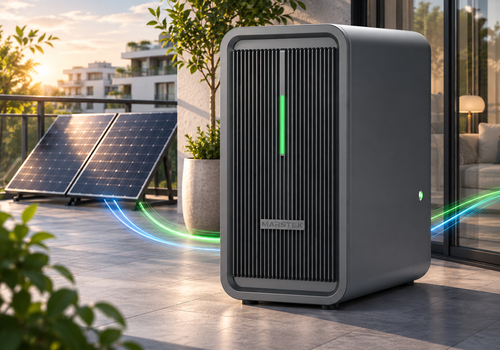
Connect your Marstek B2500 battery storage system to Homey via MQTT or Bluetooth LE.
Choose your connection
The MQTT devices require your own MQTT broker and a B2500 configured to communicate with it. The app does not include a broker. The BLE devices connect directly via Homey's Bluetooth, without an MQTT broker. Bluetooth range and support for your Homey or Bridge satellite must be checked. This app does not use your Marstek cloud account.
The BLE battery device also offers optional Wi-Fi and MQTT configuration through its Repair screen. Network changes require explicit confirmation and may interrupt existing connections. BLE support is new and requires hardware verification; HMJ-2 firmware 116.6 is the initial test target.
Supported devices:
The app currently supports the Marstek B2500 family. Compatibility depends on the model and firmware; not all variants have been tested.
Four Homey device types are available:
- Marstek B2500 (MQTT): battery status, output power, depth of discharge and schedule management.
- Marstek B2500 PV (MQTT): solar power and energy monitoring, including both PV inputs.
- Marstek B2500 (BLE): battery monitoring and control via Bluetooth, including optional Wi-Fi and MQTT setup.
- Marstek B2500 PV (BLE): solar monitoring over the battery's shared Bluetooth connection.
Adding a battery via MQTT or BLE also adds its PV device. Existing devices are kept unchanged. The separate PV setup remains available to add a missing companion.
Use only one connection method per physical battery for energy accounting and automation to avoid duplicate measurements and competing controls. Bluetooth connections are released between transactions so other tools can connect.
For requirements, setup instructions and usage guidance, visit our topic in the Homey Community. You can find it via the community or support link on this app page. You can also ask questions and share feedback there.
Cliquez sur un appareil ci-dessus pour afficher uniquement les cartes Flow associées.
Quand...
Marstek B2500 (BLE)
Le niveau de la batterie a changé
Marstek B2500 (BLE)
L'énergie a changé
Marstek B2500 (BLE)
La puissance cible a été modifiée
Marstek B2500 (BLE)
Le mode de puissance cible est passé à ...
i
« Homey » signifie que Homey contrôle la puissance cible de l'appareil. Les autres modes sont déterminés par l'appareil.
Marstek B2500 (BLE)
PV power rises above ... W
Marstek B2500 (BLE)
PV power falls below ... W
Marstek B2500 (BLE)
PV power changed
Marstek B2500 (MQTT)
Le niveau de la batterie a changé
Marstek B2500 (MQTT)
L'énergie a changé
Marstek B2500 (MQTT)
La puissance cible a été modifiée
Marstek B2500 (MQTT)
Le mode de puissance cible est passé à ...
i
« Homey » signifie que Homey contrôle la puissance cible de l'appareil. Les autres modes sont déterminés par l'appareil.
Marstek B2500 (MQTT)
PV power rises above ... W
Marstek B2500 (MQTT)
PV power falls below ... W
Marstek B2500 (MQTT)
PV power changed
Marstek B2500 PV (BLE)
L'énergie a changé
Marstek B2500 PV (BLE)
Le compteur électrique a changé
Marstek B2500 PV (BLE)
PV power rises above ... W
Marstek B2500 PV (BLE)
PV power falls below ... W
Marstek B2500 PV (BLE)
PV power changed
Marstek B2500 PV (MQTT)
L'énergie a changé
Marstek B2500 PV (MQTT)
Le compteur électrique a changé
Marstek B2500 PV (MQTT)
PV power rises above ... W
Marstek B2500 PV (MQTT)
PV power falls below ... W
Marstek B2500 PV (MQTT)
PV power changed
Et...
Marstek B2500 (BLE)
Le mode de puissance cible est ...
i
« Homey » signifie que Homey contrôle la puissance cible de l'appareil. Les autres modes sont déterminés par l'appareil.
Marstek B2500 (BLE)
Battery is above ... %
Marstek B2500 (BLE)
Battery is below ... %
Marstek B2500 (BLE)
Output ... is enabled
Marstek B2500 (BLE)
Output power is above ... W
Marstek B2500 (BLE)
Output power is below ... W
Marstek B2500 (BLE)
PV power is above ... W
Marstek B2500 (BLE)
PV power is below ... W
Marstek B2500 (MQTT)
Le mode de puissance cible est ...
i
« Homey » signifie que Homey contrôle la puissance cible de l'appareil. Les autres modes sont déterminés par l'appareil.
Marstek B2500 (MQTT)
Battery is above ... %
Marstek B2500 (MQTT)
Battery is below ... %
Marstek B2500 (MQTT)
Output ... is enabled
Marstek B2500 (MQTT)
Output power is above ... W
Marstek B2500 (MQTT)
Output power is below ... W
Marstek B2500 (MQTT)
PV power is above ... W
Marstek B2500 (MQTT)
PV power is below ... W
Marstek B2500 PV (BLE)
PV power is above ... W
Marstek B2500 PV (BLE)
PV power is below ... W
Marstek B2500 PV (MQTT)
PV power is above ... W
Marstek B2500 PV (MQTT)
PV power is below ... W
Alors...
Marstek B2500 (BLE)
Définir la puissance cible W
i
Cela règle également le mode de puissance cible sur Homey. Pour les bornes de recharge, la recharge démarre ou s'arrête automatiquement.
Marstek B2500 (BLE)
Définir le mode de puissance cible sur ...
i
Pour contrôler la puissance cible de cet appareil via Homey, sélectionnez « Homey ». Les autres modes sont déterminés par l'appareil.
Marstek B2500 (BLE)
Set charging mode to Charging mode
i
Mode 0 allows simultaneous charging/discharging on V2, but enables PV2 pass-through on V1. The device must confirm the value. MQTT V2 changes are not stored in flash; BLE changes persist and require 60 seconds between setting changes. Schedules and Homey control remain unchanged.
Marstek B2500 (BLE)
Set depth of discharge to Depth of discharge (%) %
i
90 % depth of discharge leaves 10 % battery reserve. The device must confirm the value. MQTT V2 changes are not stored in flash; BLE changes are stored in flash and limited to one change per minute.
Marstek B2500 (BLE)
Update status
Marstek B2500 (MQTT)
Définir la puissance cible W
i
Cela règle également le mode de puissance cible sur Homey. Pour les bornes de recharge, la recharge démarre ou s'arrête automatiquement.
Marstek B2500 (MQTT)
Définir le mode de puissance cible sur ...
i
Pour contrôler la puissance cible de cet appareil via Homey, sélectionnez « Homey ». Les autres modes sont déterminés par l'appareil.
Marstek B2500 (MQTT)
Set charging mode to Charging mode
i
Mode 0 allows simultaneous charging/discharging on V2, but enables PV2 pass-through on V1. The device must confirm the value. MQTT V2 changes are not stored in flash; BLE changes persist and require 60 seconds between setting changes. Schedules and Homey control remain unchanged.
Marstek B2500 (MQTT)
Set depth of discharge to Depth of discharge (%) %
i
90 % depth of discharge leaves 10 % battery reserve. The device must confirm the value. MQTT V2 changes are not stored in flash; BLE changes are stored in flash and limited to one change per minute.
Marstek B2500 (MQTT)
Update status
Assistance
Vous avez un problème avec cette appli ?
Contacter le développeur ici.








 Marstek Solar Battery n’est pas compatible avec le Homey sélectionné.
 Marstek Solar Battery va s’installer sur Homey dans un instant.
 Belgium
 Bulgaria
 Croatia
 Cyprus
 Czech Republic
 Estonia
 Finland
 Greece
 Hungary
 Iceland
 Ireland
 Latvia
 Lithuania
 Malta
 Moldova
 The Netherlands
 Portugal
 Romania
 Slovakia
 Slovenia
 Türkiye
 Ukraine
 United Kingdom


