







Z-Wave vs Zigbee: Which One Should You Choose in 2026 and What Are The Differences?
 Written by Jasper Foppele
If you’re here because you searched “Z-Wave vs Zigbee”, you probably want a clear answer, not a history lesson.
Choose Zigbee if you want the widest choice of devices (especially lights and sensors), usually at better prices, and you’re happy to build a strong mesh with a few powered repeaters like smart plugs.
Choose Z-Wave if you want a protocol that typically avoids Wi-Fi congestion, often performs very consistently through walls, and is commonly preferred for “must-work” devices like smart locks and core security setups.
Best choice for most homes in 2026: use both. Run Zigbee for comfort and scale (lighting, extra sensors) and Z-Wave for security and infrastructure—Homey brings everything together so your automations work as one home.
Z-Wave vs Zigbee: what are the differences?
Z-Wave and Zigbee are both wireless mesh protocols for smart home automation, but they differ primarily in frequency and interoperability.
Zigbee
Zigbee usually operates on 2.4 GHz, which is why it’s so common and affordable, but also why it can sometimes compete with Wi-Fi. It offers higher data speeds, better power efficiency, and a wider variety of lower-cost devices.
If your smart home plan is mostly comfort, like lighting scenes, room-by-room motion automations, lots of sensors—start with Zigbee and build a strong mesh using a few powered devices.
Z-Wave
Z-Wave operates on a lower frequency (868-908 MHz), offering better range and less interference, often preferred for security devices as well as strong wall penetration.
If your plan is security-first, such as locks, perimeter sensors, “I need this to work when I’m away”, then go for Z-Wave for the critical devices. And if you want the lowest chance of regret,mix them: Zigbee where you want variety, Z-Wave where you want maximum confidence.
Both are mesh networks, so the more powered devices you add, like plugs, switches, and bulbs, the stronger and more reliable your network becomes.
| Practical questions | Zigbee | Z-Wave |
| “Will it fight my Wi-Fi?” | Sometimes (often 2.4 GHz) | Rarely (sub-GHz) |
| “Is it cheaper?” | Often yes | Often no |
| “Will it work across brands?” | Usually, but can vary by device/brand | Often very consistent due to certification |
| “Is range better?” | Good with a dense mesh | Often strong per hop through walls |
| “Best for lights?” | Frequently the easiest choice | Works, but less common |
| “Best for locks/security?” | Possible, but fewer options | Very common choice |
Zigbee: best when you want lots of devices and cozy automations
Zigbee is the “everywhere” option. It’s widely adopted, which usually means more choice and better pricing. That’s why it’s so popular for comfort automations: lights that turn on as you enter, gentle dimming at bedtime, and “good morning” scenes that feel like your house is paying attention.
A simple setup that feels instantly premium is pairing a motion sensor with smart bulbs so your hallway lights come on at low brightness at night, then turn off again once everything is quiet. It’s small, but it changes how your home feels.
The one Zigbee detail to respect: it often runs on 2.4 GHz, the same general band as Wi-Fi. In many homes it’s fine, but in Wi-Fi-heavy environments, Zigbee gets dramatically better when you give it more “paths.” That’s why a couple of smart plugs can make Zigbee feel faster and more reliable—they act like helpful relay points in the mesh.
Z-Wave: best when you care most about reliability and security devices
Z-Wave is often the “calm network” choice because it typically operates on sub-GHz frequencies that don’t overlap with Wi-Fi in the same way. That can translate to steadier performance in busy wireless environments and good wall penetration in larger homes.
Z-Wave is also frequently chosen for security-focused devices. If your front door is the thing you check twice, a Flow that combines a smart lock with a door/window sensor can give you the kind of quiet reassurance that’s hard to put a price on: the house knows what’s open, what’s locked, and what’s supposed to happen next.
The one Z-Wave detail to respect: it’s region-specific. Don’t import random Z-Wave gear from another region unless you’re sure it matches your local frequency.
The setup that wins in most homes: Zigbee for comfort, Z-Wave for “must-work”
If you’re trying to build a smart home that feels seamless, don’t force yourself into a single protocol. Use Zigbee for the places where you want lots of options—lighting, extra sensors, quick upgrades—and use Z-Wave where you want consistent performance for core devices.Homey makes that approach feel simple because you can create one Flow that spans both networks. For example: when the last person leaves, confirm doors are closed, lock up, turn off lights, and keep safety essentials like smoke & CO detectors on watch—without you needing to think about which radio is doing what.
Homey compatibility with Zigbee and Z-Wave
Homey can support both Zigbee and Z-Wave, but how that compatibility works depends on which Homey setup you’re using.
With Homey Pro, it’s straightforward: Zigbee and Z-Wave radios are built in, so you can pair Zigbee and Z-Wave devices directly to Homey Pro and use them together in the same Flows. No extra hardware required.
With Homey Pro mini, the idea is “start small, expand when needed.” Pro mini supports modern connectivity like Thread/Matter and can be expanded with a Homey Bridge. When you add Homey Bridge, you gain Z-Wave support (plus additional radios), and the Bridge can also help extend wireless coverage. In other words: Pro mini can become Zigbee + Z-Wave compatible too, just by adding the Bridge, while Homey keeps everything unified in one app and one Flow system.
Homey Bridge determines the correct Z-Wave region/frequency based on your IP location (important because Z-Wave is region-specific).
In practice:
- Your Zigbee devices (like lights and sensors) join Homey Pro’s Zigbee mesh.
- Your Z-Wave devices (like switches, sensors, and many locks) join Homey Pro’s Z-Wave mesh.
- Homey Pro then unifies everything in the Homey app and Flows, so you can mix Zigbee and Z-Wave devices in the same automation.
Note that adding additional Homey Bridges can strengthen network performance and coverage, and both the Zigbee and Z-Wave meshes can be strengthened. Thus, Home Bridge can act like a helpful “satellite” in your home.
Here’s a short English summary of the article, with the key range figures pulled into a simple table.
Mesh network range: how far can Zigbee and Z-Wave really reach?
Range isn’t a single “spec” you can trust in every home. It changes based on your walls, floors, interference, and—most importantly—how strong your mesh is. Both Zigbee and Z-Wave build mesh networks, meaning powered devices can relay messages onward. That’s why a network can expand across a home room by room, and why it can “self-heal” by routing around a device that drops offline.
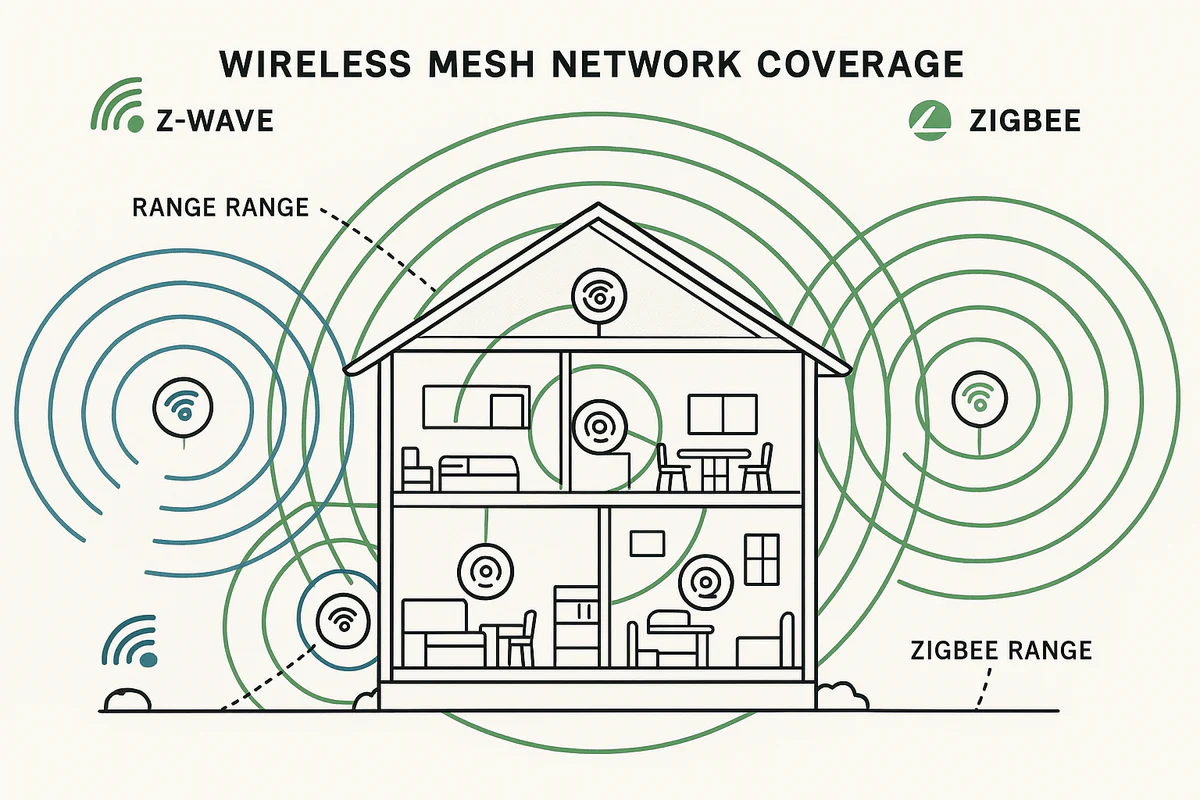
The most useful way to think about range is: how far can one device reliably talk to the next device in the chain. Once you plan for that, you can design a mesh that reaches everywhere.
Typical range and network characteristics
| Topic | Zigbee | Z-Wave |
| Typical indoor range (device-to-device) | ~10–20 m | ~15–30 m |
| Typical outdoor range (clear line of sight) | ~30–50 m | ~50–100 m |
| Frequency band | Typically 2.4 GHz | Sub-GHz (region-specific) |
| Interference sensitivity | Higher (shares space with Wi-Fi/Bluetooth) | Lower (less overlap with Wi-Fi) |
| Wall/floor penetration | Good, but can drop quickly with dense materials | Often stronger through walls/floors |
| Mesh “hops” (how many relays) | Typically supports more hops (implementation-dependent) | Often up to ~4 hops in many networks |
| Device count considerations | Large, commonly higher theoretical limits | Commonly cited ~232 devices per network |
What affects range the most (the practical takeaways)
Building materials are the biggest range killers. Concrete, brick, stone, metal framing, underfloor heating foil, and large metal appliances can reduce effective range dramatically. Floors and ceilings can be even tougher than walls, especially in homes with reinforced concrete.
Interference matters too. Zigbee often operates in the same 2.4 GHz band as Wi-Fi and Bluetooth, so busy wireless environments can reduce reliability and effective range. Z-Wave typically sits in sub-GHz frequencies, which tend to avoid that crowding and often travel through obstacles more comfortably.
How to make range “not a problem” in real homes
The best advice is simple: don’t try to stretch one link too far. Instead, build a mesh with enough powered devices spread through the home so messages always have multiple paths. In larger homes, placing powered routers strategically (rather than clustering them) is what turns “it works sometimes” into “it just works.”
Bottom line: both Zigbee and Z-Wave can reliably cover a whole home, but Z-Wave often has an advantage in penetration and lower interference, while Zigbee becomes extremely dependable when you build a dense mesh and avoid weak links.
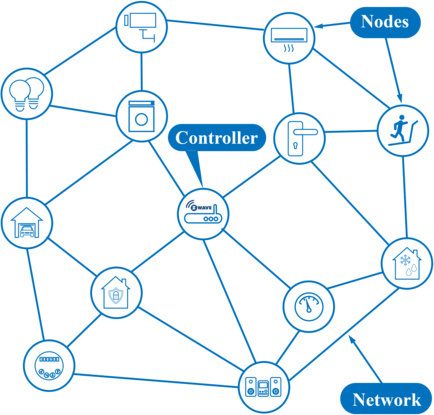
Z-Wave and Zigbee both work as mesh networks. All devices function as repeaters, so the controller does not need to connect directly to every device.
Summarising the differences and similarities between Zigbee and Z-Wave
| Aspect | Zigbee | Z-Wave |
| Frequency & interference | Operates on the 2.4 GHz band, which can lead to interference with Wi-Fi and Bluetooth. | Operates on 868.42 MHz (EU) and 908.42 MHz (US), with less risk of interference. |
| Data speed | Faster data rates, typically between 40 and 250 kbps. | Slower data rates, typically between 10 and 100 kbps. |
| Signal range | Effective range of about 10–100 meters, often ideal for smaller spaces. | Range of about 30–100 meters, often better for larger spaces and homes with obstacles. |
| Power consumption | More energy-efficient, often better for battery-powered devices. | Also low power, but typically a bit less efficient than Zigbee. |
| Compatibility & interoperability | Huge product variety, but compatibility can vary between brands. | High compatibility due to stricter certification. |
| Network capacity | Supports up to ~65,000 devices (theoretical maximum). | Supports up to 232 devices per network. |
Smart home technologies and platforms supported by Homey
Smart homes often use multiple wireless technologies and platforms. As a powerful smart home hub, Homey supports a wide range of communication standards, including Zigbee, Z-Wave, Matter, Thread, KNX, 433 MHz, Wi-Fi, Bluetooth and Infrared.
Homey also integrates with popular smart home platforms such as Amazon Alexa, Google Home and Apple Home. By combining multiple technologies and platforms in one system, Homey allows devices from different ecosystems to work together in one flexible smart home setup.
Discover more about Homey by connecting additional devices through the Homey App Store. Control them with the Homey App and create your own automations with Flows and Advanced Flows. Monitor your smart home using Dashboards, and gain deeper understanding with Homey Energy and Insights.
Ready to make your smart home feel instantly more dependable? Start with the room where automations matter most—often a hallway, entry, or bedroom. Add one reliable sensor or smart plug, build a stronger mesh, and let Homey turn that single upgrade into a home that flows naturally, every day.
If you want help choosing devices by category, browse compatible recommendations in our Best Buy Guides.
FAQ's on Zigbee and Z-Wave
Is Zigbee or Z-Wave better for a smart home?
For comfort and affordability, Zigbee often wins. For security and consistency, Z-Wave often wins. For most people, mixing both delivers the best experience.
Is Zigbee obsolete because of Matter?
No. Matter is a compatibility layer, and Zigbee devices aren’t instantly replaced. Zigbee and Z-Wave remain widely used for sensors, switches, and automations.
Can Zigbee and Z-Wave devices be used together?
Yes. Many homes run both. Homey can unify them so your automations work across protocols.
What do I need for a strong mesh?
Add powered devices that can relay signals. A few well-placed smart plugs often make a bigger difference than buying another sensor.
Key terms explained
A mesh network means devices can pass messages along, increasing coverage and reliability.
A node is any device on the network.
A router/repeater is a powered device that relays messages (often plugs, switches, or bulbs).
Interoperability is how smoothly devices from different brands work together.


