








Zigbee vs Z-Wave: Which Protocol is Right for Your Smart Home in 2026?
If you have ever compared smart home devices, you have likely seen two familiar terms appear again and again: Zigbee and Z-Wave. Both are communication protocols, like Bluetooth and Wi-Fi, they let devices talk to each other, but Zigbee and Z-Wave were designed specifically for smart homes. They work with motion sensors, wall switches, plugs, sensors and all kinds of devices that need to stay responsive.
Both create a network of connections. Instead of only communicating between the central controller, often called a hub or bridge, just like Homey Pro, the devices can also pass signals to one another. This is known as a mesh network.
The big advantage is reliability. If a device can’t reach the hub directly, it may still connect through another nearby device that acts as a signal repeater (often called a router). This can also help you control devices that would otherwise sit outside the hub’s range.
Zigbee and Z-Wave devices also use very little energy, which is why many can run on batteries for years. They don’t need to send large amounts of data, so power consumption stays low. Devices that act as repeaters are usually plugged into mains power because they do more work and use more energy. In many average homes, repeaters aren’t strictly necessary because devices are often within range of the hub — but wireless signals can still be affected by things like concrete walls and floors or metal pipes.
Z-Wave and Zigbee seem almost identical at first glance. Yet once you start building a real smart home, the differences become more meaningful. A multi-protocol hub like Homey Pro is the most effective way to manage a hybrid Zigbee and Z-Wave network without choosing a single protocol. You choose the best device for each situation while Homey brings everything together in one smooth system.
Zigbee vs. Z-Wave: Quick Comparison Table
If you’re aiming for strong coverage through thicker walls and a steady “it just works” feeling, especially for switches, relays, and locks, Z-Wave usually has the edge.
If you want the widest choice of devices for a friendly budget, mainly for lighting and sensors, then Zigbee is the easiest win. Most homes end up happiest when they mix the two: Zigbee where you want variety and speed, Z-Wave where you want infrastructure-level stability.
| What you care about | Zigbee | Z-Wave |
| Device variety | Huge range, especially lights and sensors | Broad, but typically smaller selection |
| Typical cost | Often more budget-friendly | Often slightly pricier |
| Wall performance | Good, but can be affected by busy wireless environments | Often strong in homes with thicker walls |
| Consistency across brands | Can vary depending on device profiles and ecosystems | Often feels more predictable device-to-device |
| “Best for” | Fast sensors, lighting scenes, buttons | Switches, relays, locks, backbone devices |
What do Zigbee and Z-Wave Have in Common?
Zigbee and Z-Wave are both mesh network technologies designed for smart homes. Every mains-powered device acts as a repeater to pass signals along to the next node. This structure strengthens the network as you add more devices like smart plugs or light switches. You get a self-healing system that automatically finds a new path if one device goes offline.
Both protocols share a focus on extreme energy efficiency for battery-powered sensors. Motion detectors and door sensors can run for years on a single coin cell battery because they remain in a deep sleep state until triggered. They only wake up for a fraction of a second to send a data packet before powering down again. This makes both standards much better for long-term maintenance than power-hungry Wi-Fi alternatives.
Furthermore, local control is a core advantage for both Zigbee and Z-Wave systems. Your automations run directly on a local hub rather than relying on a distant cloud server. This setup ensures your lights still turn on even if your internet connection drops out. Removing the cloud dependency also results in significantly faster response times and better data privacy for your entire home.
Where do Zigbee and Z-Wave Differ?
Zigbee and Z-Wave operate on completely different radio frequencies. Zigbee uses the 2.4 GHz band, which is the same frequency used by Wi-Fi and Bluetooth worldwide. Z-Wave uses a sub-GHz band, typically around 908 MHz in the US or 868 MHz in Europe. This lower frequency allows Z-Wave signals to pass through walls and floors more effectively while avoiding the heavy interference common on the crowded 2.4 GHz band.
The two protocols also handle device compatibility with different philosophies. Z-Wave is a closed standard with a strict certification process that ensures every device works with every hub. Zigbee is more of an open standard, which leads to cheaper hardware but occasionally causes "flavor" issues between brands. While Zigbee offers a massive variety of affordable sensors, Z-Wave usually provides a more plug-and-play experience without the need for specific workarounds.
Signal range and transmission speed also set these two apart. Zigbee can transmit data at much higher speeds, reaching up to 250 kbps, while Z-Wave tops out at 100 kbps. However, Z-Wave compensates for its slower speed with a significantly longer line-of-sight range between individual nodes. This makes Zigbee the faster choice for data-heavy tasks, whereas Z-Wave is often superior for covering large properties with fewer repeating devices.
Range, Reliability and Performance in Real Homes
People often wonder which protocol offers better range or lower latency. The answer depends on your home layout. Zigbee uses the 2.4 GHz frequency, which gives it good indoor range but can overlap with Wi-Fi. Z-Wave uses a dedicated low frequency band which can travel further through walls and floors. In a large multi floor home, this can be a practical benefit.
However, Zigbee compensates through high mesh density. Because many affordable bulbs and plugs work as Zigbee routers, you build a dense network very quickly. With each additional router, stability increases. In apartments and smaller homes, Zigbee’s flexibility is often a perfect match.
Device Variety and Ecosystem Strength
Zigbee has a wide ecosystem of accessories. Motion sensors, contact sensors, water leak detectors, smart plugs, bulbs, buttons, presence sensors and many others. Z-Wave focuses more strongly on high quality switches, relays, thermostats and locks. This means many homes use Zigbee for quick reaction tasks and Z-Wave for stable, infrastructure level controls such as hard wired switches.
Homey lets you build your smart home exactly this way. You can choose the best Zigbee or Z-Wave device for each task instead of forcing your home into one system. Regardless of what device type you choose, or which brand you go for, Homey works with all of them.
The hidden hero is your mesh
Here’s the part people don’t realize until they’ve lived with it: most “Zigbee vs Z-Wave problems” are really mesh problems.
Both technologies typically form a mesh network, meaning devices can pass messages through each other. The more well-placed mains-powered devices you have, the more stable everything feels. If your setup is mostly battery sensors scattered around the house with no powered devices to support them, even the best protocol can start to feel unreliable.
This is why something as humble as a smart plug can be a game changer. It doesn’t just power a lamp. It can help your network stay strong in that far corner of the living room where signals love to fade.
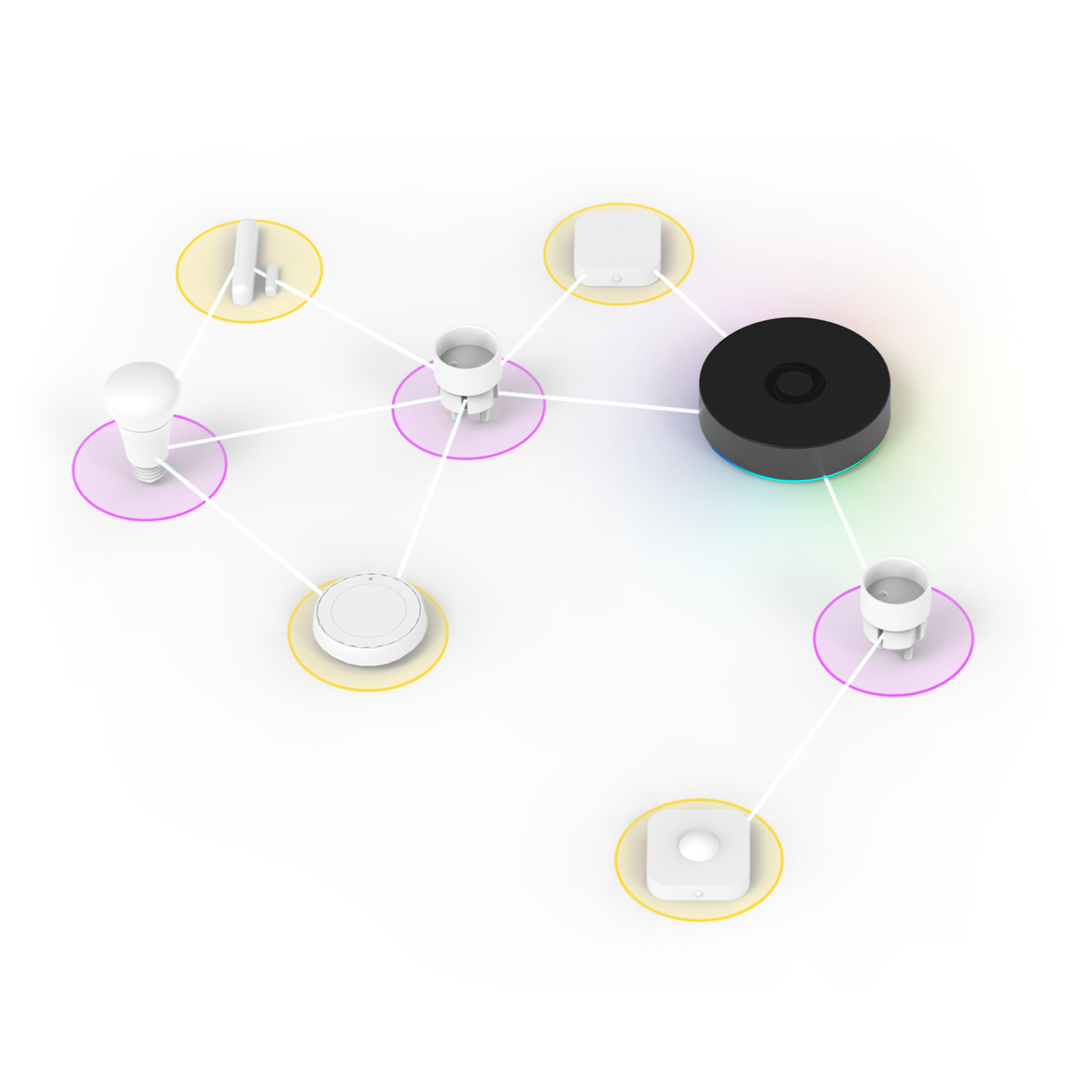
In both ecosystems, you can connect enough devices to make your entire home smart. With Z-Wave, a single network supports up to 232 devices. Zigbee, on the other hand, can theoretically handle up to around 65,000 devices in one network. Realistically, most households will never come close to hitting Z-Wave’s limit—but in large commercial environments, that ceiling can be reached more quickly, which is one reason Zigbee is often preferred when building very large networks.
How Homey Works with Both Zigbee and Z-Wave
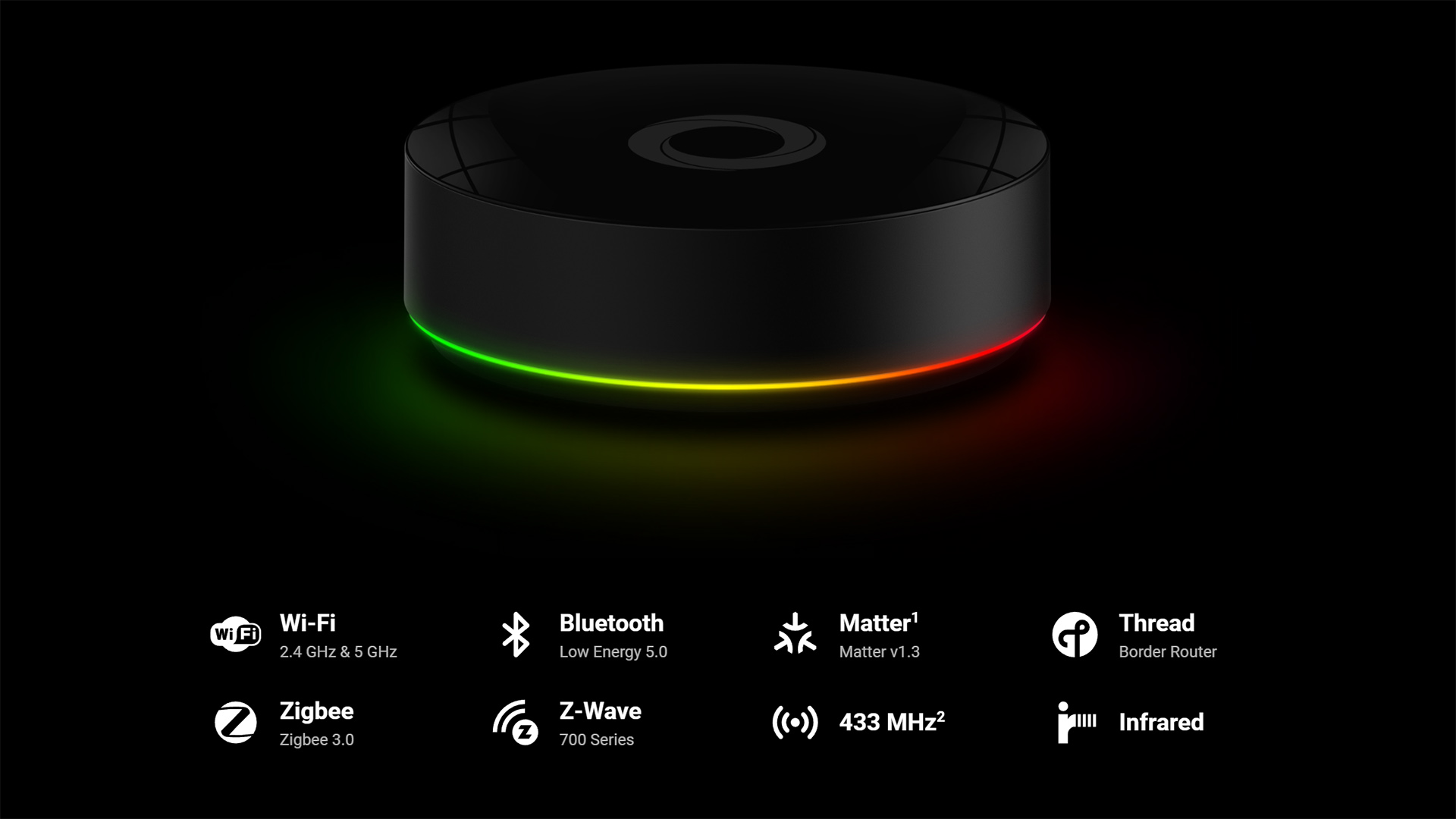
In most homes, the challenge is not choosing the perfect protocol. The challenge is coordinating everything. If you lock yourself into only Zigbee or only Z-Wave, you limit your device options. With Homey Pro, you do not need to make that choice. Homey supports Zigbee and Z-Wave natively, along with Matter, Thread, Wi-Fi, Bluetooth, 433 MHz and Infrared. This means you can mix technologies freely and let Homey handle the communication.
For instance, you can place a Zigbee motion sensor near your hallway and have it turn on a Z-Wave switch in the bathroom. You can use a Z-Wave door sensor to control a Zigbee lamp. You can create bedtime routines that include both technologies. Everything remains smooth because Homey acts as the translator and coordinator between all your devices.
This also makes upgrading your home easier. If you discover a new product you love, you do not have to check whether it fits your existing protocol. Homey lets you choose the device that fits your lifestyle, not the one that fits your limitations.
When your home is “small,” the rules change a bit
In an apartment or a compact home, Zigbee often feels like the easy start. Devices are closer together, signals don’t have to travel far, and your mesh can become “dense” quickly—especially if you’ve got several powered devices like bulbs or plugs spread across rooms. That density is what makes a smart home feel instant. You walk into the hallway and the light responds like it was waiting for you.
But apartments also have a special challenge: you’re surrounded by other people’s networks. Wi-Fi, Bluetooth, and plenty of other 2.4 GHz chatter can be everywhere. Zigbee can still work beautifully in that environment, but it rewards one simple habit: don’t build a home that’s only battery devices. Give your network a few sturdy anchors. A couple of smart plugs placed in key rooms can turn “sometimes a delay” into “always on time,” without you needing to think about it again.
In larger homes, reliability becomes a feeling
Bigger homes bring bigger distances, more walls, more floors, more weird corners where signals go to disappear. This is where Z-Wave often earns its reputation for calm reliability. It can feel more forgiving when devices are spread out and the building materials are less friendly to wireless signals.
That doesn’t mean Zigbee can’t handle a larger home. It can. The difference is that you’ll want to build Zigbee a little more intentionally: enough powered devices in the right places, and fewer “edge of range” situations. Think of it like placing lamps in a garden path. If the lights are too far apart, the path feels uncertain. However, if you space them well, the whole route feels effortless.
If your smart home goal is comfort, bigger homes can actually benefit more from automation—because it saves you from walking across the house for little things. That’s when routines built around sensors really shine. A motion sensor can make long hallways feel welcoming, and a door/window sensor can give you that tiny moment of reassurance—like a quiet “everything’s closed” check—without you doing a lap of the house.
Choosing the Right Technology for Your Next Device
If you want fast motion activated lighting, Zigbee sensors and light bulbs are a great pick. If you want a reliable wall switch or a built-in relay, Z-Wave offers excellent stability. When you are building your mesh network, adding Zigbee routers like smart plugs or bulbs is an easy way to strengthen coverage. If you want long distance communication through walls and floors, Z-Wave often performs better.
The key point is that you do not have to create a single protocol smart home. Homey Pro exists so you can mix and match confidently.
A simple, realistic starter path (that won’t turn into a weekend project)
If you’re starting fresh, it’s tempting to buy ten devices at once and “do the whole house.” That’s also how smart homes end up feeling like a hobby instead of a lifestyle upgrade.
A calmer path is to begin with one moment you want to improve.
If that moment is arriving home, start with light and presence. A motion sensor and a couple of smart bulbs can change your daily experience fast. Add one smart plug in a strategic room and you’re quietly building a stronger network while you’re at it.If that moment is bedtime, build something that makes the house exhale with you. A “goodnight” routine that dims lights, turns off devices, and makes sure doors are secure gets old in the best way—you stop thinking about it because it simply happens. That’s where solid backbone devices like switches & dimmers and a dependable smart lock can make the routine feel trustworthy.
Conclusion
Zigbee and Z-Wave are not rivals. They are two complementary technologies that both bring value to a modern smart home. Zigbee offers speed, affordability and a huge choice of small devices. Z-Wave offers stability, strong range and powerful control for switches and infrastructure devices. With Homey Pro managing both at the same time, you do not need to commit to one direction. You can build the home that suits your lifestyle and let each protocol play to its strengths.
If you want a smart home that feels reliable, flexible and ready for the future, start with the device that solves the problem in front of you. Homey will make sure it works beautifully with everything else you already own.
Smart home technologies and platforms supported by Homey
Here’s the practical reality: most homes end up with a mix of devices over time. You might start with a few Zigbee lights, add a Z-Wave switch later, and eventually bring in sensors, locks, or safety devices when the moment feels right.
The frustrating version of that story is ending up with two separate “worlds” that don’t talk to each other. The good version is having it all feel like one home, where it doesn’t matter what language the device speaks—because your automations are built around moments, not protocols.
That’s where Homey is at its best: helping you combine Zigbee and Z-Wave (and more) into one set of routines that feel consistent, personal, and dependable.
Smart homes often use multiple wireless technologies and platforms. As a powerful smart home hub, Homey supports a wide range of communication standards, including Zigbee, Z-Wave as explained, but it suppports Matter, Thread, KNX, 433 MHz, Wi-Fi, Bluetooth and Infrared too.
Homey also integrates with popular smart home platforms such as Amazon Alexa, Google Home and Apple Home. By combining multiple technologies and platforms in one system, Homey allows devices from different ecosystems to work together in one flexible smart home setup.
Frequently Asked Question on Z-Wave and Zigbee
Is Zigbee faster than Z-Wave?
Zigbee usually reacts faster for small sensors and buttons, while Z-Wave focuses more on reliable long range communication.
Does Z-Wave have better range?
In many homes Z-Wave travels further through walls due to its lower frequency band.
Can Zigbee and Z-Wave devices work together?
They can when you use Homey Pro. Homey combines both protocols inside one system.
Do Zigbee and Z-Wave need the internet?
No. Both work locally and continue functioning even when your internet connection is offline.
Is one protocol more secure than the other?
Both Zigbee and Z-Wave include modern encryption and are suitable for secure installations.
Can Zigbee interfere with Wi Fi?
Zigbee uses the 2.4 GHz spectrum which can overlap with Wi Fi, but good mesh design keeps performance stable.
Are Z-Wave devices better for switches?
Z-Wave is commonly used in professional grade wall switches and built in relays.
Do I need separate hubs for Zigbee and Z-Wave?
Not when you use Homey Pro. It supports both technologies in one controller.
Which protocol should I choose for a new device?
Choose based on the task. For sensors and buttons Zigbee is excellent. For switches and relays Z-Wave is often ideal. Homey supports both so you can choose freely.
Is Zigbee cheaper than Z-Wave?
Often, Z-Wave is a more expensive, especially for lighting and sensors. But the real cost is the experience. A cheaper device that drops off the network can quickly feel expensive in time and frustration. A strong mesh matters more than a small price difference.


