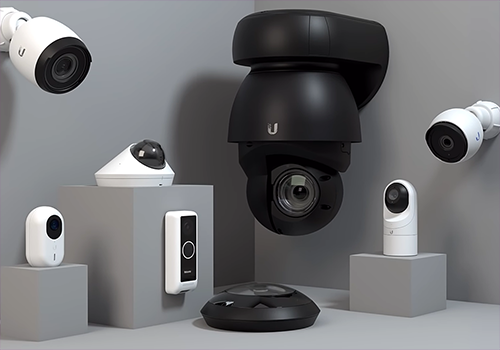
The Homey Unifi Protect App integrates your Ubiquiti Unifi Protect system with Homey, enabling you to monitor and control your Unifi cameras directly from your Homey environment. With this app, you can:
- View camera images within Homey.
- Trigger Homey flows based on motion detection or other camera events.
- Access snapshots and camera status for automation and security purposes.
- This integration helps you create a smarter, more secure home by combining the power of Unifi Protect with Homey’s automation capabilities.
Need help or want to share ideas? Join the discussion on the Homey Community Forum.
For professional assistance, troubleshooting, or custom integration services, click on Contact Developer to reach out to Monkeysoft.
More Apps from Monkeysoft
Explore our other Homey integrations for a complete smart home experience:
- Homey Unifi Access – Manage Unifi Access devices with Homey.
- Homey Unifi Network – Monitor and control your Unifi Network environment.
- Homey TvOverlay – Display useful overlays on your TV for notifications and status updates.
Triggered when a camera detects an audio event such as glass break, smoke alarm, or baby cry
Ubiquiti UniFi Protect and Access
Connection status of camera has changed
Ubiquiti UniFi Protect and Access
A door acces event is detected
i
Triggered when a door is openend by UniFi Access
Ubiquiti UniFi Protect and Access
A doorbell is ringing
Ubiquiti UniFi Protect and Access
A fingerprint was identified
Ubiquiti UniFi Protect and Access
An unknown fingerprint was detected
Ubiquiti UniFi Protect and Access
A FOB button event was detected
Ubiquiti UniFi Protect and Access
A FOB button event for FOB was detected
Ubiquiti UniFi Protect and Access
A NFC card was scanned
Ubiquiti UniFi Protect and Access
An unknown NFC card was scanned
Ubiquiti UniFi Protect and Access
The NVR is accessed
i
Triggered when a user logs in to or accesses the UniFi Protect controller (NVR) itself
Ubiquiti UniFi Protect and Access
A object was detected
Ubiquiti UniFi Protect and Access
A animal was detected
Ubiquiti UniFi Protect and Access
A smart detection ended
Ubiquiti UniFi Protect and Access
A face was detected
Ubiquiti UniFi Protect and Access
A license plate was detected
Ubiquiti UniFi Protect and Access
A package was detected
Ubiquiti UniFi Protect and Access
A person was detected
Ubiquiti UniFi Protect and Access
A vehicle was detected
Ubiquiti UniFi Protect and Access
A snapshot was created from the package camera
Ubiquiti UniFi Protect and Access
A snapshot was created
UniFi OS
The temperature changes
UniFi Protect Weather
The temperature changes
UniFi Protect Weather
Weather updated at [[location]]
Viewport
Turned on
Viewport
Turned off
And...
Access Garage door
Is closed
Access Garage door
Garage door is open
Access Garage door
Garage door is closed
Access Intercom
The contact alarm is on
Access Intercom
A lock is locked
Access Lock
The contact alarm is on
Access Lock
A lock is locked
Access Lock
Door is open
Access Lock
Door is closed
AI Port
Is turned on
Camera
The motion alarm is on
Camera Zone Motion Sensor
The motion alarm is on
Chime
Is turned on
Doorbell
The motion alarm is on
Horn Speaker
Is turned on
Light
Is turned on
Light
The motion alarm is on
NVR Alarm Manager
The state is ...
NVR Alarm Manager
The generic alarm is on
Relay
Is turned on
Relay
Garage is open
Relay
Garage is closed
Relay
Relay status is open
Relay
Relay status is closed
Sensor
The motion alarm is on
Sensor
The contact alarm is on
Sensor
The smoke alarm is on
Sensor
The CO alarm is on
Sensor
The tamper alarm is on
Sensor
The battery alarm is on
Ubiquiti UniFi Protect and Access
FOB button is Button
Ubiquiti UniFi Protect and Access
FOB press type is Press type
Viewport
Is turned on
Then...
Access Garage door
Close
Access Garage door
Open
Access Garage door
Toggle open or closed
Access Garage door
Set Door Temporary Locking Rule Enabled for Interval (minutes) minutes
Access Garage door
Unlock garage door
Access Intercom
Lock
Access Intercom
Unlock
Access Intercom
Unlock intercom door
Access Lock
Lock
Access Lock
Unlock
Access Lock
Set Door Temporary Locking Rule Enabled for Interval (minutes) minutes
Access Lock
Unlock door
Access Reader
Set Reader Access Method Wave Enabled
Access Reader
Set Reader Access Method NFC Enabled
Access Reader
Set Reader Access Method Mobile Tap Enabled
Access Reader
Set Reader Access Method Mobile Button Enabled
AI Port
Turn on
AI Port
Turn off
AI Port
Toggle on or off
Camera
Set camera status LED Enabled
Camera
Set Night Vision mode Night Vision
Camera
Set recording mode Recording mode
Camera
Take a snapshot with an width from Width in pixels
Camera
Set camera status LED Enabled
Camera
Set cameraview to black Enabled
Camera
Stop camera patrol
Camera
Start camera patrol present Present
Camera
PTZ Reset to home position
Camera
PTZ Move to preset Present
Camera
Set color night vision Enabled
Camera
Set auto tracking person on Person and smart zoom on Smart zoom
Camera
Set face detection Enabled
Chime
Turn on
Chime
Turn off
Chime
Toggle on or off
Chime
Set the volume to %
Chime
Set relative volume %
i
Change the volume with respect to the device's current volume.
Chime
Set chime Enabled with volume Volume
Chime
Play test tone
Doorbell
Set doorbell status LED Enabled
Doorbell
Set doorbell status sound Enabled
Doorbell
Set LCD message Message
Doorbell
Set Night Vision mode Night Vision
Doorbell
Set recording mode Recording mode
Doorbell
Take a snapshot with an width from Width in pixels
Doorbell
Set doorbell status LED Enabled
Doorbell
Set doorbell status sound Enabled
Doorbell
Take a snapshot from the package camera with an width from Width in pixels
Doorbell
Set camera view to black Enabled
Doorbell
Test doorbell ringtone
Doorbell
Set doorbell ring volume to Volume (0-100)
Doorbell
Set doorbell speaker volume to Volume (0-100)
Doorbell
Set paired chime volume to Volume (0-100)
Doorbell
Set face detection Enabled
Horn Speaker
Turn on
Horn Speaker
Turn off
Horn Speaker
Toggle on or off
Horn Speaker
Set the volume to %
Horn Speaker
Set relative volume %
i
Change the volume with respect to the device's current volume.
Light
Turn on
Light
Turn off
Light
Toggle on or off
Light
Dim to %
Light
Set relative dim-level %
i
Dim or brighten with respect to the device's current dim-level.
NVR Alarm Manager
Set state ...
NVR Alarm Manager
Arm NVR alarm
NVR Alarm Manager
Disarm NVR alarm
Relay
Turn on
Relay
Turn off
Relay
Toggle on or off
Relay
Pulse relay for Pulse duration (ms) ms
Siren
Test siren sound (at Volume volume)
Siren
Start siren for Duration seconds
Siren
Stop siren
Viewport
Turn on
Viewport
Turn off
Viewport
Toggle on or off
Viewport
Set Viewport to liveview Liveview ID
i
Enter the liveview ID from the UniFi Protect NVR
Widgets
You can add this app’s widgets to your dashboard or homescreen in the mobile app.
Camera
Doorbell
Support
Having an issue with this app?
Contact the developer via the developer website.
What’s new
Version 1.13.2 — Fix controller error notification showing {ip}:{port}, retry RTSP URL lookup when the controller is not ready yet, clear the RTSP warning once a URL is found, fall back to the API key (V2) when pairing finds no devices via V1, use the HEVC demuxer automatically for H.265 cameras (V1 login), and add a Video codec setting to camera and doorbell to override it. Fix Access devices (such as the UA G3 Intercom) not being found when they are not in the first device group.








 Ubiquiti UniFi Protect and Access is not compatible with the selected Homey.
 Ubiquiti UniFi Protect and Access will install on Homey shortly.
 Belgium
 Bulgaria
 Croatia
 Cyprus
 Czech Republic
 Estonia
 Finland
 Greece
 Hungary
 Iceland
 Ireland
 Latvia
 Lithuania
 Malta
Malta
 Moldova
 The Netherlands
 Portugal
 Romania
 Slovakia
 Slovenia
 Türkiye
 Ukraine
 United Kingdom


