





Drivie - Companion

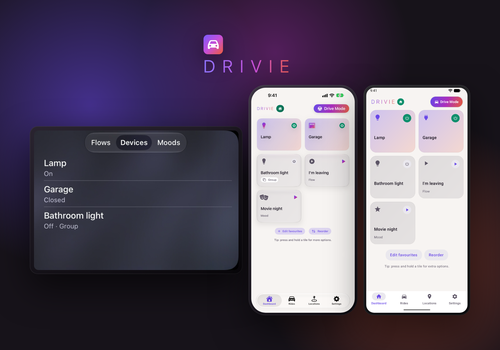
Your Homey in the car, with CarPlay and Android Auto: notifications and so much more.

Read more ›

Supported devices

Flow cards

Click on a device above to show related Flow cards only.

When...

Drivie - Companion
The first phone arrives at Location
i
Fires when a phone enters the location while no other phone was there. A phone counts as long as it is inside the location, also during a ride. Requires Drivie Pro.
Drivie - Companion
The last phone leaves Location
i
Fires when a phone leaves the location and no other phone is left there. A phone counts while it is inside the location, also during a ride. If you remove a phone, or an iPhone loses location access, it stops counting without firing this card. Requires Drivie Pro.
Drivie - Companion
A phone arrives at Location
i
Fires for every phone that arrives, with its name as a tag. A phone that is already there, also during a ride, does not fire this card again. Requires Drivie Pro.
Drivie - Companion
A phone leaves Location
i
Fires for every phone that leaves, with its name as a tag. It only fires if the phone does not come back within the wait set under "Confirm departure after". If you remove a phone, or an iPhone loses location access, this card does not fire. Requires Drivie Pro.
Drivie Android
Arrived at Location
i
Requires Drivie Pro.
Drivie Android
Arrives home within Minutes minutes
i
Drivie automatically takes traffic into account for the time. Also goes off when you are already closer to home than this time. Only works during a ride that Drivie follows, with Drivie Pro. The time can be a few minutes off. Do not use critical devices in this flow, such as locks and gates.
Drivie Android
Started heading home
i
Drivie automatically detects that you are driving toward home. Only works during a ride that Drivie follows, with Drivie Pro. Do not use critical devices in this flow, such as locks and gates.
Drivie Android
Left Location
i
Requires Drivie Pro.
Drivie Android
A ride ended
i
The phone disconnected from a CarPlay or Android Auto car. This is usually reported within seconds, but iOS and Android can delay it by several minutes, so treat the timing as approximate, not real-time. Requires Drivie Pro.
Drivie Android
A ride started
i
The phone connected to a CarPlay or Android Auto car. This is usually reported within seconds, but iOS and Android can delay it by several minutes, so treat the timing as approximate, not real-time. Requires Drivie Pro.
Drivie iPhone
Arrived at Location
i
Requires Drivie Pro.
Drivie iPhone
Arrives home within Minutes minutes
i
Drivie automatically takes traffic into account for the time. Also goes off when you are already closer to home than this time. Only works during a ride that Drivie follows, with Drivie Pro. The time can be a few minutes off. Do not use critical devices in this flow, such as locks and gates.
Drivie iPhone
Started heading home
i
Drivie automatically detects that you are driving toward home. Only works during a ride that Drivie follows, with Drivie Pro. Do not use critical devices in this flow, such as locks and gates.
Drivie iPhone
Left Location
i
Requires Drivie Pro.
Drivie iPhone
A ride ended
i
The phone disconnected from a CarPlay or Android Auto car. This is usually reported within seconds, but iOS and Android can delay it by several minutes, so treat the timing as approximate, not real-time. Requires Drivie Pro.
Drivie iPhone
A ride started
i
The phone connected to a CarPlay or Android Auto car. This is usually reported within seconds, but iOS and Android can delay it by several minutes, so treat the timing as approximate, not real-time. Requires Drivie Pro.

And...

Drivie - Companion
There is a phone at Location
i
Counts the paired Drivie phones inside the location, also during a ride. Requires Drivie Pro.
Drivie Android
Arrives home within Minutes minutes
i
Drivie automatically takes traffic into account for the time. Only works during a ride that Drivie follows, with Drivie Pro. The time can be a few minutes off. Do not use critical devices in this flow, such as locks and gates.
Drivie Android
Ask Question on your phone and in the car, continue on Yes
i
Asks the question on this phone and, when connected, on the car screen. Yes makes the card true and No makes it false, like any condition card. If there is no answer within 45 seconds, you swipe the question away or the phone cannot be reached, the card gives an error and the flow stops.
Drivie Android
Is within Location
i
Requires Drivie Pro.
Drivie Android
Is heading home
i
Drivie automatically detects that you are driving toward home. Only works during a ride that Drivie follows, with Drivie Pro. Do not use critical devices in this flow, such as locks and gates.
Drivie Android
Is on the road
i
Requires Drivie Pro.
Drivie iPhone
Arrives home within Minutes minutes
i
Drivie automatically takes traffic into account for the time. Only works during a ride that Drivie follows, with Drivie Pro. The time can be a few minutes off. Do not use critical devices in this flow, such as locks and gates.
Drivie iPhone
Ask Question on your phone and in the car, continue on Yes
i
Asks the question on this phone and, when connected, on the car screen. Yes makes the card true and No makes it false, like any condition card. If there is no answer within 45 seconds, you swipe the question away or the phone cannot be reached, the card gives an error and the flow stops.
Drivie iPhone
Is within Location
i
Requires Drivie Pro.
Drivie iPhone
Is heading home
i
Drivie automatically detects that you are driving toward home. Only works during a ride that Drivie follows, with Drivie Pro. Do not use critical devices in this flow, such as locks and gates.
Drivie iPhone
Is on the road
i
Requires Drivie Pro.

Then...

Drivie Android
Show Message on your phone and in the car
i
Shows the text as a notification on this phone. If the phone is connected to CarPlay or Android Auto, it also appears on the car screen.
Drivie iPhone
Show Message on your phone and in the car
i
Shows the text as a notification on this phone. If the phone is connected to CarPlay or Android Auto, it also appears on the car screen.

Support

Having an issue with this app? Contact the developer via the developer website.

What’s new

Version 1.9.1 — New flow card: ask a question on your phone and in the car. Yes and No both come back to your flow, like any condition card, so you can hang actions on both answers. Without an answer the flow stops with an error. The card "Arrives home within…" now takes every number of minutes you use in your flows into account. Before, only the shortest one counted.

View changelog

Drivie - Companion

This app can manage your entire Homey.

Drivie - Companion is not compatible with the selected Homey.

Drivie - Companion will install on Homey shortly.
Install App