BlueAir

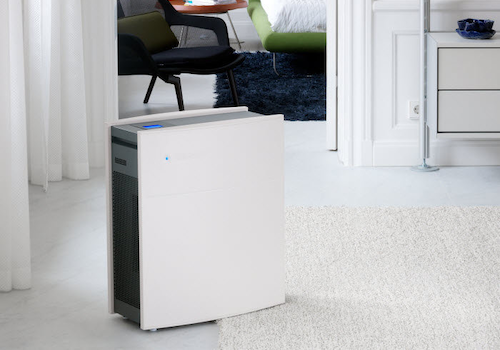
BlueAir purifiers because you need a deep breath.

Read more ›

Supported devices

Flow cards

Click on a device above to show related Flow cards only.

When...

BlueAir
CO2 has changed
i
CO2 level has changed
BlueAir
The fan speed has changed
i
The fan speed has been changed
BlueAir
The filter needs to be changed
i
Normaly filter has a status OK but if it changes this flow wioll trigger.
BlueAir
Formaldehyde (HCHO) has changed
i
Formaldehyde (HCHO) level has changed
BlueAir
The humidity has changed
i
The humidity has been changed
BlueAir
PM 1 has changed.
i
PM 1 has been changed
BlueAir
PM 10 has changed
i
PM 10 has been changed
BlueAir
PM 2.5 has changed
i
PM 2.5 has been changed
BlueAir
The temperature has changed
i
The temperature has been changed
BlueAir
tVOC has changed
i
tVOC has been changed
BlueAir
Wi-Fi status changed
i
Triggers when the device connects or disconnects from Wi-Fi
Classic
The fan speed changed
DustMagnet
The humidity changed
DustMagnet
The PM1 value has changed
DustMagnet
The PM2.5 value changed
DustMagnet
The PM10 value has changed
DustMagnet
The TVOC level has changed
DustMagnet
The temperature changes
HealthProtect
The CO₂-level changed
HealthProtect
The humidity changed
HealthProtect
The PM1 value has changed
HealthProtect
The PM2.5 value changed
HealthProtect
The PM10 value has changed
HealthProtect
The TVOC level has changed
HealthProtect
The temperature changes
Humidifier
The humidity changed
Humidifier
The temperature changes
Pure
The PM2.5 value changed

And...

BlueAir
pm1 level Level
i
pm1 measurement
BlueAir
pm10 level Level
i
pm10 measurement
BlueAir
pm2.5 level Level
i
pm2.5 measurement
BlueAir
tVOC level Level
i
tVOC measurement

Then...

Classic
Set the fan speed to %
Classic
Set the brightness to a Brightness
Classic
Set the child lock to a Child lock
Classic
Set the fan speed to Fan speed
DustMagnet
Enable Auto mode on [[device]]
i
Switch to Auto mode. If the device is off, it will be turned on first.
DustMagnet
Set the automatic to a Automatic
DustMagnet
Set the brightness to a Brightness
DustMagnet
Set the brightness to a Brightness
DustMagnet
Set the child lock to a Child lock
DustMagnet
Set the fan speed to Air speed
DustMagnet
Set the night mode to a Night mode
DustMagnet
Set the standby mode to a Standby
i
Note: 'On' wakes the device (running), 'Off' puts it into standby (stopped). Use 'Turn on' / 'Turn off' cards for clearer wording.
DustMagnet
Turn off [[device]]
i
Put the device into standby.
DustMagnet
Turn on [[device]]
i
Wake the device from standby.
HealthProtect
Enable Auto mode on [[device]]
i
Switch to Auto mode. If the device is off, it will be turned on first.
HealthProtect
Set the automatic to a Automatic
HealthProtect
Set the brightness to a Brightness
HealthProtect
Set the brightness to a Brightness
HealthProtect
Set the child lock to a Child lock
HealthProtect
Set the fan speed to Air speed
HealthProtect
Set the germ shield to Germ shield
HealthProtect
Set the mood light to Mood light
HealthProtect
Set the night mode to a Night mode
HealthProtect
Set the standby mode to a Standby
i
Note: 'On' wakes the device (running), 'Off' puts it into standby (stopped). Use 'Turn on' / 'Turn off' cards for clearer wording.
HealthProtect
Turn off [[device]]
i
Put the device into standby.
HealthProtect
Turn on [[device]]
i
Wake the device from standby.
Humidifier
Enable Auto mode on [[device]]
i
Switch to Auto mode. If the device is off, it will be turned on first.
Humidifier
Set the standby mode to a Standby
i
Note: 'On' wakes the device (running), 'Off' puts it into standby (stopped). Use 'Turn on' / 'Turn off' cards for clearer wording.
Humidifier
Turn off [[device]]
i
Put the device into standby.
Humidifier
Turn on [[device]]
i
Wake the device from standby.
Pure
Enable Auto mode on [[device]]
i
Switch to Auto mode. If the device is off, it will be turned on first.
Pure
Set the automatic to a Automatic
Pure
Set the brightness to a Brightness
Pure
Set the child lock to a Child lock
Pure
Set the fan speed to Air speed
Pure
Set the night mode to a Night mode
Pure
Set the standby mode to a Standby
i
Note: 'On' wakes the device (running), 'Off' puts it into standby (stopped). Use 'Turn on' / 'Turn off' cards for clearer wording.
Pure
Turn off [[device]]
i
Put the device into standby.
Pure
Turn on [[device]]
i
Wake the device from standby.

Widgets

You can add this app’s widgets to your dashboard or homescreen in the mobile app.

BlueAir Air Quality
BlueAir Air Quality
BlueAir Control
BlueAir Control

Support

Having an issue with this app? Contact the developer via email.

What’s new

Version 3.2.24 — fix: prevent permanent unavailable state after repeated auth failures

View changelog

BlueAir

BlueAir is not compatible with the selected Homey.

BlueAir will install on Homey shortly.
Install App