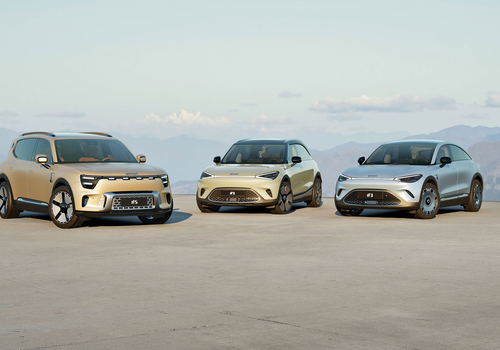
Keep an eye on your Smart #1, #3 and #5 from Homey. See your battery level, remaining range and charging status at a glance, and use them in Flows to react when charging starts, finishes or your battery runs low.
Sign in with your Hello Smart account to add your vehicle.
Read more ›
Supported devices
Smart #1
Smart #3
Smart #5
Flow cards
Click on a device above to show related Flow cards only.
When...
Smart #1
The battery level changed
Smart #1
The power changed
Smart #1
The electric current changed
Smart #1
The voltage changed
Smart #1
The target temperature changed
Smart #1
The temperature changes
Smart #1
The PM2.5 value changed
Smart #1
The humidity changed
Smart #1
The contact alarm turned on
Smart #1
The contact alarm turned off
Smart #1
Charging started
Smart #1
Charging stopped
Smart #1
Charging completed
Smart #1
Battery dropped below % %
Smart #1
Car arrived home
Smart #1
Car switched off
Smart #1
Software update available
Smart #1
Charger plugged in
Smart #1
Charger unplugged
Smart #1
Tyre warning turned on
Smart #1
Tyre warning cleared
Smart #1
Range dropped below km km
Smart #3
The battery level changed
Smart #3
The power changed
Smart #3
The electric current changed
Smart #3
The voltage changed
Smart #3
The target temperature changed
Smart #3
The temperature changes
Smart #3
The PM2.5 value changed
Smart #3
The humidity changed
Smart #3
The contact alarm turned on
Smart #3
The contact alarm turned off
Smart #3
Charging started
Smart #3
Charging stopped
Smart #3
Charging completed
Smart #3
Battery dropped below % %
Smart #3
Car arrived home
Smart #3
Car switched off
Smart #3
Software update available
Smart #3
Charger plugged in
Smart #3
Charger unplugged
Smart #3
Tyre warning turned on
Smart #3
Tyre warning cleared
Smart #3
Range dropped below km km
Smart #5
The battery level changed
Smart #5
The power changed
Smart #5
The electric current changed
Smart #5
The voltage changed
Smart #5
The target temperature changed
Smart #5
The temperature changes
Smart #5
The PM2.5 value changed
Smart #5
The humidity changed
Smart #5
The contact alarm turned on
Smart #5
The contact alarm turned off
Smart #5
Charging started
Smart #5
Charging stopped
Smart #5
Charging completed
Smart #5
Battery dropped below % %
Smart #5
Car arrived home
Smart #5
Car switched off
Smart #5
Software update available
Smart #5
Charger plugged in
Smart #5
Charger unplugged
Smart #5
Tyre warning turned on
Smart #5
Tyre warning cleared
Smart #5
Range dropped below km km
And...
Smart #1
A lock is locked
Smart #1
The contact alarm is on
Smart #1
Range is above km km
Smart #1
Battery is above % %
Smart #1
Car is within km km of home
Smart #3
A lock is locked
Smart #3
The contact alarm is on
Smart #3
Range is above km km
Smart #3
Battery is above % %
Smart #3
Car is within km km of home
Smart #5
A lock is locked
Smart #5
The contact alarm is on
Smart #5
Range is above km km
Smart #5
Battery is above % %
Smart #5
Car is within km km of home
Then...
Smart #1
Set the temperature °C
Smart #1
Turn on climate at °C °C
Smart #1
Turn off climate
Smart #1
Set ... seat heating to ...
Smart #1
Turn steering wheel heating ...
Smart #1
Enable trip recording
Smart #1
Disable trip recording
Smart #1
Get car location
Advanced
Smart #1
Set ... seat ventilation to ...
Smart #1
Sound horn and flash lights
Smart #1
Get connection health
Advanced
Smart #3
Set the temperature °C
Smart #3
Turn on climate at °C °C
Smart #3
Turn off climate
Smart #3
Set ... seat heating to ...
Smart #3
Turn steering wheel heating ...
Smart #3
Enable trip recording
Smart #3
Disable trip recording
Smart #3
Get car location
Advanced
Smart #3
Set ... seat ventilation to ...
Smart #3
Sound horn and flash lights
Smart #3
Get connection health
Advanced
Smart #5
Set the temperature °C
Smart #5
Turn on climate at °C °C
Smart #5
Turn off climate
Smart #5
Set ... seat heating to ...
Smart #5
Turn steering wheel heating ...
Smart #5
Enable trip recording
Smart #5
Disable trip recording
Smart #5
Get car location
Advanced
Smart #5
Set ... seat ventilation to ...
Smart #5
Sound horn and flash lights
Smart #5
Get connection health
Advanced
What’s new
Version 1.5.0 — New: a "Get connection health" Flow action that reports a privacy-safe diagnostic summary (region, data freshness, rate-limit cool-down and field counts) as tokens for your automations. Improved pairing now tailors each vehicle's controls to what it actually supports, hiding unsupported comfort tiles (such as seat or steering-wheel heating) without ever removing capabilities from vehicles that have them.
View changelog














 Smart is not compatible with the selected Homey.
 Smart will install on Homey shortly.
 Belgium
 Bulgaria
 Croatia
 Cyprus
 Czech Republic
 Estonia
 Finland
 Greece
 Hungary
 Iceland
 Ireland
 Latvia
 Lithuania
 Malta
Malta
 Moldova
 The Netherlands
 Portugal
 Romania
 Slovakia
 Slovenia
 Türkiye
 Ukraine
 United Kingdom


