The SENSY-ONE app for Homey helps you get more out of your sensors. Understand the air quality and climate in your home and let your smart home respond to presence.
Connect your SENSY-ONE devices to Homey Pro and use their measurements in Flows and Insights. Set up presence zones or show messages and camera snapshots on your AirDot. Your devices connect locally over Wi-Fi, Ethernet, Zigbee or Bluetooth LE, depending on the model. No additional bridge or cloud account is needed.
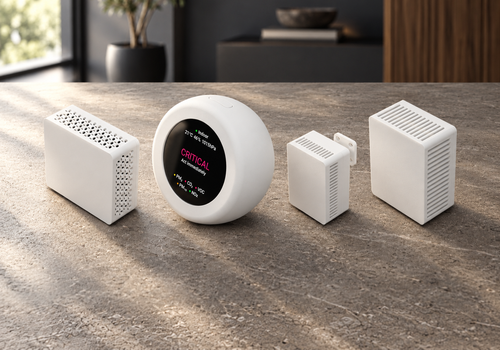
This app supports AirBee, AirDot, S1 Pro, E1 Pro and S1 Pro Zigbee. Available measurements and features vary by device.
Click on a device above to show related Flow cards only.
When...
AirBee BLE
The CO₂-level changed
AirBee BLE
The temperature changes
AirBee BLE
The humidity changed
AirBee BLE
The pressure changed
AirBee Zigbee
The CO₂-level changed
AirBee Zigbee
The temperature changes
AirBee Zigbee
The humidity changed
AirBee Zigbee
The pressure changed
AirDot
The CO₂-level changed
AirDot
The PM1 value has changed
AirDot
The PM2.5 value changed
AirDot
The PM10 value has changed
AirDot
The temperature changes
AirDot
The humidity changed
AirDot
The pressure changed
AirDot
The luminance changed
AirDot
CO₂ rises above Threshold (ppm) ppm
i
Runs only when a fresh measurement crosses the threshold. The first reading after startup, reconnection or missing data does not trigger this Flow.
AirDot
CO₂ falls below Threshold (ppm) ppm
i
Runs only when a fresh measurement crosses the threshold. The first reading after startup, reconnection or missing data does not trigger this Flow.
AirDot
PM1 rises above Threshold (µg/m³) µg/m³
i
Runs only when a fresh measurement crosses the threshold. The first reading after startup, reconnection or missing data does not trigger this Flow.
AirDot
PM1 falls below Threshold (µg/m³) µg/m³
i
Runs only when a fresh measurement crosses the threshold. The first reading after startup, reconnection or missing data does not trigger this Flow.
AirDot
PM2.5 rises above Threshold (µg/m³) µg/m³
i
Runs only when a fresh measurement crosses the threshold. The first reading after startup, reconnection or missing data does not trigger this Flow.
AirDot
PM2.5 falls below Threshold (µg/m³) µg/m³
i
Runs only when a fresh measurement crosses the threshold. The first reading after startup, reconnection or missing data does not trigger this Flow.
AirDot
PM4 rises above Threshold (µg/m³) µg/m³
i
Runs only when a fresh measurement crosses the threshold. The first reading after startup, reconnection or missing data does not trigger this Flow.
AirDot
PM4 falls below Threshold (µg/m³) µg/m³
i
Runs only when a fresh measurement crosses the threshold. The first reading after startup, reconnection or missing data does not trigger this Flow.
AirDot
PM10 rises above Threshold (µg/m³) µg/m³
i
Runs only when a fresh measurement crosses the threshold. The first reading after startup, reconnection or missing data does not trigger this Flow.
AirDot
PM10 falls below Threshold (µg/m³) µg/m³
i
Runs only when a fresh measurement crosses the threshold. The first reading after startup, reconnection or missing data does not trigger this Flow.
AirDot
VOC Index rises above Threshold (index) index
i
Runs only when a fresh measurement crosses the threshold. The first reading after startup, reconnection or missing data does not trigger this Flow.
AirDot
VOC Index falls below Threshold (index) index
i
Runs only when a fresh measurement crosses the threshold. The first reading after startup, reconnection or missing data does not trigger this Flow.
AirDot
NOx Index rises above Threshold (index) index
i
Runs only when a fresh measurement crosses the threshold. The first reading after startup, reconnection or missing data does not trigger this Flow.
AirDot
NOx Index falls below Threshold (index) index
i
Runs only when a fresh measurement crosses the threshold. The first reading after startup, reconnection or missing data does not trigger this Flow.
AirDot
Temperature rises above Threshold (°C) °C
i
Runs only when a fresh measurement crosses the threshold. The first reading after startup, reconnection or missing data does not trigger this Flow.
AirDot
Temperature falls below Threshold (°C) °C
i
Runs only when a fresh measurement crosses the threshold. The first reading after startup, reconnection or missing data does not trigger this Flow.
AirDot
Humidity rises above Threshold (%) %
i
Runs only when a fresh measurement crosses the threshold. The first reading after startup, reconnection or missing data does not trigger this Flow.
AirDot
Humidity falls below Threshold (%) %
i
Runs only when a fresh measurement crosses the threshold. The first reading after startup, reconnection or missing data does not trigger this Flow.
AirDot
Air pressure rises above Threshold (hPa) hPa
i
Runs only when a fresh measurement crosses the threshold. The first reading after startup, reconnection or missing data does not trigger this Flow.
AirDot
Air pressure falls below Threshold (hPa) hPa
i
Runs only when a fresh measurement crosses the threshold. The first reading after startup, reconnection or missing data does not trigger this Flow.
AirDot
Illuminance rises above Threshold (lx) lx
i
Runs only when a fresh measurement crosses the threshold. The first reading after startup, reconnection or missing data does not trigger this Flow.
AirDot
Illuminance falls below Threshold (lx) lx
i
Runs only when a fresh measurement crosses the threshold. The first reading after startup, reconnection or missing data does not trigger this Flow.
AirDot
Air quality status changed
i
The status text uses the language selected on AirDot.
E1 Pro
The pressure changed
E1 Pro
The luminance changed
E1 Pro
Presence detected
E1 Pro
Presence ended
E1 Pro
Area becomes occupied
E1 Pro
Area becomes clear
E1 Pro
The target count in Area changed
S1 Pro
The temperature changes
S1 Pro
The humidity changed
S1 Pro
The pressure changed
S1 Pro
The luminance changed
S1 Pro
Presence detected
S1 Pro
Presence ended
S1 Pro
Area becomes occupied
S1 Pro
Area becomes clear
S1 Pro
Movement detected in Area
S1 Pro
The target count in Area changed
S1 Pro Zigbee
The temperature changes
S1 Pro Zigbee
The humidity changed
S1 Pro Zigbee
The pressure changed
S1 Pro Zigbee
The luminance changed
S1 Pro Zigbee
Presence detected
S1 Pro Zigbee
Presence ended
S1 Pro Zigbee
Area becomes occupied
S1 Pro Zigbee
Area becomes clear
S1 Pro Zigbee
Movement detected in Area
S1 Pro Zigbee
The target count in Area changed
And...
E1 Pro
Presence is detected
E1 Pro
Area is occupied
E1 Pro
The target count in Area is ComparisonCount
S1 Pro
Presence is detected
S1 Pro
Area is occupied
S1 Pro
Movement is detected in Area
S1 Pro
The target count in Area is ComparisonCount
S1 Pro Zigbee
Presence is detected
S1 Pro Zigbee
Area is occupied
S1 Pro Zigbee
Movement is detected in Area
S1 Pro Zigbee
The target count in Area is ComparisonCount
Then...
AirDot
Show Title: Message, Seconds (0 = until closed) seconds, color Text color, sound Play a sound
i
0 seconds keeps the message visible until dismissed. Title: 64 bytes, message: 240 bytes.
AirDot
Show ... for Seconds (0 = until closed) seconds, sound Play a sound
i
Select an image tag from your camera. JPEG and PNG are prepared automatically. 0 seconds keeps the image visible until dismissed.
AirDot
Close the message or photo
E1 Pro
Turn the LED on
E1 Pro
Turn the LED off
E1 Pro
Set LED brightness to Brightness
E1 Pro
Set the LED color to Color
E1 Pro
Turn the buzzer on
E1 Pro
Turn the buzzer off
E1 Pro
Sound the buzzer for Seconds seconds
i
Stops automatically. A new timed alert replaces the previous timer. Manual on/off cancels it. If disconnected, stopping is retried after reconnecting.
S1 Pro
Turn the LED on
S1 Pro
Turn the LED off
S1 Pro
Set LED brightness to Brightness
S1 Pro
Set the LED color to Color
S1 Pro
Turn the buzzer on
S1 Pro
Turn the buzzer off
S1 Pro
Sound the buzzer for Seconds seconds
i
Stops automatically. A new timed alert replaces the previous timer. Manual on/off cancels it. If disconnected, stopping is retried after reconnecting.
S1 Pro Zigbee
Turn the LED on
S1 Pro Zigbee
Turn the LED off
S1 Pro Zigbee
Set LED brightness to Brightness
S1 Pro Zigbee
Set the LED color to Color
S1 Pro Zigbee
Turn the buzzer on
S1 Pro Zigbee
Turn the buzzer off
S1 Pro Zigbee
Sound the buzzer for Seconds seconds
i
Stops automatically. A new timed alert replaces the previous timer. Manual on/off cancels it. If disconnected, stopping is retried after reconnecting.
Support
Having an issue with this app?
Contact the developer via the developer website.
What’s new
Version 1.0.2 — Optional sensor measurements now appear only after valid data is received: SCD40 on S1 Pro and S1 Pro Zigbee, and SCD40 or BME688 on E1 Pro. Empty add-on measurements on existing devices are removed after three minutes of connection. Previously working measurements are retained during temporary interruptions to preserve Flows and Insights.








 SENSY-ONE is not compatible with the selected Homey.
 SENSY-ONE will install on Homey shortly.
 Belgium
 Bulgaria
 Croatia
 Cyprus
 Czech Republic
 Estonia
 Finland
 Greece
 Hungary
 Iceland
 Ireland
 Latvia
 Lithuania
 Malta
Malta
 Moldova
 The Netherlands
 Portugal
 Romania
 Slovakia
 Slovenia
 Türkiye
 Ukraine
 United Kingdom


