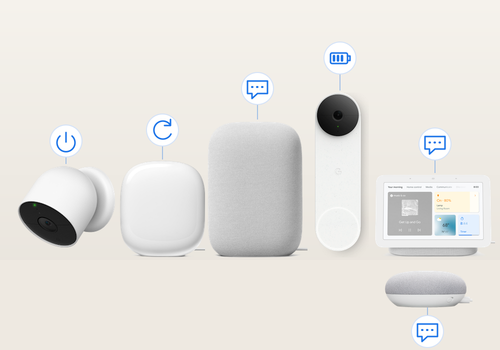
Bring the Google/Nest controls you have been missing into one place. Automate camera on/off for privacy, get reminders before supported camera batteries run flat, manage your Wifi network and send spoken announcements to speakers and displays. See your devices and their available status together, then use Homey Flows to make them work with the rest of your home.
This independent app uses unofficial Google services and complements integrations that provide camera video and detection events. Camera and Wifi functions need a separate Google account invited as Admin in Google Home; speakers use local Cast. Announcement text is sent to Google for speech synthesis. Available functions depend on the device. Setup instructions, supported models and technical details are in the linked Homey Community topic.
Klicke oben auf ein Gerät, um nur verwandte Flow-Karten anzuzeigen.
Wenn ...
Google / Nest speaker or display
Begann zu spielen
Google / Nest speaker or display
Hörte auf zu spielen
Google / Nest speaker or display
Lautstärke hat sich geändert
Nest camera or doorbell
Angeschaltet
Nest camera or doorbell
Ausgeschaltet
Nest camera or doorbell
Battery drops below Battery level%
i
Uses Google cloud status, refreshed every ten minutes. Unknown values do not trigger this card.
Nest camera or doorbell
Charging started
i
Uses Google cloud status, refreshed every ten minutes. Unknown values do not trigger this card.
Nest camera or doorbell
Charging stopped
i
Uses Google cloud status, refreshed every ten minutes. Unknown values do not trigger this card.
Nest camera or doorbell
Power connected
i
Uses Google cloud status, refreshed every ten minutes. Unknown values do not trigger this card.
Nest camera or doorbell
Power disconnected
i
Uses Google cloud status, refreshed every ten minutes. Unknown values do not trigger this card.
Wifi network
A restart was started
i
Google has accepted the restart command. The network goes down shortly after.
Wifi network
The restart is confirmed
i
The network went down and all mesh points are back.
Wifi network
A restart failed
Wifi network
The internet went down
i
Reported by Google. Not triggered during a restart started from this app.
Wifi network
The internet is back
Wifi network
A mesh point was restarted
i
The mesh point went offline and is back in the mesh.
Wifi network
A speed test finished
Wifi network
Device connected
i
Useful for presence, for example when a phone comes home. Requires Presence in the device settings.
Wifi network
Device disconnected
i
Triggers when the device has been gone for about 3 minutes, so short dropouts are ignored. Requires Presence in the device settings.
Wifi network
A new device joined the network
i
A device the app has never seen before. Requires Presence in the device settings.
Wifi node
The node connected
i
Based on Google cloud status, checked every ten minutes.
Wifi node
The node disconnected
i
Based on Google cloud status, checked every ten minutes.
Und ...
Google / Nest speaker or display
Wird abgespielt
Nest camera or doorbell
Ist an
Nest camera or doorbell
Battery is below Battery level%
i
Checks the latest reading. Unknown battery levels stop the Flow.
Nest camera or doorbell
The battery is charging
i
Checks the latest reading. Unknown status stops the Flow.
Nest camera or doorbell
The camera is on
Nest camera or doorbell
Power is connected
i
Checks the latest reading. Unknown status stops the Flow.
Wifi network
The internet is online
Wifi network
A restart is in progress
Wifi network
Total traffic is below Mbit/s Mbit/s
i
Download plus upload right now. Useful to avoid restarting while someone is streaming.
Wifi network
A restart is allowed now
i
False while a restart is running or within the minimum time between restarts.
Wifi network
Device is connected
Wifi network
Device is paused
Wifi network
A speed test is running
Wifi node
The node is connected
Dann ...
Google / Nest speaker or display
Play
Google / Nest speaker or display
Pause
Google / Nest speaker or display
Play/Pause umschalten
Google / Nest speaker or display
Lautstärke setzen auf %
Google / Nest speaker or display
Setze relative Lautsärke %
i
Ändere die Lautstärke unter Berücksichtigung der aktuellen Lautstärke des Gerätes.
Google / Nest speaker or display
Lautstärke stummschalten
Google / Nest speaker or display
Lautstärke nicht mehr stummschalten
Google / Nest speaker or display
Stummschaltung ein- oder ausschalten
Google / Nest speaker or display
Say Message in ...
i
Up to 200 characters. Uses the speaker settings for volume, speed and muted devices. Text is sent to Google. Interrupts current media; queued messages expire after two minutes.
Google / Nest speaker or display
Say Message in ... at Volume%, slow Slow speech, include muted Also send to muted devices
i
Up to 200 characters. Restores previous volume after playback. Mute refers to media audio, not the physical microphone switch. Text is sent to Google.
Google / Nest speaker or display
Stop playback and queued messages
i
Cancels queued announcements and stops current playback.
Google Nest Controls
Say Message on all added speakers in ... at Volume%, slow Slow speech, include muted Also send to muted devices
i
Sends to individual speakers added to this app. Groups are excluded to avoid duplicate announcements. Each speaker has its own queue. Text is sent to Google.
Nest camera or doorbell
Einschalten
Nest camera or doorbell
Ausschalten
Nest camera or doorbell
Ein- oder ausschalten
Nest camera or doorbell
Turn camera off
i
Queues the request and continues the Flow immediately. Cameras are handled one at a time. A newer request for the same camera replaces its pending target. Unconfirmed requests retry in the background and survive app restarts.
Nest camera or doorbell
Turn camera on
i
Queues the request and continues the Flow immediately. Cameras are handled one at a time. A newer request for the same camera replaces its pending target. Unconfirmed requests retry in the background and survive app restarts.
Nest camera or doorbell
Refresh camera status
i
Reads camera and battery status. Reuses the shared five-minute cache; it does not force an extra Google request.
Wifi network
Restart the whole network
i
Saves the request and continues the Flow immediately. Execution and confirmation run in the background, with retries when needed. Pause and priority keep only the latest requested state. Restarts are observed before repeating an uncertain request.
Wifi network
Restart Mesh point
i
Saves the request and continues the Flow immediately. Execution and confirmation run in the background, with retries when needed. Pause and priority keep only the latest requested state. Restarts are observed before repeating an uncertain request.
Wifi network
Run a speed test
i
Saves the request and continues the Flow immediately. Execution and confirmation run in the background, with retries when needed. Pause and priority keep only the latest requested state. Restarts are observed before repeating an uncertain request.
Wifi network
Pause Device for Minutes minutes
i
Saves the request and continues the Flow immediately. Execution and confirmation run in the background, with retries when needed. Pause and priority keep only the latest requested state. Restarts are observed before repeating an uncertain request.
Wifi network
Resume internet for Device
i
Saves the request and continues the Flow immediately. Execution and confirmation run in the background, with retries when needed. Pause and priority keep only the latest requested state. Restarts are observed before repeating an uncertain request.
Wifi network
Prioritize Device for Minutes minutes
i
Saves the request and continues the Flow immediately. Execution and confirmation run in the background, with retries when needed. Pause and priority keep only the latest requested state. Restarts are observed before repeating an uncertain request.
Wifi network
Stop prioritizing
i
Saves the request and continues the Flow immediately. Execution and confirmation run in the background, with retries when needed. Pause and priority keep only the latest requested state. Restarts are observed before repeating an uncertain request.
Wifi node
Restart this Wifi node
i
Queues the request immediately, then observes the node leaving and returning in the background. Failed requests retry automatically; an uncertain response is observed first. Duplicate pending requests are combined.
Support
Hast du Probleme mit dieser App?
Kontaktiere den Entwickler hier.
Was ist neu?
Version 0.3.55 — Improved Google sign-in stability: preserves the existing Android identity across repairs, restarts, sign-outs and failed attempts. Concurrent submissions share one sign-in, rapid retries and reuse of setup tokens are blocked, and the verified access token is reused. Canceled sign-ins cannot complete after sign-out or app shutdown. Google may still revoke unofficial sessions.



 Google Nest Controls ist mit dem gewählten Homey nicht kompatibel.
 Google Nest Controls wird in Kürze auf Homey installiert.
 Belgium
 Bulgaria
 Croatia
 Cyprus
 Czech Republic
 Estonia
 Finland
 Greece
 Hungary
 Iceland
 Ireland
 Latvia
 Lithuania
 Malta
 Moldova
 The Netherlands
 Portugal
 Romania
 Slovakia
 Slovenia
 Türkiye
 Ukraine
 United Kingdom


