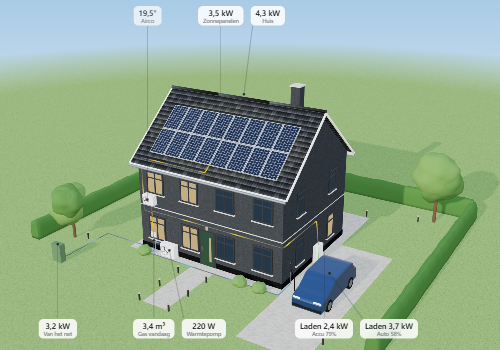
HomeDeck puts your whole home on one screen. It opens on your house in 3D, with solar panels, battery, car and heat pump where they really are and calm lines that show where the power goes. Tap a storey to go inside, or tap a part of the house to see how it is doing.
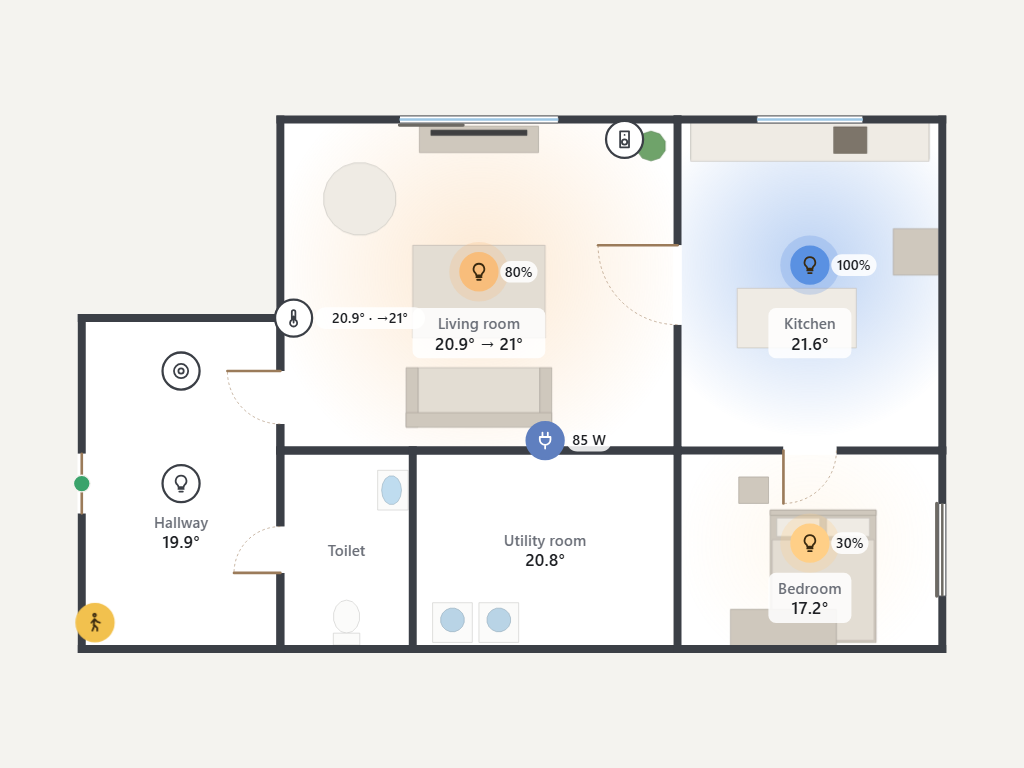
Inside, every storey is a live floor plan. Lamps glow where they hang, rooms show their temperature, blinds and doors their state, and next to each device is the value that matters (°C, %, W). Tap a device for its controls. With a clock, weather and calendar beside it, it is a complete dashboard for a tablet on the wall.
Homey serves the dashboard and the editor as web pages in your own home network, so a wall tablet, laptop or phone only needs a browser. No cloud account and no extra computer.
What you get:
- The house from outside in 3D, set up to look like yours: detached, semi-detached, terraced, corner house or apartment, roof, facade, carport, dormer and extension. It lives with the day: the sun where it really stands, clouds, rain and snow from the forecast, and in the evening only the windows of rooms where a lamp is on
- Your real outdoor lamps on the house: along the path, the driveway and in the garden. They burn when the lamp is on, and a tap switches them
- Tap a storey and the roof lifts off while you fly inside
- Only what needs attention at the top: a window open while rain is coming, the bins tomorrow, the cheapest hours for electricity, a low battery, an alarm
- An "I'm leaving" check: what is open, what is not locked and which lamps are on, with all lamps off in one go
- The house can follow the shape of your floor plan, with sloping roofs, a roof terrace, a garage or shed, and the garden you draw yourself with lawn, terrace, pond and fences
- Buttons for your moods and Flows (a Flow starts with the card "A HomeDeck button is pressed"), a calm clock at night for a tablet on the wall, and the doorbell over everything with the camera picture
- Advice on what to do now: power to spare, the cheapest hours, a dear moment, or a sunny tomorrow for the car, also as Flow triggers
- A Flow can show things on a screen: the camera when someone walks up, a message, a storey or the Energy page, on all screens or one, and the screen goes back by itself
- The alarm from the screen, and an alarm, smoke or leak takes over every screen
- Climate per room on one page, whole rooms of lamps with one slider, who is home, what is playing, and the robot vacuum, also per room
- Shared shopping list, tasks and meals of the week, also from a Flow, and Logic variables to see
- A guest view for visitors and children, Energy beside the house on big screens, and named screens: a new tablet takes over all choices with one link
- Light, dark, as your device, or with the sun, with one tap
- Solar panels on one roof half or on both, such as east-west, also in the solar forecast
- Or use a photo of your own house and draw what can be tapped, with lines that show where the power goes
- Solar panels, grid connection, home battery, car with charger, heat pump, air conditioner, gas and water appear when Homey has such a device, each with a page of its own: today's chart, solar forecast, weather, costs
- The Energy page with all blocks of Energy Dashboard: live flows, prices, costs, history, Sankey, gas, water, heating, warnings, and settings for your devices and contract
- Floor plans in 2D and 3D, with real furniture, lamps of the right kind (ceiling, pendant, wall, floor and table lamps) and a wall thermostat that shows the room temperature
- An editor in the browser: draw rooms of any shape and walls, place doors, windows, furniture and devices, resize and turn everything, copy and paste, undo. A quick start from your Homey zones puts every device in its room
- Start from a picture: add a floor plan image or the PDF of the estate agent, set the scale, and the editor recognises walls (also at an angle), rooms, doors and windows. This happens in your browser; nothing is sent anywhere
- Groups of lamps (made with a group app) work as one lamp
- A widget for Homey dashboards, showing the plan or the house
- On every screen you choose what it starts on, the house or a storey, and a simple view for slower tablets
- An optional access code for the web page and a PIN before changes
- Report a problem: an anonymous report for the maker, without names, address or photo. If you turn it on yourself, errors also go to the maker automatically and anonymously
- Backup: export everything to one file; before every update the app also makes a copy itself
Already use Energy Dashboard? Then the Energy button opens that app, with its own settings and history. Both keep working side by side.
This is still a test version: all feedback is more than welcome on the forum (https://community.homey.app/t/161491). The manual is at https://github.com/WNijhof/homey-floorplan-dashboard/blob/main/docs/manual.md
Furniture models: Kenney, KayKit (Kay Lousberg) and Quaternius, all CC0.
Læs mere ›







 Denne app kan administrere hele din Homey.
 HomeDeck bliver snart installeret på Homey.
 Belgium
 Bulgaria
 Croatia
 Cyprus
 Czech Republic
 Estonia
 Finland
 Greece
 Hungary
 Iceland
 Ireland
 Latvia
 Lithuania
 Malta
 Moldova
 The Netherlands
 Portugal
 Romania
 Slovakia
 Slovenia
 Türkiye
 Ukraine
 United Kingdom


