MealPlan

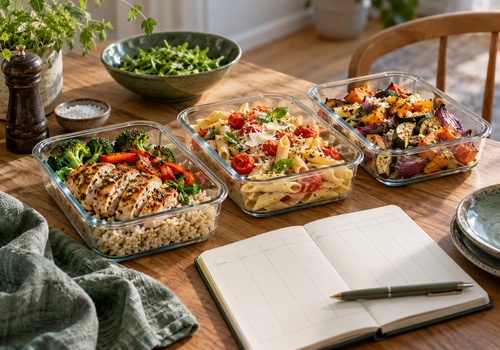
Remember your meals and plan the week ahead

Læs mere ›

Understøttede enheder

Flow-kort

Klik på en enhed ovenfor for kun at vise relaterede Flow-kort.

Når...

Meal planner
The displayed meal changed
Meal planner
The meal was marked as collected
Meal planner
It is time to collect the meal
MealPlan
It is time for a meal reminder
MealPlan
Today's displayed meal changed

Og...

Meal planner
A meal is planned
Meal planner
Food has been collected
i
True when the displayed meal has been marked as collected using the device button or a Flow action.
Meal planner
Today's meal is Meal
Meal planner
Food has not been collected
i
True when a meal is planned for the displayed day and has not been marked as collected. Use with a time trigger, for example 06:45, and a push notification action. No planned meal means this condition is false.
Meal planner
No meal is planned
i
Checks the displayed day and meal type.
Meal planner
The displayed meal contains Text
Meal planner
Meal source is Source
Meal planner
Meal category is Category
Meal planner
The meal has notes
Meal planner
Meal notes contain Text
Meal planner
Meal portions are at least Portions
Meal planner
A meal is planned for tomorrow
Meal planner
Tomorrow's meal is Meal
Meal planner
Tomorrow's meal contains Text
Meal planner
The meal day is Weekday
i
Checks the displayed meal date, including Yesterday or Tomorrow if selected.
Meal planner
The meal week is ISO week number
Meal planner
The device is showing Day
Meal planner
Meal-plan reminders are enabled
Meal planner
The displayed meal is a favourite
Meal planner
The displayed meal uses weekly repetition
Meal planner
Today's meal matches tomorrow's meal
MealPlan
A Type meal is planned for Offset
MealPlan
Today's Type contains Text

Så...

Meal planner
Mark the meal as collected
Meal planner
Reset meal collection
Meal planner
Add the current meal to the timeline
Meal planner
Refresh meal information
i
Refreshes the device from its saved meal plan.
Meal planner
Set today's meal to Meal
i
Saves the meal for today's calendar date in this device's plan and meal type, regardless of its displayed-day setting.
Meal planner
Set tomorrow's meal to Meal
Meal planner
Set meal notes to Notes
i
Updates notes for the displayed meal. Requires a planned meal.
Meal planner
Set meal source to Source
i
Updates the source of the displayed meal. Requires a planned meal.
Meal planner
Clear the displayed meal
i
Clears the displayed meal name and notes. Other dates and meal types are preserved. This date will not fall back to weekly repetition.
Meal planner
Copy the displayed meal to tomorrow
i
Copies the displayed meal and its details to tomorrow's calendar date, replacing that meal type on that date.
Meal planner
Show the meal for Day
i
Changes the device setting. The device continues to follow the selected relative day automatically.
Meal planner
Set the displayed meal to Meal
Meal planner
Set the meal on Date YYYY-MM-DD to Meal
i
Uses the paired plan and this device's meal type. Dates must use YYYY-MM-DD.
Meal planner
Set meal category to Category
i
Updates the displayed meal. Requires a planned meal.
Meal planner
Set meal portions to Portions
i
Updates the displayed meal. Requires a planned meal.
Meal planner
Append Notes to meal notes
i
Adds a new line to notes for the displayed meal. Requires a planned meal.
Meal planner
Clear meal notes
i
Clears only notes for the displayed meal.
Meal planner
Copy the displayed meal to Date YYYY-MM-DD
i
Copies all meal details, replacing the same meal type on the target date.
Meal planner
Clear tomorrow's meal
i
Clears tomorrow's name and notes for this device's meal type.
Meal planner
Save the displayed meal as a favourite
Meal planner
Remove the displayed meal from favourites
Meal planner
Show Meal type
Meal planner
Enable meal-plan reminders
i
Applies to the paired plan's reminder settings.
Meal planner
Disable meal-plan reminders
i
Applies to the paired plan's reminder settings.
Meal planner
Set reminder time to Time HH:MM
i
Uses the paired plan's time zone. Example: 06:45.
Meal planner
Set reminder weekdays to Days
Meal planner
Remind about the meal for Day
Meal planner
Remind about Meal type
Meal planner
Add tomorrow's meal to the timeline
Meal planner
Add the displayed meal and notes to the timeline
Meal planner
Add an uncollected-food reminder to the timeline
i
Only adds a timeline message if the displayed meal is planned and not collected. For a phone push notification, use the condition card with Homey’s own push notification action.
MealPlan
Add Offset Type to the timeline
MealPlan
Set Offset Type to Meal name
MealPlan
Refresh meal information

Widgets

Du kan tilføje denne apps widgets til dit dashboard eller din startskærm i mobil-appen.

Today's meal
Today's meal
Next seven days
Next seven days

Support

Har du et problem med denne app? Kontakt udvikleren her.

Hvad er nyt

Version 1.0.2 — Added extensive device Flow actions and conditions for meal editing, dates, sources, dietary categories, portions, notes, favourites, weekly repetition, reminder settings and collection-aware timeline messages.

Se ændringslog

MealPlan

MealPlan er ikke kompatibel med den valgte Homey.

MealPlan bliver snart installeret på Homey.
Installer