



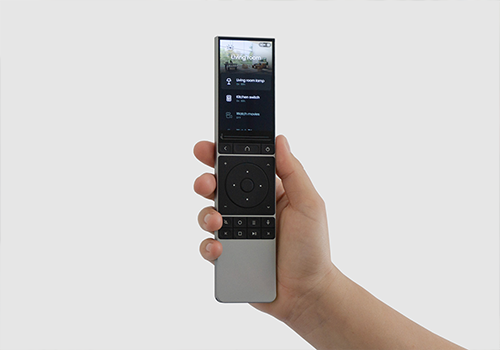
Unfolded Circle

Upplev sömlös och enhetlig kontroll över dina smarta enheter med Unfolded Circle.

Varning! Den här appen kanske inte fungerar korrekt.

Den här appen testas och har aldrig granskats. Den kanske inte fungerar som förväntat.
Var extra försiktig när du installerar den här appen.
« Tillbaka till den vanliga versionen

Upplev sömlös och enhetlig kontroll över dina smarta enheter med Unfolded Circle.

Läs mer ›

Enheter som stöds

Flow-kort

Klicka på en enhet ovan för att visa endast relaterade Flow-kort.

När...

UC Dock
Dimningsnivå ändrades
UC Dock
Volymen ändrades
UC Dock
An IR code was learned
i
Triggered when the dock learns an IR code during IR learning mode.
UC Remote
Aktiverad
UC Remote
Inaktiverad
UC Remote
Dimningsnivå ändrades
UC Remote
Batterinivån ändrades
UC Remote
Batterialarmet aktiverat
UC Remote
Batterialarmet aktiverat
UC Remote
Luminansen ändrades
UC Remote
Entity Entity state changed
i
Triggered when an entity on the UC Remote changes state (e.g. TV turns on/off, volume changes).
Unfolded Circle
Starta Flow name flöde från fjärrkontrollen
i
Detta kort gör flödet tillgängligt som en entitet på fjärrkontrollen. Utlösare, <Namn>.
Unfolded Circle
A voice command was transcribed: [[text]]

Och...

UC Remote
Är på
UC Remote
Batterialarmet är på
UC Remote
Battery level is greater than Battery %%
UC Remote
Battery level is less than Battery %%
UC Remote
Active user is Profile
UC Remote
Activity Activity is active
UC Remote
Battery is charging
UC Remote
Remote is connected
UC Remote
Remote is in standby
UC Remote
Lux is greater than Lux
UC Remote
Lux is less than Lux

Då...

UC Dock
Dimma till %
UC Dock
Ställ in relativ dimnivå %
i
Dimma eller ljusa upp med avseende på enhetens aktuella dimnivå.
UC Dock
Ställ in volymen på %
UC Dock
Ställ in relativ volym %
i
Ändra volymen i förhållande till enhetens aktuella volym.
UC Dock
Identify [[device]]
i
Blink the dock's status LED in green, amber, blue and red to identify it.
UC Dock
Start IR learning
i
Enable IR learning mode on the dock. Learned codes are reported via the 'IR code learned' trigger card. While learning, no IR codes can be sent.
UC Dock
Stop IR learning
i
Disable IR learning mode on the dock.
UC Dock
Reboot
i
Reboot the UC Dock. The dock will be temporarily unavailable during restart.
UC Dock
Send Format IR code IR Code on Output
i
Send an IR code through the UC Dock's IR blaster.
UC Remote
Aktivera
UC Remote
Stäng av
UC Remote
Växla på och av
UC Remote
Dimma till %
UC Remote
Ställ in relativ dimnivå %
i
Dimma eller ljusa upp med avseende på enhetens aktuella dimnivå.
UC Remote
Send system command Command
i
Execute a system command on the UC Remote (reboot, restart UI, etc.).
UC Remote
Run macro Macro
i
Execute a macro on the UC Remote. Macros run a predefined sequence of commands.
UC Remote
Use Entity to send Command
i
Send a command to a specific entity on the UC Remote. Select the entity first, then choose a command.
UC Remote
Start activity Activity
i
Start an activity on the UC Remote.
UC Remote
Stop activity Activity
i
Stop a running activity on the UC Remote.
UC Remote
Switch profile to Profile
i
Switch the active profile on the UC Remote.

Support

Har du problem med den här appen? Kontakta utvecklaren genom att skicka ett e-postmeddelande.

Vad är nytt?

Version 2.0.0 — Major update: UC Dock driver (IR codes, LED, learning mode), new flow cards (run macro, system command, entity state changed, switch profile, 9 condition cards), real-time WebSocket entity state, activity & profile caching. Fully redesigned settings page: Overview, Voice Settings, Help (6 guide sub-pages), and Logging tabs. STT model selection. Fixed voice transcription audio format mismatch.

Visa ändringslogg

Unfolded Circle

Den här appen kan hantera hela Homey.

Unfolded Circle är inte kompatibelt med vald Homey.

Unfolded Circle installeras på Homey inom kort.
Installera