Ostrzeżenie! Ta aplikacja może nie działać prawidłowo.
Ta wersja aplikacji jest obecnie testowana i nikt nie wystawił opinii na jej temat. Aplikacja może nie działać zgodnie z oczekiwaniami. Podczas jej instalowania zachowaj szczególną ostrożność.
# Neo Smart Water Valve for Homey
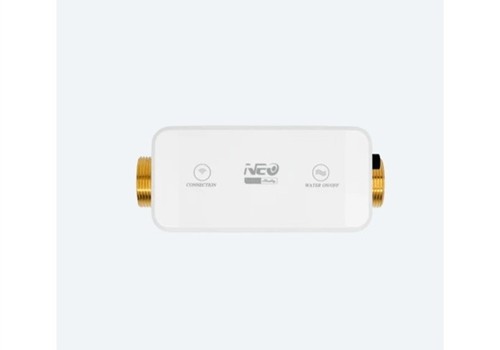
This app adds local network support for the Neo Smart Water Valve (NAS-WV02W) to your Homey ecosystem.
## Features
* **Instant Valve Control:** Seamlessly open and close the water valve directly from the Homey app or via Flows using rapid local HTTP RPC commands.
* **Real-time Sensor Monitoring:** Monitor crucial live data from your valve:
* Current Water Flow Rate
* Water Pressure
* Water Temperature
* **Water Consumption Tracking:** Total water usage is accurately tracked and seamlessly integrated into Homey. You can view your historical water consumption directly under Homey's built-in **Energy** tab.
* **Advanced Flow Automation:** Build powerful security and monitoring routines using dedicated Flow cards (Triggers, Conditions, and Actions).
## Prerequisites & Setup
The Neo Smart Water Valve broadcasts its sensor telemetry via the MQTT protocol. Therefore, **an active MQTT broker is required** on your local network to receive sensor updates.
### Recommended Setup
We highly recommend utilizing the [MQTT Server](https://homey.app/en-us/app/net.weejewel.mqttserver/MQTT-Server/) app directly from the Homey App Store.
**Step-by-Step Installation:**
1. Install the **MQTT Server** app on your Homey to host your own local broker.
2. Install the **MQTT Client** app on your Homey and configure it to connect to your newly created MQTT Server.
3. Power up your Neo Smart Water Valve and connect it to your local Wi-Fi network.
4. Open a web browser and enter the IP address of the Neo Smart Valve to access its local web interface.
5. Navigate to the valve's MQTT settings. Enable MQTT and input the IP address of your Homey (where the MQTT Server is running).
6. Open the Homey app, go to Devices -> Add Device -> Neo Smart Valve.
7. Enter the device's **IP Address** and verify the **MQTT Status Topic** (the default is usually `shelly/valve/status`).
## Flow Cards
This app provides extensive Flow support to automate your water system:
**Triggers (WHEN):**
* Valve was opened / closed
* Water started / stopped flowing
* Water pressure exceeded threshold
* Water temperature exceeded threshold
**Conditions (AND):**
* Valve is open / closed
* Water is / is not flowing
* Water pressure is above / below threshold
* Water temperature is above / below threshold
**Actions (THEN):**
* Open the valve
* Close the valve
## Supported Devices
* Neo Smart Water Valve (NAS-WV02W) powered by Shelly.
Kliknij na urządzenie powyżej, aby wyświetlić tylko powiązane karty Flow.
Kiedy...
Shelly Neo Smart Water Valve
Włączone
Shelly Neo Smart Water Valve
Wyłączone
Shelly Neo Smart Water Valve
Zmiana temperatury
Shelly Neo Smart Water Valve
Zmiana ciśnienia
Shelly Neo Smart Water Valve
Zmiana w liczniku wody
Shelly Neo Smart Water Valve
Zmienił się przepływ wody
Shelly Neo Smart Water Valve
Valve was opened
Shelly Neo Smart Water Valve
Valve was closed
Shelly Neo Smart Water Valve
Water started flowing
Shelly Neo Smart Water Valve
Water stopped flowing
Shelly Neo Smart Water Valve
Water pressure exceeded mbar (e.g. 7000) mbar
Shelly Neo Smart Water Valve
Water temperature exceeded °C (e.g. 30) °C
Oraz...
Shelly Neo Smart Water Valve
Jest włączone
Shelly Neo Smart Water Valve
Valve is open
Shelly Neo Smart Water Valve
Water is flowing
Shelly Neo Smart Water Valve
Water pressure is above mbar mbar
Shelly Neo Smart Water Valve
Water temperature is above °C °C
Wtedy...
Shelly Neo Smart Water Valve
Włącz
Shelly Neo Smart Water Valve
Wyłącz
Shelly Neo Smart Water Valve
Przełącz na wł. lub wył.
Shelly Neo Smart Water Valve
Open the valve
Shelly Neo Smart Water Valve
Close the valve
Pomoc
Twórcy tej aplikacji nie oferują bezpośredniej pomocy.
Nowości
Wersja 0.0.1 — The Shelly Neo Valve app is born! Initial release bringing the Neo Smart Water Valve (NAS-WV02W) to the Homey ecosystem. Features: instant valve control via local HTTP RPC, real-time MQTT sensor telemetry (flow, pressure, temperature), water consumption tracking in Homey Energy tab, and comprehensive Flow cards for home automation.








 Shelly Neo Smart Water Valve nie jest kompatybilna z wybranym Homey.
 Shelly Neo Smart Water Valve zostanie wkrótce zainstalowana na Homey.
 Belgium
 Bulgaria
 Croatia
 Cyprus
 Czech Republic
 Estonia
 Finland
 Greece
 Hungary
 Iceland
 Ireland
 Latvia
 Lithuania
 Malta
Malta
 Moldova
 The Netherlands
 Portugal
 Romania
 Slovakia
 Slovenia
 Türkiye
 Ukraine
 United Kingdom


