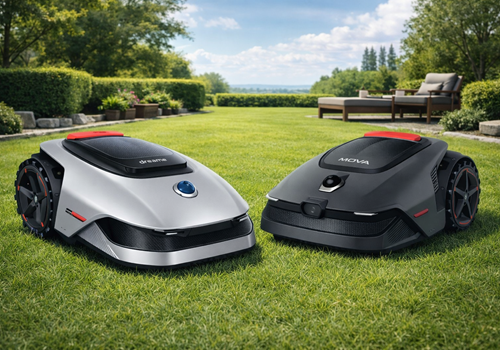
MOVA & Dreame Mower

Control, automate and monitor your robotic lawn mower from Homey

Les mer ›

Støttede enheter

Flow-kort

Klikk på en enhet ovenfor for å kun vise relaterte Flow-kort.

Når …

Robotic Lawn Mower
Batterinivået ble endret
Robotic Lawn Mower
Den generelle alarmen ble aktivert
Robotic Lawn Mower
Den generelle alarmen ble deaktivert
Robotic Lawn Mower
Active map changed
Robotic Lawn Mower
Mower battery drops below Below (%)%
i
Triggers once per mowing session when the battery drops below the set percentage.
Robotic Lawn Mower
Go to Maintenance Point button pressed
Robotic Lawn Mower
Pause button pressed
Robotic Lawn Mower
Resume Mowing button pressed
Robotic Lawn Mower
Return to Dock button pressed
Robotic Lawn Mower
Start Mowing button pressed
Robotic Lawn Mower
Start Spot Mowing button pressed
Robotic Lawn Mower
Stop button pressed
Robotic Lawn Mower
Charging status changed
Robotic Lawn Mower
Consumable drops below Below (%)%
i
Triggers when blade, brush, or robot life drops below the set percentage.
Robotic Lawn Mower
Firmware update available
i
Fires when a new firmware update is available for the mower.
Robotic Lawn Mower
Garage door close requested
i
Triggered by the mower when the garage safety logic requests the gate action.
Robotic Lawn Mower
Garage danger area entered
Robotic Lawn Mower
Garage danger area left
Robotic Lawn Mower
Garage door stable open
Robotic Lawn Mower
Garage emergency
Robotic Lawn Mower
External start blocked by garage safety
Robotic Lawn Mower
Mower is home
Robotic Lawn Mower
Garage maintenance point reached
Robotic Lawn Mower
Garage door open requested
i
Triggered by the mower when the garage safety logic requests the gate action.
Robotic Lawn Mower
Garage position uncertain
Robotic Lawn Mower
Garage safe return completed
Robotic Lawn Mower
Garage safe return started
Robotic Lawn Mower
Garage safety block
Robotic Lawn Mower
Garage safety line crossed to lawn
Robotic Lawn Mower
Garage sensor battery low
Robotic Lawn Mower
Garage sensor unavailable
Robotic Lawn Mower
Mower docked at station
Robotic Lawn Mower
Mower error occurred
Robotic Lawn Mower
Mower returning to dock
Robotic Lawn Mower
Mower status changed
Robotic Lawn Mower
Mowing completed
Robotic Lawn Mower
Mowing started

Og …

Robotic Lawn Mower
Den generelle alarmen er på
Robotic Lawn Mower
Active map is Map
Robotic Lawn Mower
Battery is above Percentage (%)%
Robotic Lawn Mower
Mower is at maintenance point
Robotic Lawn Mower
Garage door is open
Robotic Lawn Mower
Garage mode is enabled
Robotic Lawn Mower
Mower is charging
Robotic Lawn Mower
Mower is docked
Robotic Lawn Mower
Mow efficiency is set to efficient
Robotic Lawn Mower
Mower is mowing
Robotic Lawn Mower
Mower has error
Robotic Lawn Mower
Mowing mode is Mode

Så …

Robotic Lawn Mower
Find mower with audible alert
Robotic Lawn Mower
Start garage safe return
Robotic Lawn Mower
Set garage door state to State
Robotic Lawn Mower
Set garage sensor availability to Availability
Robotic Lawn Mower
Set garage sensor battery to Battery % %
Robotic Lawn Mower
Go to maintenance point
Robotic Lawn Mower
Pause mowing
Robotic Lawn Mower
Refresh all data
Robotic Lawn Mower
Resume mowing
Robotic Lawn Mower
Return to dock
Robotic Lawn Mower
Set active map to Map
Robotic Lawn Mower
Set child lock State
Robotic Lawn Mower
Set cutting height to Height (mm) mm
Robotic Lawn Mower
Set mow efficiency to Mode
Robotic Lawn Mower
Set lift alarm State
Robotic Lawn Mower
Set mowing mode to Mode
Robotic Lawn Mower
Start border patrol for zone Zone number
Robotic Lawn Mower
Start edge mowing
Robotic Lawn Mower
Start edge mowing for zone Zone number
Robotic Lawn Mower
Start mowing
i
Starts mowing using the mode configured with 'Set mowing mode'. Use 'Set mowing mode' before this action to choose all area, zone, edge, or spot. This action does not use the Zone or Spot picker on the device card.
Robotic Lawn Mower
Start mowing spots Spot IDs (comma-separated)
i
Enter the spot IDs as configured in the MOVA or Dreame app, separated by commas (e.g. 1,2).
Robotic Lawn Mower
Start mowing zones Zone IDs (comma-separated)
i
Enter the zone IDs as configured in the MOVA or Dreame app, separated by commas (e.g. 1,2,3).
Robotic Lawn Mower
Stop mowing
Robotic Lawn Mower
Clear recoverable error
i
Dismisses a recoverable error so the mower can resume operation. Only works if the underlying issue (e.g. stuck wheel) has been resolved. Note: not supported on all MOVA models — the mower may ignore the command.

Kontrollprogrammer

Du kan legge kontrollprogrammene for denne appen til dashboard eller startskjermen i mobilappen.

Mowing History
Mowing History
Mower Map
Mower Map

Støtte

Har du et problem med denne appen? Kontakt utvikleren her.

Nyheter

Versjon 1.1.41 — Fixed the live position feed going silent until the app was restarted: the MQTT broker password is the account access token, which is rotated about every two hours, but a reconnect still replayed the token captured at app start. Any reconnect after a rotation therefore failed to authenticate permanently. Reconnects now always use the current token, a rejected login triggers one immediate token refresh instead of a 40-minute retry ladder, and a healthy live connection is no longer disturbed by a rotation. Garage Mode reliability (community contribution): maintenance-point arrivals are now confirmed by the mower firmware or by stable stationary telemetry after the native command; a missing maintenance point is learned automatically after a confirmed arrival, and confirmed changes made in the official MOVA/Dreame app are synchronized. The departure to the maintenance point follows the same phases as a normal garage start (departure, adjusting, positioning, transit) and the gate can no longer close during any of them. Door sensor: a missed open/close confirmation now falls back to the configured gate runtime instead of blocking, a late sensor contact counts as a valid confirmation, and a movement timeout no longer marks the sensor itself as failed. The danger marker can no longer be captured accidentally at the charging station, and switching Garage Mode off during a maintenance trip no longer leaves the status stuck. New experimental setting: Permanent Slow Motion (native LOW mode all day). Upgrade fix: verified maintenance points stored by previous versions are migrated, so existing installations keep their learned point. The app settings page now shows a loading screen while the device list is fetched, and the installed app is about 9 MB smaller because build-only tooling is no longer shipped.

Vis endringslogg

MOVA & Dreame Mower

MOVA & Dreame Mower er ikke kompatibel med den valgte Homey.

MOVA & Dreame Mower vil straks installeres på Homey.
Installer