경고! 이 앱이 제대로 작동하지 않을 수 있습니다.
이 앱 버전은 현재 테스트 중이며 아직 검토되지 않았습니다. 기대한 대로 작동하지 않을 수 있습니다.
이 앱을 설치할 때는 각별히 주의하세요.
« 일반 버전으로 돌아가기
MelPump gives you a clear view of how your heat pump really performs, and this app brings that insight into Homey. Follow temperatures, COP and energy use in real time, see the heat pump's consumption in Homey Energy, and get notified when MelPump detects a problem such as short cycling or a drop in efficiency.
Combine your heat pump with the rest of your home: block hot water when electricity is expensive, force solar mode when your panels produce a surplus, switch on holiday mode when everyone leaves, or adjust the heat curve ahead of cheap hours. To get started, create an API token in your MelPump account settings and add your heat pump in Homey. This is an unofficial community app: it is not developed, supported or endorsed by MelPump, so please report problems with the app to the app developer and not to MelPump support.
자세히 읽기 ›
Flow 카드
위의 디바이스를 클릭하면 관련 Flow 카드만 표시됩니다.
언제...
Heat Pump
Saving mode activated
Heat Pump
Saving mode deactivated
Heat Pump
Smart Energy switched on
Heat Pump
Smart Energy switched off
Heat Pump
Solar mode started
Heat Pump
Solar mode stopped
Heat Pump
Forced solar mode has ended
Heat Pump
Function was switched State
Heat Pump
New MelPump alarm: Alarm type
Heat Pump
Summer eco activated
Heat Pump
Summer eco deactivated
Heat Pump
Compressor started
Heat Pump
Compressor stopped
Heat Pump
Hot water temperature fell below Temperature °C
Heat Pump
Hot water temperature rose above Temperature °C
Heat Pump
Target flow temperature changed
Heat Pump
Night mode activated
Heat Pump
Night mode deactivated
Heat Pump
Heat pump reports an error
Heat Pump
New MelPump alarm
Heat Pump
Legionella run completed
Heat Pump
MelPump mode changed
Heat Pump
Operation changed
Heat Pump
Mode of zone Zone changed
Heat Pump
Compressor started Starts times within an hour
Heat Pump
Heater has been on for Minutes minutes
Heat Pump
Room temperature zone Zone is Direction target by Degrees °C for Minutes minutes
Heat Pump
Hot water is ready
그리고...
Heat Pump
Zone Zone is heating/cooling
Heat Pump
COP is above COP
Heat Pump
Saving mode is active
Heat Pump
There are unacknowledged MelPump alarms
Heat Pump
Summer eco is running
Heat Pump
Compressor is running
Heat Pump
Hot water temperature is above Temperature °C
Heat Pump
Night mode is running
Heat Pump
Solar mode is active
Heat Pump
Immersion heater is on
Heat Pump
Booster heater is on
Heat Pump
Mode of zone Zone is Control mode
Heat Pump
Hot water is ready
그러면...
Heat Pump
Set MelPump mode to Mode
Heat Pump
Turn Function State
Heat Pump
Turn saving mode State
Heat Pump
Apply hot water preset Preset
Heat Pump
Force solar mode for Minutes minutes
Heat Pump
Force solar mode until Time
Heat Pump
Stop solar mode
Heat Pump
Set hot water temperature to Temperature °C
Heat Pump
Apply preset Preset
Heat Pump
Set heat curve correction for zone Zone to Correction
Heat Pump
Set Heating or cooling flow temperature for zone Zone to Temperature °C
Heat Pump
Set zone Zone control mode to Control mode
Heat Pump
Acknowledge MelPump alarm Alarm id
Heat Pump
Acknowledge all MelPump alarms
Heat Pump
Boost hot water for at most Minutes minutes
Heat Pump
Turn on holiday mode until Date at Time
새로운 기능
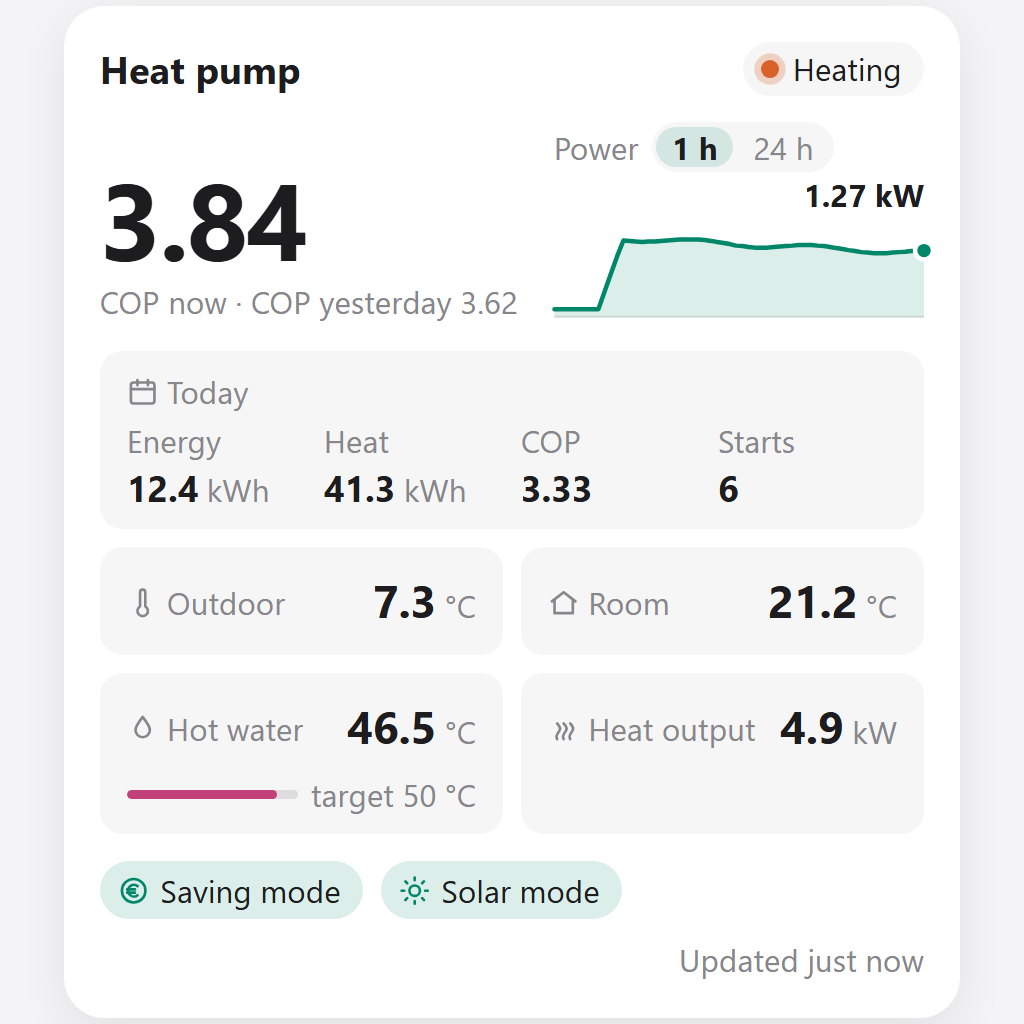
버전 1.1.0 — New widget features: today's figures, a 24-hour power graph, hot water progress, warnings and alarms, data age, a compact layout and optional quick buttons, with instant updates. Also more reliable and lighter: changes from Homey show up within about 20 seconds, temperature sliders send only the final value, fewer requests while MelPump can't be reached, and lower memory use.
업데이트 로그 보기






 Belgium
 Bulgaria
 Croatia
 Cyprus
 Czech Republic
 Estonia
 Finland
 Greece
 Hungary
 Iceland
 Ireland
 Latvia
 Lithuania
 Malta
 Moldova
 The Netherlands
 Portugal
 Romania
 Slovakia
 Slovenia
 Türkiye
 Ukraine
 United Kingdom


