





WebPanel

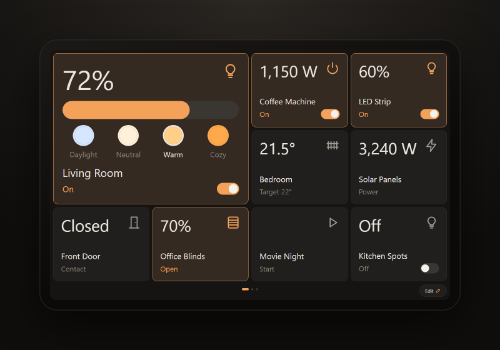
Wall dashboards for your tablets, served by Homey

자세히 읽기 ›

지원되는 디바이스

Flow 카드

위의 디바이스를 클릭하면 관련 Flow 카드만 표시됩니다.

언제...

WebPanel
A countdown finished on all tablets
i
From "Show a countdown". The tablet also plays a short sound when the time is up. Shows on every tablet and browser that has a WebPanel dashboard open, no device needed.
WebPanel
Someone answered yes to Question
i
Fires when ✓ is tapped on a question from "Ask a yes/no question" (under Then). The question must be the same text (case doesn't matter). Shows on every tablet and browser that has a WebPanel dashboard open, no device needed.
WebPanel
Someone answered no to Question
i
Fires when ✕ is tapped on a question from "Ask a yes/no question" (under Then). The question must be the same text (case doesn't matter). Shows on every tablet and browser that has a WebPanel dashboard open, no device needed.
WebPanel Dashboard
A countdown finished
i
From "Show a countdown". The tablet also plays a short sound when the time is up.
WebPanel Dashboard
Someone answered yes to Question
i
Fires when ✓ is tapped on a question from "Ask a yes/no question" (under Then). The question must be the same text (case doesn't matter).
WebPanel Dashboard
Someone answered no to Question
i
Fires when ✕ is tapped on a question from "Ask a yes/no question" (under Then). The question must be the same text (case doesn't matter).

그리고...

WebPanel
A message is showing
i
Any message, question or countdown from a Flow. Shows on every tablet and browser that has a WebPanel dashboard open, no device needed.
WebPanel Dashboard
A message is showing
i
Any message, question or countdown from a Flow.

그러면...

WebPanel
Ask Question and wait up to Seconds seconds
i
Advanced Flow: shows ✕ and ✓ and waits. Then the "Confirmed" tag is the answer, and "Answered" says whether anyone answered. Shows on every tablet and browser that has a WebPanel dashboard open, no device needed.
Advanced
WebPanel
Ask Question over ... and wait up to Seconds seconds
i
Advanced Flow: drop an image tag (for example a camera snapshot) on this card. Shows it full screen with ✕ and ✓ and waits; the "Confirmed" tag is the answer. Shows on every tablet and browser that has a WebPanel dashboard open, no device needed.
Advanced
WebPanel
Ask Question over ... for Seconds seconds
i
Drop an image tag (for example a camera snapshot) on this card. Shows it full screen with ✕ and ✓; the answer starts Flows with "Someone answered yes/no". Shows on every tablet and browser that has a WebPanel dashboard open, no device needed.
WebPanel
Ask Question for Seconds seconds
i
Shows ✕ and ✓ on the display. The answer starts Flows with "Someone answered yes/no" (under When) and the same question. Shows on every tablet and browser that has a WebPanel dashboard open, no device needed.
WebPanel
Close the message on all tablets
i
Closes whatever message, question or countdown is showing. An open question counts as unanswered. Shows on every tablet and browser that has a WebPanel dashboard open, no device needed.
WebPanel
Count down Minutes minutes for Message
i
Shows the time left, then "Time's up" until someone taps it. Tapping it earlier cancels it. "A countdown finished" fires at zero. Shows on every tablet and browser that has a WebPanel dashboard open, no device needed.
WebPanel
Show Message for Seconds seconds
i
Shows a notification card on the display. Tap it to close. Shows on every tablet and browser that has a WebPanel dashboard open, no device needed.
WebPanel
Show Message with Icon in Colour for Seconds seconds
i
Like "Show a message", with your choice of icon and colour. Shows on every tablet and browser that has a WebPanel dashboard open, no device needed.
WebPanel
Show Message over ... for Seconds seconds
i
Drop an image tag (for example a camera snapshot) on this card. It is shown full screen. Shows on every tablet and browser that has a WebPanel dashboard open, no device needed.
WebPanel
Show Message with Icon in Colour until tapped
i
Stays on the display until someone taps it, or a Flow uses "Close the message". Shows on every tablet and browser that has a WebPanel dashboard open, no device needed.
WebPanel Dashboard
Show Message for Seconds seconds
i
Shows a notification card on the display. Tap it to close.
WebPanel Dashboard
Show Message with Icon in Colour for Seconds seconds
i
Like "Show a message", with your choice of icon and colour.
WebPanel Dashboard
Show Message with Icon in Colour until tapped
i
Stays on the display until someone taps it, or a Flow uses "Close the message".
WebPanel Dashboard
Show Message over ... for Seconds seconds
i
Drop an image tag (for example a camera snapshot) on this card. It is shown full screen.
WebPanel Dashboard
Count down Minutes minutes for Message
i
Shows the time left, then "Time's up" until someone taps it. Tapping it earlier cancels it. "A countdown finished" fires at zero.
WebPanel Dashboard
Close the message
i
Closes whatever message, question or countdown is showing. An open question counts as unanswered.
WebPanel Dashboard
Ask Question for Seconds seconds
i
Shows ✕ and ✓ on the display. The answer starts Flows with "Someone answered yes/no" (under When) and the same question.
WebPanel Dashboard
Ask Question over ... for Seconds seconds
i
Drop an image tag (for example a camera snapshot) on this card. Shows it full screen with ✕ and ✓; the answer starts Flows with "Someone answered yes/no".
WebPanel Dashboard
Ask Question and wait up to Seconds seconds
i
Advanced Flow: shows ✕ and ✓ and waits. Then the "Confirmed" tag is the answer, and "Answered" says whether anyone answered.
Advanced
WebPanel Dashboard
Ask Question over ... and wait up to Seconds seconds
i
Advanced Flow: drop an image tag (for example a camera snapshot) on this card. Shows it full screen with ✕ and ✓ and waits; the "Confirmed" tag is the answer.
Advanced

지원

이 앱의 개발자는 직접 지원을 제공하지 않습니다.

새로운 기능

버전 1.0.1 — New: Flow cards that show messages, countdowns and questions on all tablets at once, no device needed. New: give each tablet its own home page with &home= in its link.

업데이트 로그 보기

WebPanel

이 앱으로 Homey 전체를 관리할 수 있습니다.

선택하신 Homey에 WebPanel이(가) 호환되지 않습니다.

WebPanel이(가) 곧 Homey에 설치됩니다.
앱 설치