





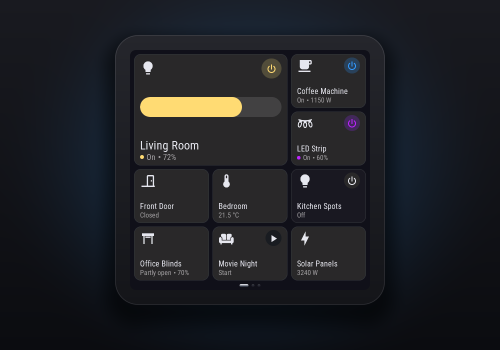
ESPanel

Your Homey on an ESP32 wall display: tiles, rooms, dimmers and Flow messages

자세히 읽기 ›

지원되는 디바이스

Flow 카드

위의 디바이스를 클릭하면 관련 Flow 카드만 표시됩니다.

언제...

ESPanel Display
켜지면
ESPanel Display
꺼지면
ESPanel Display
밝기가 변경되면
ESPanel Display
Page changed
ESPanel Display
Button was pressed
i
Add Flow buttons to the display in Apps → ESPanel → Configure (Add → Flow button).
ESPanel Display
Someone touched the display
i
The first touch after the display has been idle or untouched for 30 seconds, so it works like a presence sensor without firing for every tap.
ESPanel Display
The screen State
i
Because nobody has used the display for the times set under Screen timeout in its settings.
ESPanel Display
The display went offline
i
After a minute without contact, so a restart doesn't count. Check its power and Wi-Fi.
ESPanel Display
The display came back online
i
After "The display went offline".
ESPanel Display
A countdown finished
i
From "Show a countdown". The display has no speaker, so play a sound on another device here.
ESPanel Display
Someone answered yes to Question
i
Fires when ✓ is tapped on a question from "Ask a yes/no question" (under Then). The question must be the same text (case doesn't matter).
ESPanel Display
Someone answered no to Question
i
Fires when ✕ is tapped on a question from "Ask a yes/no question" (under Then). The question must be the same text (case doesn't matter).

그리고...

ESPanel Display
켜지면
ESPanel Display
The screen is State
ESPanel Display
Is showing page Page
ESPanel Display
A message is showing
i
Any message, question or countdown from a Flow.
ESPanel Display
The display is online

그러면...

ESPanel
Set the accent colour of all displays to Colour
i
For example red while the alarm is on. The displays redraw.
ESPanel
Set the theme of all displays to Theme
i
The same as Theme in Apps → ESPanel → Configure → Appearance; automatic is dark in the evening and night. The displays redraw.
ESPanel Display
켜기
ESPanel Display
끄기
ESPanel Display
켬/끔 상태 전환하기
ESPanel Display
다음 밝기로 조절 %
ESPanel Display
상대 밝기 설정 %
i
제품의 현재 디밍 수준에 따라 어둡게 또는 밝게 설정돼요.
ESPanel Display
Show Message for Seconds seconds
i
Shows a notification card on the display. Tap it to close.
ESPanel Display
Show Message with Icon in Colour for Seconds seconds
i
Like "Show a message", with your choice of icon and colour.
ESPanel Display
Show Message with Icon in Colour until tapped
i
Stays on the display until someone taps it, or a Flow uses "Close the message".
ESPanel Display
Show Message over ... for Seconds seconds
i
Drop an image tag (for example a camera snapshot) on this card. It is shown full screen.
ESPanel Display
Count down Minutes minutes for Message
i
Shows the time left, then "Time's up" until someone taps it. Tapping it earlier cancels it. "A countdown finished" fires at zero.
ESPanel Display
Close the message
i
Closes whatever message, question or countdown is showing. An open question counts as unanswered.
ESPanel Display
Ask Question for Seconds seconds
i
Shows ✕ and ✓ on the display. The answer starts Flows with "Someone answered yes/no" (under When) and the same question.
ESPanel Display
Ask Question over ... for Seconds seconds
i
Drop an image tag (for example a camera snapshot) on this card. Shows it full screen with ✕ and ✓; the answer starts Flows with "Someone answered yes/no".
ESPanel Display
Ask Question and wait up to Seconds seconds
i
Advanced Flow: shows ✕ and ✓ and waits. Then the "Confirmed" tag is the answer, and "Answered" says whether anyone answered.
Advanced
ESPanel Display
Ask Question over ... and wait up to Seconds seconds
i
Advanced Flow: drop an image tag (for example a camera snapshot) on this card. Shows it full screen with ✕ and ✓ and waits; the "Confirmed" tag is the answer.
Advanced
ESPanel Display
Set Tile to Text with the small text Small text
i
For text tiles (Apps → ESPanel → Configure → Add → Text tile). The small text is optional.
ESPanel Display
Highlight Tile in Colour, Effect
i
A thick coloured border, until "Stop highlighting a tile".
ESPanel Display
Stop highlighting Tile
ESPanel Display
Show a Effect dot in Colour Corner
i
A small dot in a corner of the screen, on every page, until "Hide an indicator dot". For example: post has arrived, the car is charging.
ESPanel Display
Hide the dot Corner
ESPanel Display
Show page Page
ESPanel Display
Open Room
i
Shows a room's devices, as if it was tapped on the Rooms page. Add "Turn on" to light the screen too.
ESPanel Display
Turn the screen timeout On or off
i
The same as "Dim and turn off when not in use" in the display's settings. Off keeps the screen bright, for example during a party.
ESPanel Display
Lock the display
i
Touches do nothing until "Unlock the display" (child lock, cleaning). Messages and questions from Flows can still be tapped.
ESPanel Display
Unlock the display
ESPanel Display
Restart the display
i
Restarts openHASP on the display. It is back with your tiles in about 15 seconds.
ESPanel Display
Redraw the display

지원

이 앱의 개발자는 직접 지원을 제공하지 않습니다.

새로운 기능

버전 1.0.0 — First release.

업데이트 로그 보기

ESPanel

이 앱으로 Homey 전체를 관리할 수 있습니다.

선택하신 Homey에 ESPanel이(가) 호환되지 않습니다.

ESPanel이(가) 곧 Homey에 설치됩니다.
앱 설치