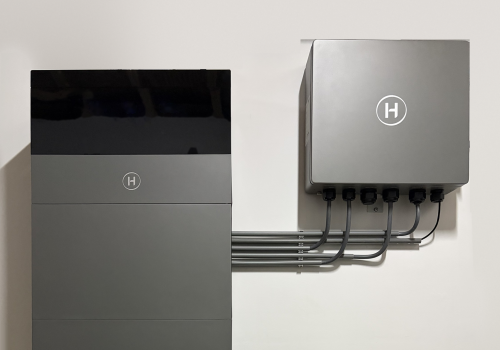
Hoymiles HiOne

Your home battery charges when energy is cheap and powers your home when it is dear

자세히 읽기 ›

지원되는 디바이스

Flow 카드

위의 디바이스를 클릭하면 관련 Flow 카드만 표시됩니다.

언제...

HiOne Station
소비 전력이 변경되면
HiOne Station
배터리 수준이 변경되면
HiOne Station
전류가 변경되면
HiOne Station
전압이 변경되면
HiOne Station
Battery mode changed

그리고...

HiOne Station
Battery mode is Mode
HiOne Station
Battery is charging
HiOne Station
Battery is idle (within ±Threshold (W) W)
i
True when the battery power is near zero (neither charging nor discharging), within the given threshold in watts.
HiOne Station
Battery is discharging (more than Threshold (W) W)
i
True when the battery is discharging faster than the given threshold in watts.
HiOne Station
Grid is importing power
HiOne Station
Connection is local (LAN)
HiOne Station
It is a buy moment
i
True when buying now pays: no meaningfully cheaper slot comes before the next dear stretch, and that stretch - up to the next cheaper refill, across midnight if need be - holds a price that covers the round trip, wear and margin. Never true in a slot dear enough to discharge into.
HiOne Station
Discharging pays
i
True when the price is above the break-even on today's low, plus the required margin.
HiOne Station
It is a sell moment
i
True when exporting pays and this quarter is among the dearest the charge on board can fill before a cheaper refill takes over, so a long peak is sold whole when the charge is there. When the charge is not known: no meaningfully higher price is left before that refill.
HiOne Station
Today's spread pays
i
True when the gap between the cheapest and dearest hour covers wear and losses.
HiOne Station
The battery still needs charging
i
True while the charge is below what the dear hours still ahead will draw. Put it in front of a Flow that switches to Force Charge: that mode charges TO its target and nothing more, so once the target is met the inverter sits idle and stops taking in surplus solar - only Self-Consumption does that. Without this check a cheap sunny afternoon parks the battery while the sun goes to the grid.
HiOne Station
This quarter hour is one of the dearest the battery can still cover
i
Ranks the quarter hours up to the next cheaper refill (across midnight if need be) by price and keeps as many as the charge on board can serve at the house load. A battery that cannot cover the whole expensive stretch should spend itself on the dearest part of it. A single quarter just outside a run is counted in, so the battery does not stop for fifteen minutes.
HiOne Station
A cheaper refill is coming before the dearest moment
i
True when some hour before the dearest hour still ahead refills the battery for less than the energy is worth right now - charging losses and wear included. Then holding the charge is the worse trade: spend it now and buy it back in the dip. Put it INVERTED in front of a Flow that parks the battery, so it only parks when the charge really cannot be replaced in time. Without it an overnight stretch at 35 ct parks the battery to serve a 45 ct evening that the 17 ct afternoon in between would have filled for a third of the price.
HiOne Station
Another battery is charging
i
True while a Flow has recently reported another battery on this meter as charging. Charging this battery at the same time would buy the same energy twice; discharging into it would be a round trip for nothing.
HiOne Station
Another battery is discharging
i
True while a Flow has recently reported another battery on this meter as discharging. Charging this battery from that export just moves energy between batteries and loses a little on the way.

그러면...

HiOne Station
Set battery mode to Mode
i
Battery working mode. Self-Consumption: solar first, then battery, then grid. Economy: time-of-use schedule to avoid peak tariffs. Backup: only discharge during a grid outage. Off-Grid: no grid connection. Force Charge: forcibly charge to the set SoC — set Max Power to 0% to stop charging entirely, so the battery won't absorb power other sources feed back to the grid (e.g. other batteries discharging on high dynamic tariffs). Force Discharge: forcibly discharge to the set SoC. Peak Shaving: cap grid import at a set power. Time of Use: scheduled charge/discharge windows. AI Mode: cloud-managed optimization using prices, forecasts and consumption. Cloud connection required.
HiOne Station
Set reserve SOC to Reserve SOC (%)%
i
Relevant for: every mode except Off-Grid (4). Sets the reserved SOC of the ACTIVE battery mode. Written over Modbus when the mode has a known register, otherwise through the cloud. Beware that it means opposite things per mode: a floor the battery discharges to in Self-Consumption, but the ceiling it charges up to in Force Charge. Measured warning: it is not a dependable floor - a battery set to 40 was seen discharging straight through it to 37. The device now also has a slider per mode, each writing its own register locally; those let you set a mode's reserve without that mode being active, and cannot target the wrong one. Be aware that in Self-Consumption this is not only a floor: the inverter also charges the battery UP to this level, from the grid when there is no sun. Setting it above the current state of charge therefore costs money at a high tariff, rather than merely holding energy back.
HiOne Station
Set the Mode reserve SOC to Reserve SOC (%)%
i
Writes the reserved SOC of the mode you name, whether or not that mode is active. Local Modbus only: each mode keeps this value in its own register, so naming the mode addresses that register directly - the cloud can only ever write whichever mode is running. Use this to prepare a mode before switching to it, for example setting the Force Charge target while the station is still in Self-Consumption. Self-Consumption, Force Charge and Force Discharge have a known register; other modes are refused rather than redirected. Remember the value means opposite things: a discharge floor in Self-Consumption, a charge target in Force Charge - and as a floor it is not dependable (a battery set to 40 was seen discharging through it to 37). Be aware that in Self-Consumption this is not only a floor: the inverter also charges the battery UP to this level, from the grid when there is no sun. Setting it above the current state of charge therefore costs money at a high tariff, rather than merely holding energy back.
HiOne Station
Set Peak Shaving: reserve Reserve SOC (%)%, max Max SOC (%)%, grid limit Grid power limit (W)W
i
Relevant for: Peak Shaving (mode 7). Configures and activates Peak Shaving mode. Cloud connection required.
HiOne Station
Switch dry contact State
i
Enables or disables the relay / dry contact output (cloud connection and compatible hardware required).
HiOne Station
Set max charge/discharge power to Max power (%)%
i
Relevant for: Force Charge (mode 5) and Force Discharge (mode 6). Applies to the active mode if it is one of these, otherwise activates Force Charge. For an explicit direction use 'Set max charge power' or 'Set max discharge power' instead. Tip: 0% in Force Charge stops the battery charging — useful to prevent it absorbing power that other sources feed back to the grid (e.g. other batteries discharging during high dynamic tariffs). Cloud connection required.
HiOne Station
Set max charge power (Force Charge) to Max charge power (%)%
i
Relevant for: Force Charge (mode 5). Sets the charge power limit and switches to that mode. Tip: 0% stops the battery charging — useful to prevent it absorbing power other sources feed back to the grid. Cloud connection required.
HiOne Station
Set max discharge power (Force Discharge) to Max discharge power (%)%
i
Relevant for: Force Discharge (mode 6). Sets the discharge power limit and switches to that mode. Cloud connection required.
HiOne Station
Limit charge power to Charge limit (%)% without changing the battery mode
i
Sets the Force Charge power limit without switching to that mode. NOTE: this register only governs while the station is in Force Charge — with the limit at 0 in Self-Consumption an inverter was still measured charging 5.5 kW from a neighbouring battery. To stop it absorbing someone else's export, switch the battery mode instead. Written straight to the stick over Modbus, so it lands in about ten seconds and keeps working without internet. Requires a local connection to the gateway.
HiOne Station
Set the local charge ceiling to Charge ceiling (%)%
i
Relevant for: EVERY battery mode. Writes the station's own maximum SOC straight to the stick over Modbus, so it binds whatever mode is running - unlike the max charge power action, which only governs inside Force Charge. Set it below the current state of charge to stop a charge: measured on live hardware, a battery taking 2028 W fell to zero within twenty seconds, and the surplus went to the grid instead. It does not discharge the battery and does not change the operating mode, so the inverter keeps covering the house. Set 100 to release it again. Use this rather than a mode switch when speed matters: a mode change travels through the cloud and takes about four minutes. Local only - without a Modbus connection it fails with a clear message instead of falling back.
HiOne Station
Limit discharge power to Discharge limit (%)% without changing the battery mode
i
Stops the battery discharging at 0%, without switching to Force Discharge. Use it to keep the battery from emptying into another load. Written straight to the stick over Modbus, so it takes about ten seconds instead of the minutes a cloud mode switch needs, and it keeps working without internet. Requires a local connection to the gateway.
HiOne Station
Set max SOC to Max SOC (%)%
i
Relevant for: Peak Shaving (mode 7) — the only mode with a max SOC. Activates Peak Shaving if it is not already active. Cloud connection required.
HiOne Station
Set grid power limit to Grid power limit (W)W
i
Relevant for: Peak Shaving (mode 7). Sets the grid power limit for Peak Shaving mode and activates it. Cloud connection required.
HiOne Station
Time of Use: charge Charge from (HH:MM)–Charge until (HH:MM) at Charge power (%)% to Charge up to SOC (%)%, discharge Discharge from (HH:MM)–Discharge until (HH:MM) at Discharge power (%)% to Discharge down to SOC (%)%
i
Relevant for: Time of Use (mode 8). Sets a single Time of Use charge/discharge period and activates Time of Use mode. Times in HH:MM. For multi-period schedules use the S-Miles app. Cloud connection required.
HiOne Station
Limit inverter output to Power limit (%)%
i
Limits the inverter output via the local gateway connection (LAN, port 10081). Warning: every change writes to the inverter's EEPROM — avoid changing it more than a few times per day to prevent wear.
HiOne Station
Turn inverter Inverter serial number State
i
Turns an inverter on or off via the local gateway connection. Enter the inverter serial number (from the type plate or the S-Miles app). Useful at negative energy prices.
HiOne Station
Hold the battery at its current charge
i
Sets the Self-Consumption reserve to the charge already on board, so the battery neither discharges nor charges. Use this to save energy for a dearer hour: parking the reserve at 100% would instead buy energy from the grid at the current price, because in Self-Consumption the inverter charges up to the reserve as well. Does nothing while Force Charge runs: that mode charges to its own target, so there is nothing to hold.
HiOne Station
Start charging to Charge to (%)% at Power (% of 16 kW)% power
i
Force Charge from the grid up to the level you name, at the power you name. One card for what used to take four setting cards with delays between them: the app writes the Force Charge target, opens the charge ceiling, sets the power and only then switches the mode, waiting for each step, so the battery never charges towards an old target or at an old rate. Written locally over Modbus; needs a connection to the stick. 40% is 6.4 kW, about 9.3 A per phase.
HiOne Station
Start charging to what the dear hours will need, at Power (% of 16 kW)% power
i
As "Start charging to a level", with the level taken from the price plan: the floor plus what the coming dear slots will draw from the house, plus what the slots where selling pays can export (see the "selling power" setting), capped at 95%. The target is shown on the Charge target tile.
HiOne Station
Start selling down to Sell down to (%)% at Power (% of 16 kW)% power
i
Force Discharge down to the level you name, at the power you name. The app sets the Force Discharge floor first, then the power, and only then switches the mode, waiting for each step - so a sale never runs past an older, lower floor or starts at an old rate. Written locally over Modbus; needs a connection to the stick. 32% is about 5.1 kW, 20% about 3.2 kW.
HiOne Station
Stop charging or selling, back to Self-Consumption
i
Sets the Force Charge power to 0 and switches to Self-Consumption, in that order. The zero keeps a later switch back into Force Charge from resuming at the old rate. Without a local connection only the mode is switched, through the cloud.
HiOne Station
Charge to what the dear hours will need
i
Sets the Force Charge target to the floor plus what the coming dear slots will draw from the house, plus what the slots where selling pays can export (see the "selling power" setting), capped at 95%. Only sets the target; "Start charging to what the dear hours will need" also starts the charge.
HiOne Station
Report that another battery is State
i
This app only sees its own devices, so it cannot tell what other batteries on the same meter are doing. Call this from a Flow while the state holds — once a minute is fine. The report expires by itself after three minutes, so a disabled Flow or a restart opens the guards again instead of holding this battery back forever.

지원

이 앱에 문제가 있습니까? 개발자에게 문의하려면 여기를 클릭하세요..

새로운 기능

버전 1.1.10 — New in Insights: the battery mode as a number (1 = Self-Consumption, 5 = Force Charge, and so on), the buy and sell moments of the price plan as on/off, and the discharge floor in ct/kWh, which also gets its own tile. So a graph shows exactly when the plan wanted to buy or sell, and why it did not. Also, the description now explains which Hoymiles devices this app is for and points owners of Hoymiles microinverters with a DTU to the Hoymiles Wi-Fi Solar Panel app.

업데이트 로그 보기

Hoymiles HiOne

선택하신 Homey에 Hoymiles HiOne이(가) 호환되지 않습니다.

Hoymiles HiOne이(가) 곧 Homey에 설치됩니다.
앱 설치