Avertissement ! Cette appli peut ne pas fonctionner correctement.
Cette appli est en cours de test, et n’a jamais été revue. Il se peut qu’elle ne fonctionne pas comme attendu. Prenez des précautions supplémentaires en installant cette appli.
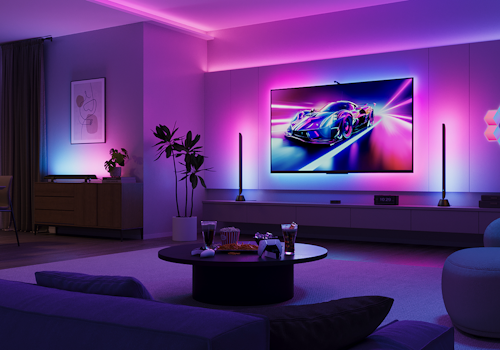
Official app for the Govee WIFI enabled devices. This app supports the main light functions and appliance operations as they are available in the Govee Cloud API or through local API discovery (Pro only).
Getting started
Cloud devices
For cloud features you need to use the Govee mobile app to request the API key for you account. After installing the Homey Govee app you can set the API key in the app settings (or during first device pairing). Now you can add the Govee devices.
Local devices (Pro only)
Local API devices can be added using the special device type. These work fully local without any cloud. These functions are limited, for example scene support will not work. However you can enable a hybrid mode by selecting the cloud enhancement features. This does require the API key as described in the cloud devices section.
Supported devices
Currently the app supports the:
All cloud API enabled devices/appliances
All local API enabled devices
You can cloud boost your local API devices (allowing for cloud only operations)
You can set basic power/light operations, select light scenes (cloud only), select DIY scenes (cloud only), activate a snapshot (cloud only), enable music mode (cloud only).
Cliquez sur un appareil ci-dessus pour afficher uniquement les cartes Flow associées.
Quand...
[Beta] BLE Light Strip (H617A/H617E)
Activé
[Beta] BLE Light Strip (H617A/H617E)
Désactivé
[Beta] BLE Light Strip (H617A/H617E)
Intensité lumineuse modifiée
[Beta] BLE Temp Sensor
La température a changé
[Beta] BLE Temp Sensor
L'humidité a changé
[Beta] BLE Temp Sensor
Le niveau de la batterie a changé
Air purifier
Est déconnectée
Air purifier
Est connectée
Air purifier
Activé
Air purifier
Désactivé
Aroma diffuser
Est déconnectée
Aroma diffuser
Est connectée
Aroma diffuser
Activé
Aroma diffuser
Désactivé
Aroma diffuser
Le réservoir est vide
Aroma diffuser
Le réservoir n'est plus vide
Aroma diffuser
The aroma diffuser is lacking water
i
When the aroma diffuser generates the lacking water event
Box
Est déconnectée
Box
Est connectée
Box
Activé
Box
Désactivé
Dehumidifier
Est déconnectée
Dehumidifier
Est connectée
Dehumidifier
Activé
Dehumidifier
Désactivé
Fan
Est déconnectée
Fan
Est connectée
Fan
Activé
Fan
Désactivé
Fan
Oscillation activée
Fan
Oscillation désactivée
Heater
Est déconnectée
Heater
Est connectée
Heater
Activé
Heater
Désactivé
Heater
Oscillation activée
Heater
Oscillation désactivée
Humidifier
Est déconnectée
Humidifier
Est connectée
Humidifier
Activé
Humidifier
Désactivé
Humidifier
L'humidité cible a changé
Humidifier
Le réservoir est vide
Humidifier
Le réservoir n'est plus vide
Humidifier
The humidifier is lacking water
i
When the humidifier generates the lacking water event
Ice maker
Est déconnectée
Ice maker
Est connectée
Ice maker
Activé
Ice maker
Désactivé
Ice maker
The ice maker is lacking water
i
When the ice maker generates the lacking water event
Kettle
Est déconnectée
Kettle
Est connectée
Kettle
Activé
Kettle
Désactivé
Kettle
La température a changé
Kettle
La température cible a été modifiée
Light
Est déconnectée
Light
Est connectée
Light
Activé
Light
Désactivé
Light
Intensité lumineuse modifiée
Local API devices
Est déconnectée
Local API devices
Est connectée
Local API devices
Activé
Local API devices
Désactivé
Local API devices
Intensité lumineuse modifiée
Matter devices
Intensité lumineuse modifiée
Matter devices
Activé
Matter devices
Désactivé
Sensor
Est déconnectée
Sensor
Est connectée
Sensor
L'alarme de présence s'est activée
Sensor
L'alarme de présence s'est désactivée
Sensor
The presence state changed
i
When the presence state changes, for example presence is newly detected or no longer detected
Socket
Est déconnectée
Socket
Est connectée
Socket
Activé
Socket
Désactivé
Thermometer
Est déconnectée
Thermometer
Est connectée
Thermometer
La température a changé
Thermometer
L'humidité a changé
Timer
Est déconnectée
Timer
Est connectée
Timer
Activé
Timer
Désactivé
Et...
[Beta] BLE Light Strip (H617A/H617E)
Est activé
Air purifier
Est connectée
Air purifier
Est activé
Air purifier
The nightlight scene Nightlight scene Is active
i
Current active nightlight scene
Aroma diffuser
Est connectée
Aroma diffuser
Est activé
Aroma diffuser
Le réservoir est rempli
Aroma diffuser
The nightlight scene Nightlight scene Is active
i
Current active nightlight scene
Box
Est connectée
Box
Est activé
Dehumidifier
Est connectée
Dehumidifier
Est activé
Dehumidifier
The nightlight scene Nightlight scene Is active
i
Current active nightlight scene
Fan
Est connectée
Fan
Est activé
Fan
L'oscillation est activée
Heater
Est connectée
Heater
Est activé
Heater
L'oscillation est activée
Heater
The nightlight scene Nightlight scene Is active
i
Current active nightlight scene
Humidifier
Est connectée
Humidifier
Est activé
Humidifier
Le réservoir est rempli
Humidifier
The nightlight scene Nightlight scene Is active
i
Current active nightlight scene
Ice maker
Est connectée
Ice maker
Est activé
Kettle
Est connectée
Kettle
Est activé
Light
Est connectée
Light
Est activé
Light
The DIY scene DIY scene Is active
i
Current active DIY scene
Light
The light scene Light scene Is active
i
Current active light scene
Light
The nightlight scene Nightlight scene Is active
i
Current active nightlight scene
Local API devices
Est connectée
Local API devices
Est activé
Local API devices
The DIY scene DIY scene Is active
i
Current active DIY scene
Local API devices
The light scene Light scene Is active
i
Current active light scene
Local API devices
The nightlight scene Nightlight scene Is active
i
Current active nightlight scene
Matter devices
Est activé
Sensor
Est connectée
Sensor
L'alarme de présence est activée
Socket
Est connectée
Socket
Est activé
Socket
The nightlight scene Nightlight scene Is active
i
Current active nightlight scene
Thermometer
Est connectée
Timer
Est connectée
Timer
Est activé
Alors...
[Beta] BLE Light Strip (H617A/H617E)
Activer
[Beta] BLE Light Strip (H617A/H617E)
Désactiver
[Beta] BLE Light Strip (H617A/H617E)
Alterner activé ou désactivé
[Beta] BLE Light Strip (H617A/H617E)
Mettre l'intensité lumineuse sur %
[Beta] BLE Light Strip (H617A/H617E)
Définir l'intensité lumineuse sur relative %
i
Diminuez ou augmentez la luminosité par rapport au niveau actuel de l'appareil.
[Beta] BLE Light Strip (H617A/H617E)
Définir la teinte °
i
Sélectionnez une couleur dans l'échelle des teintes, par exemple rouge (0°/360°), jaune (60°) ou bleu (180°).
[Beta] BLE Light Strip (H617A/H617E)
Définir la couleur ...
[Beta] BLE Light Strip (H617A/H617E)
Définir une couleur aléatoire
[Beta] BLE Light Strip (H617A/H617E)
Définir la saturation %
Air purifier
Activer
Air purifier
Désactiver
Air purifier
Alterner activé ou désactivé
Air purifier
Set the work mode to Work mode with option Option
i
Sets the work mode of the air purifier
Air purifier
Activate the nightlight Activate
i
Activates or deactivates the nightlight
Air purifier
Switch to light scene Scene
i
Switches to the selected light scene (and turns on the light if off)
Air purifier
Switch to random light scene
i
Switches to a random light scene (and turns on the light if off)
Aroma diffuser
Activer
Aroma diffuser
Désactiver
Aroma diffuser
Alterner activé ou désactivé
Aroma diffuser
Set the work mode to Work mode with option Option
i
Sets the work mode of the aroma diffuser
Aroma diffuser
Activate the nightlight Activate
i
Activates or deactivates the nightlight
Aroma diffuser
Switch to light scene Scene
i
Switches to the selected light scene (and turns on the light if off)
Aroma diffuser
Switch to random light scene
i
Switches to a random light scene (and turns on the light if off)
Box
Activer
Box
Désactiver
Box
Alterner activé ou désactivé
Dehumidifier
Activer
Dehumidifier
Désactiver
Dehumidifier
Alterner activé ou désactivé
Dehumidifier
Set the work mode to Work mode with option Option
i
Sets the work mode of the dehumidifier
Dehumidifier
Activate the nightlight Activate
i
Activates or deactivates the nightlight
Dehumidifier
Switch to light scene Scene
i
Switches to the selected light scene (and turns on the light if off)
Dehumidifier
Switch to random light scene
i
Switches to a random light scene (and turns on the light if off)
Fan
Activer
Fan
Désactiver
Fan
Alterner activé ou désactivé
Fan
Activer l'oscillation
Fan
Désactiver l'oscillation
Fan
Activer ou désactiver l'oscillation
Fan
Set the work mode to Work mode with option Option
i
Sets the work mode of the fan
Govee
Action Dreamview scene Scene
i
Activate or deactivate a Dreamview scene using the cloud API
Govee
Action device group Group
i
Activate or deactivate a Govee device group using the cloud API
Govee
Action same-model group Group
i
Activate or deactivate a Govee same-model group using the cloud API
Heater
Activer
Heater
Désactiver
Heater
Alterner activé ou désactivé
Heater
Activer l'oscillation
Heater
Désactiver l'oscillation
Heater
Activer ou désactiver l'oscillation
Heater
Set the work mode to Work mode with option Option
i
Sets the work mode of the heater
Heater
Activate the nightlight Activate
i
Activates or deactivates the nightlight
Heater
Switch to light scene Scene
i
Switches to the selected light scene (and turns on the light if off)
Heater
Switch to random light scene
i
Switches to a random light scene (and turns on the light if off)
Humidifier
Activer
Humidifier
Désactiver
Humidifier
Alterner activé ou désactivé
Humidifier
Définir l'humidité %
Humidifier
Set the work mode to Work mode with option Option
i
Sets the work mode of the humidifier
Humidifier
Activate the nightlight Activate
i
Activates or deactivates the nightlight
Humidifier
Switch to light scene Scene
i
Switches to the selected light scene (and turns on the light if off)
Humidifier
Switch to random light scene
i
Switches to a random light scene (and turns on the light if off)
Ice maker
Activer
Ice maker
Désactiver
Ice maker
Alterner activé ou désactivé
Ice maker
Set the work mode to Work mode with option Option
i
Sets the work mode of the ice maker
Kettle
Activer
Kettle
Désactiver
Kettle
Alterner activé ou désactivé
Kettle
Définir la température °C
Kettle
Set the work mode to Work mode with option Option
i
Sets the work mode of the kettle
Light
Activer
Light
Désactiver
Light
Alterner activé ou désactivé
Light
Mettre l'intensité lumineuse sur %
Light
Définir l'intensité lumineuse sur relative %
i
Diminuez ou augmentez la luminosité par rapport au niveau actuel de l'appareil.
Light
Définir la saturation %
Light
Définir la teinte °
i
Sélectionnez une couleur dans l'échelle des teintes, par exemple rouge (0°/360°), jaune (60°) ou bleu (180°).
Light
Définir la couleur ...
Light
Définir une couleur aléatoire
Light
Définir une température %
i
Ajuste la température de la lumière. Une valeur plus élévée signifie une couleur plus chaude.
Light
Activate the dreamview mode Activate
i
Activates or deactivates the dream view mode that is supported by the light (music or video)
Light
Activate music mode Music mode with sensitivity Sensitivity
i
Activates the music mode in the specified mode and sensitivity
Light
Activate snapshot Snapshot
i
Activates a previously created snapshot for your light configuration
Light
Set Segment or segments Segment list to brightness Segment brightness
i
Use the dropdown to set a specific segment to one color, or use the Segment List input to list one or multiple segments to set to a specific brightness
Light
Set Segment or segments Segment list to color Segment color
i
Use the dropdown to set a specific segment to one color, or use the Segment List input to list one or multiple segments to set to a specific color.
Light
Switch to DIY scene DIY Scene
i
Switches to the selected DIY scene (and turns on the light if off)
Light
Switch to random diy scene
i
Switches to a random diy scene (and turns on the light if off)
Light
Switch to light scene Scene
i
Switches to the selected light scene (and turns on the light if off)
Light
Switch to random light scene
i
Switches to a random light scene (and turns on the light if off)
Local API devices
Activer
Local API devices
Désactiver
Local API devices
Alterner activé ou désactivé
Local API devices
Mettre l'intensité lumineuse sur %
Local API devices
Définir l'intensité lumineuse sur relative %
i
Diminuez ou augmentez la luminosité par rapport au niveau actuel de l'appareil.
Local API devices
Définir la saturation %
Local API devices
Définir la teinte °
i
Sélectionnez une couleur dans l'échelle des teintes, par exemple rouge (0°/360°), jaune (60°) ou bleu (180°).
Local API devices
Définir la couleur ...
Local API devices
Définir une couleur aléatoire
Local API devices
Définir une température %
i
Ajuste la température de la lumière. Une valeur plus élévée signifie une couleur plus chaude.
Local API devices
Activate the dreamview mode Activate
i
Activates or deactivates the dream view mode that is supported by the light (music or video)
Local API devices
Activate music mode Music mode with sensitivity Sensitivity
i
Activates the music mode in the specified mode and sensitivity
Local API devices
Activate snapshot Snapshot
i
Activates a previously created snapshot for your light configuration
Local API devices
Set Segment or segments Segment list to brightness Segment brightness
i
Sets the segment to a specific brightness
Local API devices
Set Segment or segments Segment list to color Segment color
i
Use the dropdown to set a specific segment to one color, or use the Segment List input to list one or multiple segments to set to a specific brightness.
Local API devices
Switch to DIY scene DIY Scene
i
Switches to the selected DIY scene (and turns on the light if off)
Local API devices
Switch to random diy scene
i
Switches to a random diy scene (and turns on the light if off)
Local API devices
Switch to light scene Scene
i
Switches to the selected light scene (and turns on the light if off)
Local API devices
Switch to random light scene
i
Switches to a random light scene (and turns on the light if off)
Matter devices
Définir la saturation %
Matter devices
Définir une température %
i
Ajuste la température de la lumière. Une valeur plus élévée signifie une couleur plus chaude.
Matter devices
Mettre l'intensité lumineuse sur %
Matter devices
Définir l'intensité lumineuse sur relative %
i
Diminuez ou augmentez la luminosité par rapport au niveau actuel de l'appareil.
Matter devices
Définir la teinte °
i
Sélectionnez une couleur dans l'échelle des teintes, par exemple rouge (0°/360°), jaune (60°) ou bleu (180°).
Matter devices
Définir la couleur ...
Matter devices
Définir une couleur aléatoire
Matter devices
Activer
Matter devices
Désactiver
Matter devices
Alterner activé ou désactivé
Socket
Activer
Socket
Désactiver
Socket
Alterner activé ou désactivé
Socket
Activate the nightlight Activate
i
Activates or deactivates the nightlight
Socket
Switch to light scene Scene
i
Switches to the selected light scene (and turns on the light if off)
Socket
Switch to random light scene
i
Switches to a random light scene (and turns on the light if off)
Timer
Activer
Timer
Désactiver
Timer
Alterner activé ou désactivé
Widgets
Vous pouvez ajouter les widgets de cette application à votre tableau de bord ou à votre écran d’accueil dans l’application mobile.
Dreamview Scenes
Govee Groups
Assistance
Vous avez un problème avec cette appli ?
Contacter le développeur en envoyant un e-mail.
Nouveautés
Version 2.21.1 — Fixed smart plugs with a nightlight failing to set up; they now also get flow cards for nightlight scenes.








 Govee n’est pas compatible avec le Homey sélectionné.
 Govee va s’installer sur Homey dans un instant.
 Belgium
 Bulgaria
 Croatia
 Cyprus
 Czech Republic
 Estonia
 Finland
 Greece
 Hungary
 Iceland
 Ireland
 Latvia
 Lithuania
 Malta
 Moldova
 The Netherlands
 Portugal
 Romania
 Slovakia
 Slovenia
 Türkiye
 Ukraine
 United Kingdom


