Avertissement ! Cette appli peut ne pas fonctionner correctement.
Cette appli est en cours de test, et n’a jamais été revue. Il se peut qu’elle ne fonctionne pas comme attendu. Prenez des précautions supplémentaires en installant cette appli.
Setup:
After app installation, you can insert an "Account" device and sign in with your Blink account credentials.
The cameras and systems/SyncModules assigned to the account can then be added to Homey.
Supported Blink Devices:
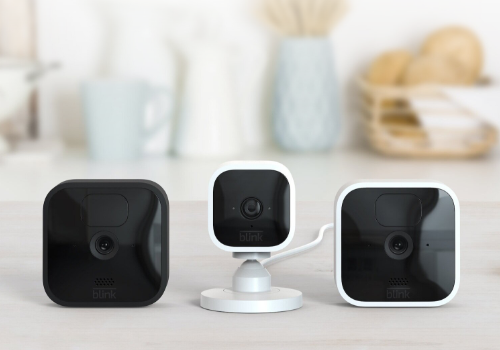
- Blink indoor/outdoor ("square") camera
- Blink mini camera
- Blink System/Sync Module
Camera Features:
- Response to motion detection (flow event)
- Switch motion detection on/off by switching the Homey device on/off
- Take snapshot (triggers the event "Snapshot was created" after recording)
- Response to new snapshot (flow event)
- Record video (flow action)
- Temperature, WiFi/SyncModule reception signal strength, status (online/offline)
System/SyncModule Features:
- Enable/disable alarm status by turning on/off Homey device
- SyncModul memory usage, WiFi signal strength
Account Properties:
- API status, cloud storage usage
Cliquez sur un appareil ci-dessus pour afficher uniquement les cartes Flow associées.
Quand...
Account
A camera is offline.
i
Triggers when a camera is offline. The camara name is provided by a token.
Account
A motion was detected.
i
Triggers when a motion was detected by a camera. The camara name is provided by a token.
Account
An API error occurs.
Account
The API access is flawless.
Account
Doorbell button was pressed.
i
Triggers when a doorbell button was pressed. The camara name is provided by a token.
Account
A liveview was recorded.
i
Triggers when a liveview was recorded by a camera. The camara name is provided by a token.
Account
The cloud video usage has changed.
Camera
Activé
Camera
Désactivé
Camera
L'alarme mouvement s'est activée
Camera
L'alarme mouvement s'est désactivée
Camera
La température a changé
Camera
Le niveau de la batterie a changé
Camera
L'alarme batterie s'est activée
Camera
L'alarme batterie s'est désactivée
Camera
The camera is online.
Camera
The camera is offline.
Camera
A motion was detected.
i
Triggers when a motion was detected by a camera. The camara name is provided by a token.
Camera
A liveview was recorded.
i
Triggers when a liveview was recorded by a camera. The camara name is provided by a token.
Camera
A camera snapshot was created.
i
Triggers when a camera snapshot was created.
Doorbell
Activé
Doorbell
Désactivé
Doorbell
L'alarme mouvement s'est activée
Doorbell
L'alarme mouvement s'est désactivée
Doorbell
Le niveau de la batterie a changé
Doorbell
L'alarme batterie s'est activée
Doorbell
L'alarme batterie s'est désactivée
Doorbell
The camera is online.
Doorbell
The camera is offline.
Doorbell
A motion was detected.
i
Triggers when a motion was detected by a camera. The camara name is provided by a token.
Doorbell
Doorbell button was pressed.
i
Triggers when a doorbell button was pressed. The camara name is provided by a token.
Doorbell
A liveview was recorded.
i
Triggers when a liveview was recorded by a camera. The camara name is provided by a token.
Doorbell
A camera snapshot was created.
i
Triggers when a camera snapshot was created.
Mini camera
Activé
Mini camera
Désactivé
Mini camera
L'alarme mouvement s'est activée
Mini camera
L'alarme mouvement s'est désactivée
Mini camera
The camera is online.
Mini camera
The camera is offline.
Mini camera
A motion was detected.
i
Triggers when a motion was detected by a camera. The camara name is provided by a token.
Mini camera
A liveview was recorded.
i
Triggers when a liveview was recorded by a camera. The camara name is provided by a token.
Mini camera
A camera snapshot was created.
i
Triggers when a camera snapshot was created.
System
Activé
System
Désactivé
System
The SyncModule storage is free again.
System
The SyncModule storage is full.
System
The SyncModule video usage has changed.
Et...
Account
API error is present
i
This Flow will continue if API error is/isn't currently present.
Account
Cloud video usage is higher than ...
i
Cloud video usage (%)
Camera
Est activé
Camera
L'alarme mouvement est en marche
Camera
L'alarme batterie est en marche
Camera
Camera is offline
i
This Flow will continue if the camera is currently offline/online.
Doorbell
Est activé
Doorbell
L'alarme mouvement est en marche
Doorbell
L'alarme batterie est en marche
Doorbell
Camera is offline
i
This Flow will continue if the camera is currently offline/online.
Mini camera
Est activé
Mini camera
L'alarme mouvement est en marche
Mini camera
Camera is offline
i
This Flow will continue if the camera is currently offline/online.
System
Est activé
System
Local storage of the SyncModule is full
i
This Flow will continue if the local storage of the SyncModule is/isn't full.
System
SyncModule video usage is higher than ...
i
SyncModule video usage (%)
Alors...
Account
Export a camera video with Video ID Video ID from motion alert of the camera Camera name to FTP server FTP server using port FTP port and FTP security FTP security to path FTP path (optional) with user User and password Password.
i
Use this action to export a camera video to an SMB share. Use the motion alert card's video ID tag.
Account
Export a camera video with Video ID Video ID from motion alert of the camera Camera name to the SMB share SMB share with user User and password Password.
i
Use this action to export a camera video to an SMB share. Use the motion alert card's video ID tag.
Blink for Home
Export a camera snapshot ... of the camera Camera name to FTP server FTP server using port FTP port and FTP security FTP security to path FTP path (optional) with user User and password Password.
i
Use this action to export an image token from a snapshot to a FTP server.
Blink for Home
Export a camera snapshot ... of the camera Camera name to the SMB share SMB share with user User and password Password.
i
Use this action to export an image token from a snapshot to a SMB share.
Camera
Activer
Camera
Désactiver
Camera
Alterner activé ou désactivé
Camera
Requests a new camera snapshot.
i
Use this action to request a new camera snapshot. After retrieving the new image, a second flow is triggered where you can use the image as flow token.
Advanced
Camera
Requests a new camera snapshot.
i
Use this action to request a new camera snapshot. After retrieving the new image, a second flow is triggered where you can use the image as flow token.
Camera
Starts recording a new camera video.
i
Use this action to request the recording of a new camera video.
Camera
Export a camera video with Video ID Video ID from motion alert of the camera Camera name to FTP server FTP server using port FTP port and FTP security FTP security to path FTP path (optional) with user User and password Password.
i
Use this action to export a camera video to an SMB share. Use the motion alert card's video ID tag.
Camera
Export a camera video with Video ID Video ID from motion alert of the camera Camera name to the SMB share SMB share with user User and password Password.
i
Use this action to export a camera video to an SMB share. Use the motion alert card's video ID tag.
Camera
Turn camera floodlight on/off
i
When turned on, the floodlight is turned off after 60 sec automatically.
Doorbell
Activer
Doorbell
Désactiver
Doorbell
Alterner activé ou désactivé
Doorbell
Requests a new camera snapshot.
i
Use this action to request a new camera snapshot. After retrieving the new image, a second flow is triggered where you can use the image as flow token.
Advanced
Doorbell
Requests a new camera snapshot.
i
Use this action to request a new camera snapshot. After retrieving the new image, a second flow is triggered where you can use the image as flow token.
Doorbell
Starts recording a new camera video.
i
Use this action to request the recording of a new camera video.
Doorbell
Export a camera video with Video ID Video ID from motion alert of the camera Camera name to FTP server FTP server using port FTP port and FTP security FTP security to path FTP path (optional) with user User and password Password.
i
Use this action to export a camera video to an SMB share. Use the motion alert card's video ID tag.
Doorbell
Export a camera video with Video ID Video ID from motion alert of the camera Camera name to the SMB share SMB share with user User and password Password.
i
Use this action to export a camera video to an SMB share. Use the motion alert card's video ID tag.
Mini camera
Activer
Mini camera
Désactiver
Mini camera
Alterner activé ou désactivé
Mini camera
Requests a new camera snapshot.
i
Use this action to request a new camera snapshot. After retrieving the new image, a second flow is triggered where you can use the image as flow token.
Advanced
Mini camera
Requests a new camera snapshot.
i
Use this action to request a new camera snapshot. After retrieving the new image, a second flow is triggered where you can use the image as flow token.
Mini camera
Starts recording a new camera video.
i
Use this action to request the recording of a new camera video.
Mini camera
Export a camera video with Video ID Video ID from motion alert of the camera Camera name to FTP server FTP server using port FTP port and FTP security FTP security to path FTP path (optional) with user User and password Password.
i
Use this action to export a camera video to an SMB share. Use the motion alert card's video ID tag.
Mini camera
Export a camera video with Video ID Video ID from motion alert of the camera Camera name to the SMB share SMB share with user User and password Password.
i
Use this action to export a camera video to an SMB share. Use the motion alert card's video ID tag.
System
Activer
System
Désactiver
System
Alterner activé ou désactivé
Assistance
Vous avez un problème avec cette appli ?
Contacter le développeur via le Forum Communauté Homey.
Nouveautés
Version 2.1.10 — Skip SyncModules without active storage on video check.







 Blink for Home n’est pas compatible avec le Homey sélectionné.
 Blink for Home va s’installer sur Homey dans un instant.
 Belgium
 Bulgaria
 Croatia
 Cyprus
 Czech Republic
 Estonia
 Finland
 Greece
 Hungary
 Iceland
 Ireland
 Latvia
 Lithuania
 Malta
 Moldova
 The Netherlands
 Portugal
 Romania
 Slovakia
 Slovenia
 Türkiye
 Ukraine
 United Kingdom


