








Choosing a Smart Home Protocol with Homey
When you first dive into smart home technology, it can feel like an alphabet soup: Z-Wave, Zigbee, Thread, Matter, Wi-Fi, all promising a smarter home, all slightly different. The good news is you don’t need to “pick a winner” with Homey, it supports all of them.
Each protocol has its strengths. Z-Wave brings predictability. Zigbee brings speed and broad device choice, while Matter and Thread focus on ecosystem flexibility. Wi-Fi is great for high-bandwidth devices. With a controller like Homey Pro, they don’t compete – they work side by side in one clear system.
In this article, we’ll compare these communication technologies in practical, everyday terms so you can make confident choices for your own home.
Z-Wave: Predictable and Calm
Z-Wave is built for one thing: reliable, low-energy control. It runs on sub-GHz radio, which helps signals travel through walls and floors. Messages are small and acknowledged, making it ideal for things that need to “just work” every day, like door sensors, switches, smart plugs, thermostats and locks.
Because Z-Wave devices form a mesh network, each mains-powered node strengthens the whole system. Battery devices sleep most of the time, which is why Z-Wave motion or climate sensors can last for years. In a Homey setup, Z-Wave is often the backbone for comfort and security automations where stability matters more than raw speed.
Zigbee: Fast, Lightweight and Widely Available
Zigbee also uses a mesh network topology, but relies on the 2.4 GHz band. That’s the same area where Wi-Fi and Bluetooth live, which can be a bit busier. Zigbee is designed to handle lots of small messages quickly and is especially popular in lighting, sensors, switches and buttons.
In practice, Zigbee is great for setups where you want many small, affordable devices that react quickly, like a whole house full of smart bulbs and switch modules. With Homey, you can comfortably combine Zigbee lights with Z-Wave sensors in the same automation Flows, letting each protocol do what it’s best at.
Thread: Modern, Efficient and Future-Ready
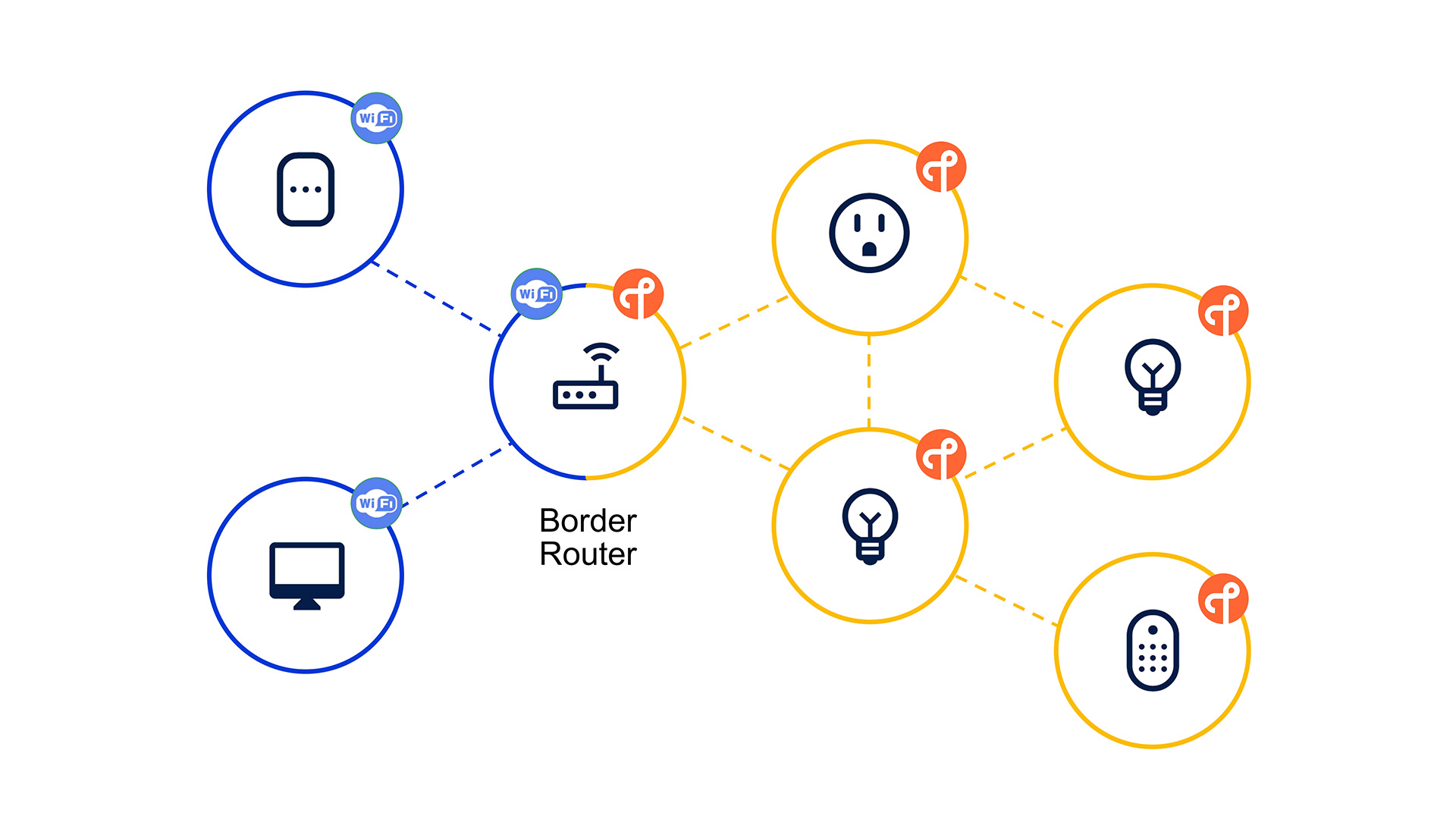
Thread is the newest mesh protocol designed specifically to eliminate the lag and reliability issues of older systems. It creates a robust self-healing network that does not rely on a central hub or "master" device to keep everything running. Because it is based on IP (Internet Protocol), your smart devices can talk to each other and the cloud more directly and securely.
This protocol excels at speed and extreme energy efficiency for battery-powered hardware. Unlike Zigbee or Z-Wave, Thread devices can seamlessly transition roles to ensure the mesh stays strong if one node goes offline. With Homey Pro as a Thread Border Router, adding Thread devices means your home is using the latest Matter standard, providing a fast and highly responsive backbone for your most critical automations.
Matter: Ecosystem Flexibility and Integration
Matter is not a radio protocol by itself, but a standard that runs over existing technologies like Wi-Fi and Thread. Its goal is simple: make smart home devices work together across brands and platforms, so you’re less locked into a single ecosystem.
Matter focuses on common language and secure, local communication. A Matter-certified plug, for example, can in principle be controlled by multiple apps and platforms. Homey can act as the central brain that speaks Matter alongside Z-Wave, Zigbee and Wi-Fi, so you’re free to mix newer Matter devices with the gear you already own.
Instead of replacing Z-Wave or Zigbee, Matter often complements them. Many homes will continue to run a mixed network where existing Z-Wave and Zigbee devices handle proven tasks, while new Matter devices add flexibility over time.
Wi-Fi: High Bandwidth, Higher Power Use
Wi-Fi is the network you already use for laptops, phones and streaming devices. In the smart home, it’s ideal for products that need more bandwidth, like cameras, speakers and video doorbells.
The main trade-off is energy usage. Wi-Fi modules draw more power, so battery-powered Wi-Fi sensors are rare or need frequent charging. Wi-Fi is also more sensitive to congestion if everything in your home uses it, which is why many smart homes prefer to offload simple control tasks to Z-Wave, Zigbee or Matter-over-Thread.
Homey talks directly to Wi-Fi devices via apps, so your connected speakers, cameras or plugs can join the same Flows as your Z-Wave motion sensors or Zigbee ceiling lights.
How Homey Brings Everything Together
From a user’s perspective, the protocol shouldn’t be the main story. What matters is that your hallway light turns on when you walk by, your heating follows your schedule, and your energy use stays under control.
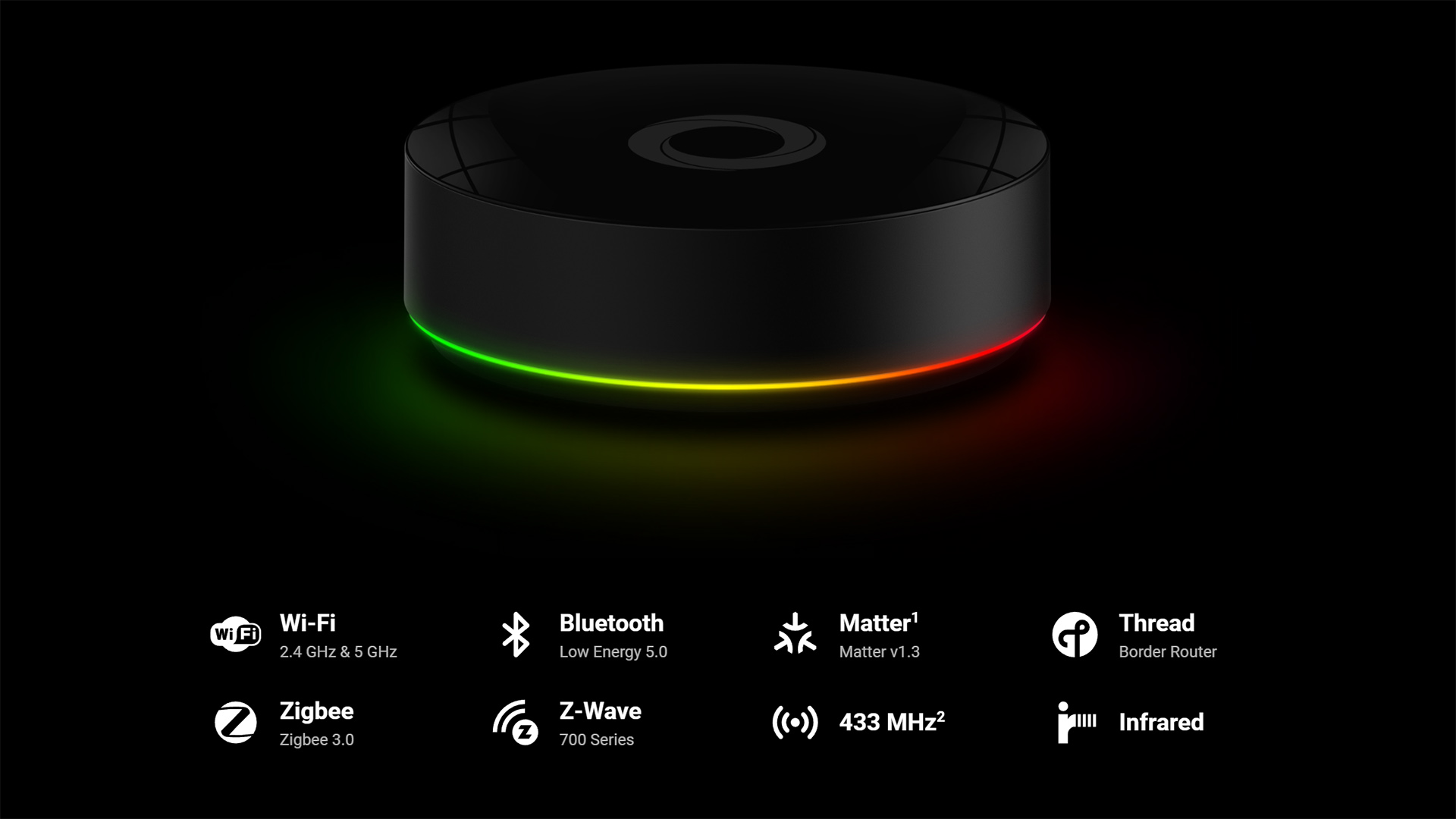
This is where Homey comes in. Homey Pro speaks Z-Wave, Zigbee, Matter (Thread), Infrared, Bluetooth, 433 MHz and Wi-Fi and presents them in a single clear interface. In practice, you might have:
- A Z-Wave motion sensor in the hallway
- A Zigbee ceiling light in the kitchen
- A Matter-enabled thermostat for you dining area
- A Wi-Fi speaker in the living room
In Homey, these devices simply appear side by side. You can create a single automation that uses the Z-Wave sensor to trigger the Zigbee light, adjust the Matter thermostat and start a playlist on the Wi-Fi speaker. The technical differences stay under the surface.
Which Protocol Should You Choose?
You don’t have to pick or standardize on just one. A sensible, practical approach looks like this:
- Use Z-Wave where you want long-lasting sensors and robust, predictable control, for example for security, climate and core switching.
- Use Zigbee where you want lots of responsive, affordable devices, especially smart lighting and buttons.
- Use Matter and Thread to keep your setup flexible and compatible with future ecosystems.
- Use Wi-Fi for devices that naturally live on the network already, such as speakers, cameras and doorbells.
Because Homey connects them all, you can pick devices based on quality, form factor and use case rather than worrying too much about the underlying protocol.
Conclusion: Complementary Protocols, One Unified Home
Z-Wave, Zigbee, Thread, Matter and Wi-Fi each have a clear role in a modern smart home. There is no single winner – there is a toolbox. Z-Wave brings calm reliability, Zigbee brings speed and variety, Matter brings ecosystem flexibility via Thread or Ethernet, and Wi-Fi connects higher-bandwidth wireless devices.
Homey ties these strengths together. Instead of forcing you to choose one path, it lets you build on what you already have, add what you really want next, and keep everything manageable in one place. Check out Homey Pro as the world's most advanced smart home hub.
FAQ
Do I need to pick only one protocol for my smart home?
No, you can mix protocols. With a controller like Homey Pro, Z-Wave, Zigbee, Matter and Wi-Fi devices can all work together in the same Flows.
Is Matter going to replace Z-Wave and Zigbee?
Matter is designed to improve compatibility, not instantly replace everything. Many existing Z-Wave and Zigbee devices will keep doing their job for years alongside newer Matter products.
Which protocol is best for sensors and switches?
Z-Wave and Zigbee are both very strong choices for sensors and switches. Z-Wave leans towards predictability and long battery life; Zigbee offers fast, lightweight communication and a lot of device choice.
When should I use Wi-Fi smart devices?
Wi-Fi devices make sense for high-bandwidth products like cameras and speakers, or when a product you like only comes in a Wi-Fi version. Just remember they typically use more power.
Is Z-Wave more reliable than Zigbee?
Both can be very reliable when installed correctly. Z-Wave benefits from the quieter sub-GHz band, while Zigbee benefits from fast, lightweight communication. Good mesh design matters more than the protocol alone.
Does Matter need its own hub?
Matter devices need at least one Matter controller in the home. A device like Homey Pro can fill this role while also managing Z-Wave, Zigbee and Wi-Fi devices.
Can I control all these protocols from one app?
Yes, that’s exactly what Homey is built for. You add devices from different brands and protocols, then control them in one app and one automation system.
Will mixing protocols make my home more complicated?
Not necessarily. Physically, you have different radios, but with Homey you manage everything in one place, so day-to-day use stays simple.
Which protocol has the best range?
Z-Wave often has strong range because of its sub-GHz band and mesh routing. Zigbee and Thread (used by Matter) also gain range through their mesh, while Wi-Fi range depends heavily on your router and network setup.
How do I decide which protocol to start with?
Think about what you want to automate first: comfort, security, energy or entertainment. Choose solid devices for those tasks, then let Homey connect everything, regardless of whether they use Z-Wave, Zigbee, Matter or Wi-Fi.
Glossary
Z-Wave
Z-Wave is a sub-GHz wireless protocol designed for predictable, low-energy control of smart home devices. It uses a mesh network and acknowledged messages to keep automations stable and responsive. Z-Wave is especially strong for long-lasting sensors, switches and locks.
Zigbee
Zigbee is a low-power mesh protocol that typically runs at 2.4 GHz. It’s optimised for many small devices sending frequent, lightweight messages, which is why it’s popular in smart lighting and sensors. Its wide adoption means you’ll find Zigbee devices in many form factors and price ranges.
Matter
Matter is a smart home standard that focuses on interoperability between brands and platforms. It runs over existing transports like Wi-Fi and Thread and defines a common language for devices to talk to each other. The goal is that certified devices are easier to set up and work with more ecosystems, including Homey.
Wi-Fi
Wi-Fi is the general-purpose wireless network most homes already use for internet access. In smart homes, it’s well-suited to devices that need more bandwidth, such as cameras and speakers. Wi-Fi devices often consume more power, so they are usually mains-powered rather than battery-driven.
Mesh Network
A mesh network is a structure where devices can pass messages for each other, not just talk directly to a hub. Z-Wave and Zigbee both use this model to extend range and improve reliability. When you add more mains-powered nodes, you make the mesh stronger rather than more congested.
Thread
Thread is a low-power mesh networking technology that Matter often uses as its underlying transport. It runs on 2.4 GHz and is designed for reliability and low energy use in connected home devices. You don’t usually control Thread directly; you experience it through Matter and compatible controllers.
Bridge / Hub / Controller
A bridge, hub or controller is the device that manages your smart home network. It understands the protocol, keeps track of devices and runs your automations. Homey Pro is a controller that speaks multiple protocols at once, so you don’t need a separate hub for every ecosystem.
Local Control
Local control means commands and automations run inside your home, without needing a remote cloud server. Z-Wave, Zigbee and Matter are all designed with local control in mind, and Homey Pro executes Flows locally. This improves responsiveness and keeps your home running even during internet outages.
Cloud Integration
Cloud integration connects devices and controllers to online services for remote access, voice assistants or advanced features. It’s useful, but not something you want to depend on for basic lighting or heating. A balanced setup uses local control for core tasks and cloud features where they truly add value.
Homey Pro
Homey Pro is a multi-protocol smart home controller that supports Z-Wave, Zigbee, Matter, Wi-Fi and more. It gives you one app and one automation system (Flows and Advanced Flows) for devices across brands and technologies. This lets you design your smart home around comfort and reliability, not protocol limitations.


