








Homey
Self-Hosted Server
The world’s most advanced smart home platform.
Now runs on your hardware.
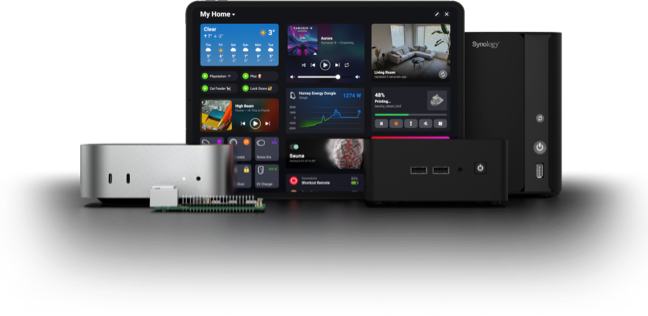
Host your own Homey.
Homey Self-Hosted Server is based on Homey Pro’s operating system, but hosted on your own hardware. Extend with Homey Bridge to connect your Bluetooth, Zigbee, Z-Wave, 433 MHz, and Infrared devices.
Matter
Connect your Matter devices directly on your local network.
LAN
Connect your devices through their local API.
Cloud
Connect your devices and services through their cloud APIs.
Zigbee
Connect your Zigbee devices.
With Homey Bridge
Z-Wave
Connect your Z-Wave devices.
With Homey Bridge
Infrared
Connect your Infrared devices.
With Homey Bridge
433 MHz
Connect your 433 MHz devices.
With Homey Bridge
Bluetooth
Connect your Bluetooth devices.
With Homey Bridge

An experience you’ll love.
Bring all Homey features to your own hardware. Connect devices from over 1,000 brands, automate with Flow and Advanced Flow, create custom Homey Dashboards, and track energy usage with Homey Energy.
Cloud services like remote access, the Homey App Store,
and voice assistant integration are also included.
Get more out of your
Homey Self-Hosted Server.
Expand your setup with add-ons designed for Homey,
fully compatible with your Self-Hosted Server.


Start now, decide later.
Homey Self-Hosted Server is free for the first month.
If you’re convinced, subscribe monthly or get a lifetime license.
1
Install on your system.
Follow the easy setup guide.
It just takes a few minutes.
2
Try it free for 30 days.
Explore all features.
No credit card needed.
3
Choose your plan.
Subscribe for 59 kr/mo.
Or get a lifetime license for 1699 kr.
Rather just plug-and-play?
Discover Homey Pro and Homey Pro mini. With built-in antennas and software ready to go, your smart home just works — right out of the box.


Compare to Homey Pro.
See what you can do with Homey Self-Hosted Server and
how it stacks up to the plug-and-play Homey Pro.
Homey
|
Homey
|
Homey
|
|
|---|---|---|---|
|
59 kr/mo or 1699 kr |
2999 kr |
4999 kr |
|
| Mobile App | |||
| Web App | |||
| Automate | |||
| Flow | |||
| Advanced Flow | |||
| Monitor | |||
| Insights | |||
| Energy | |||
| Apps | |||
| Official Apps | |||
| Community Apps | |||
| Connectivity | |||
| Matter1 | |||
| Thread | — | ||
| Zigbee | |||
| Z-Wave | |||
| Bluetooth | |||
| Infrared | |||
| 433 MHz2 | |||
| Assistants | |||
| Google Assistant | |||
| Amazon Alexa | |||
| Siri Shortcuts | |||
| Nerd Stuff | |||
| Logic & Variables | |||
| HomeyScript | |||
| Experiments | |||
|
= with Homey Bridge
|
|||
| = with Homey Bridge | Install | Discover | Discover |
FAQ
What’s the difference between Homey Self-Hosted Server and Homey Pro?
Homey Self-Hosted Server is a software-only product based on the operating system powering Homey Pro, although it’s not exactly the same. You host Homey Self-Hosted Server yourself, on your own hardware. You’ll need to install and maintain it to keep it online and up to date.
Out of the box, it supports devices that connect over Wi-Fi, Ethernet, Cloud, and Matter. Matter-over-Thread also works if you already have a Thread Border Router in your home. To add Zigbee, Z-Wave, Bluetooth LE, 433 MHz, or Infrared devices, simply connect a Homey Bridge to unlock those wireless technologies — no USB sticks required.
Homey Pro, on the other hand, combines both hardware and software into a single, ready-to-use hub. It offers the same powerful platform as Homey Self-Hosted Server, but without the setup or maintenance. Simply plug it in, and your smart home is ready to go.
How do I install updates?
Refer to the installation guide on how to update for your specific platform.
Can I try Homey Self-Hosted Server for free?
Yes! Every new installation includes a 30-day free trial, with no payment details required.
After the trial, you can continue using Homey Self-Hosted Server by subscribing monthly or purchasing a lifetime license — helping support the ongoing development of Homey.
Where can I start my subscription?
Once you’ve set up your Homey Self-Hosted Server, you can start a monthly subscription from My Self-Hosted Servers in the My Account section of the Homey website.
If your monthly subscription expires, your Homey Self-Hosted Server will automatically go offline until you resubscribe or purchase a lifetime license.
Where can I buy a lifetime license?
Once you’ve set up your Homey Self-Hosted Server, you can buy a lifetime license from My Self-Hosted Servers in the My Account section on the Homey website.
Can I transfer my lifetime license?
Yes! You can transfer your lifetime license between installations from My Self-Hosted Servers in the My Account section on the Homey website.
Can I get technical support for my installation?
Unfortunately, we can’t offer direct technical support for your installation, as there’s a wide variety of hardware configurations out there. That’s why we offer a 30-day free trial, so you can explore and test whether Homey Self-Hosted Server works well for you. Support related to billing issues is always available.
Does Homey Self-Hosted Server require an internet connection?
Like Homey Pro, Homey Self-Hosted Server is designed to work even when your internet is offline. However, this depends on the devices and features you’re using.
Devices that rely on the cloud won’t be available without internet access, so Homey Self-Hosted Server won’t be able to reach them either. A few cloud-based features, such as initial activation, push notifications, webhooks, and weather, also require an active internet connection.
Even if your internet goes down, you can still access Homey locally by visiting http://x.x.x.x in your browser, as long as Local Users are enabled.
Can I create backups of my installation?
Yes! You can back up your installation by copying the folder that contains your user data to a safe location. By default, Homey Self-Hosted Server stores this folder at ~/.homey-shs/, unless you’ve specified a different path when starting your Docker container.
What are the system requirements for Homey Self-Hosted Server?
Homey Self-Hosted Server requires a Linux-based operating system with Docker. It supports ARM64 and AMD64 architectures (Intel/AMD processors with 64-bit architecture). We recommend a CPU of at least 1.5 GHz, ideally with more than one core, for the best performance.
The server itself uses around 200–300 MB of RAM. Each installed app typically adds 10–100 MB in size, depending on its complexity and features. Disk usage is about 1 GB, depending on the number of installed apps and the amount of stored data.
Can I migrate from Homey Cloud, Homey Pro, or Homey Pro mini to Homey Self-Hosted Server?
At this time, it isn’t possible to transfer your userdata from Homey Cloud, Homey Pro, or Homey Pro mini to Homey Self-Hosted Server. If you’d like this feature in the future, let us know on the Homey Community Forum.
Which cloud services does Homey Self-Hosted Server include?
Whether you’re on the free trial, a monthly subscription, or own a lifetime license, your installation always includes access to Homey’s full suite of cloud services.
That means you don’t need to worry about cloud-dependent features such as (but not limited to) secure remote access, the Homey App Store, push notifications, webhooks, cloud-only devices, live weather data, Amazon Alexa, Google Assistant, IFTTT, Share a Flow, location services, and dynamic energy prices.
Can I access Homey Self-Hosted Server remotely without port forwarding?
Yes! Secure and hassle-free remote access is included with every Homey Self-Hosted Server installation.
If you prefer, you can also set up port forwarding or place a reverse proxy in front — both methods are supported.
Can I use Amazon Alexa, Google Assistant, and Siri with Homey Self-Hosted Server?
Yes! Support for all three voice assistants is included with every Homey Self-Hosted Server installation, whether you’re on the free trial, a monthly subscription, or a lifetime license.
Can I create multiple installations of Homey Self-Hosted Server?
Yes! You can create up to ten installations under a single account. Each installation includes its own free trial, but requires a separate monthly subscription or lifetime license afterward.
The most common approach is to install Homey Self-Hosted Server on separate hardware. However, if you’re feeling adventurous, you can also run several instances on the same machine — as long as each has its own LAN IP, for example, by creating multiple bridged networks on Linux or using Proxmox.
Can I use USB dongles with Homey Self-Hosted Server?
Homey Self-Hosted Server is designed to work seamlessly with Homey Bridge for Zigbee, Z-Wave, Bluetooth, 433 MHz & Infrared connectivity. There is no need for USB dongles, so Homey Self-Hosted Server does not support these.
Africa


Asia


Europe

 Belgium
Deutsch English
 Bulgaria
 Croatia
 Cyprus
 Czech Republic

 Estonia
 Finland


 Greece

 Hungary
 Iceland
 Ireland

 Latvia
 Lithuania

 Malta
Malta
 Moldova
 The Netherlands


 Portugal
 Romania
 Slovakia
 Slovenia


 Türkiye
 Ukraine
 United Kingdom


