








Build the Ultimate Smart Home Office with Homey
Working from a home office offers incredible flexibility, but it also comes with unique challenges. Creating a productive environment, managing distractions, and maintaining a healthy work-life balance can be difficult.
By using Homey to automate your home office, you can build a space that is not only smart but also actively helps you focus, stay comfortable, and disconnect at the end of the day.
Creating a "Focus Mode" Environment
Getting started with your workday should be seamless. With a single "Work Mode" Flow, Homey can instantly prepare your office environment. This Flow signals your smart coffee maker to begin brewing a fresh cup, so it is ready for you when you sit down. At the same time, it adjusts your smart lights to a bright, cool-white color temperature to improve alertness and help you concentrate.
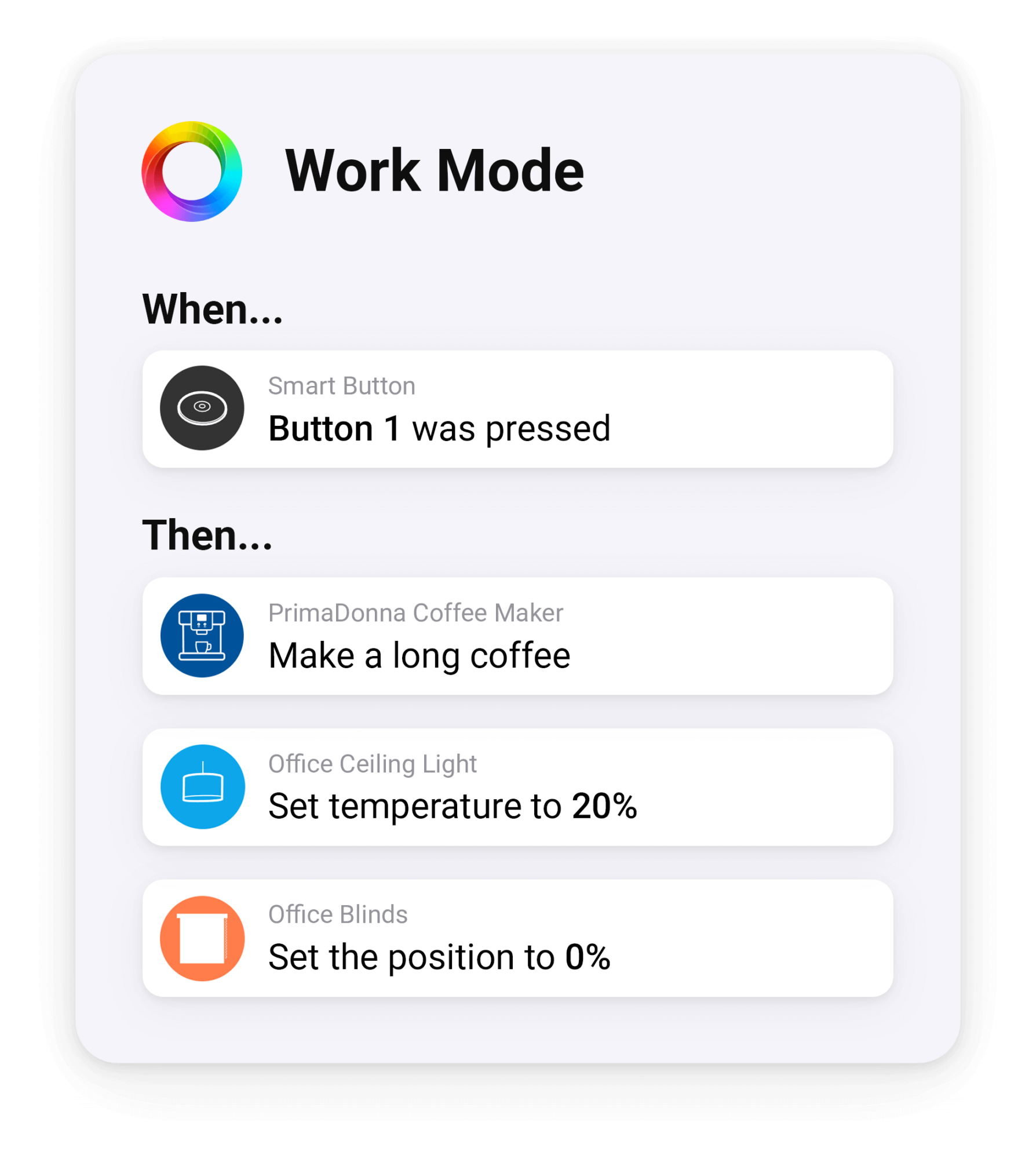
The same "Work Mode" Flow also helps you get into a state of deep work. It can automatically adjust your smart blinds to eliminate screen glare from the morning sun. To mask distracting household noises, it can also start a focus playlist, like instrumental music or ambient sounds, on a nearby smart speaker. It creates an instant bubble of productivity so you can get right to work.
The Professional and Uninterrupted Video Call
Looking professional on video calls is more important than ever. You can create a "Video Call" Flow and trigger it with a smart button on your desk. One press tells Homey to instantly set your lighting for a perfect on-camera look. It activates a smart lamp to properly illuminate your face, guaranteeing you are never poorly lit for an important meeting.
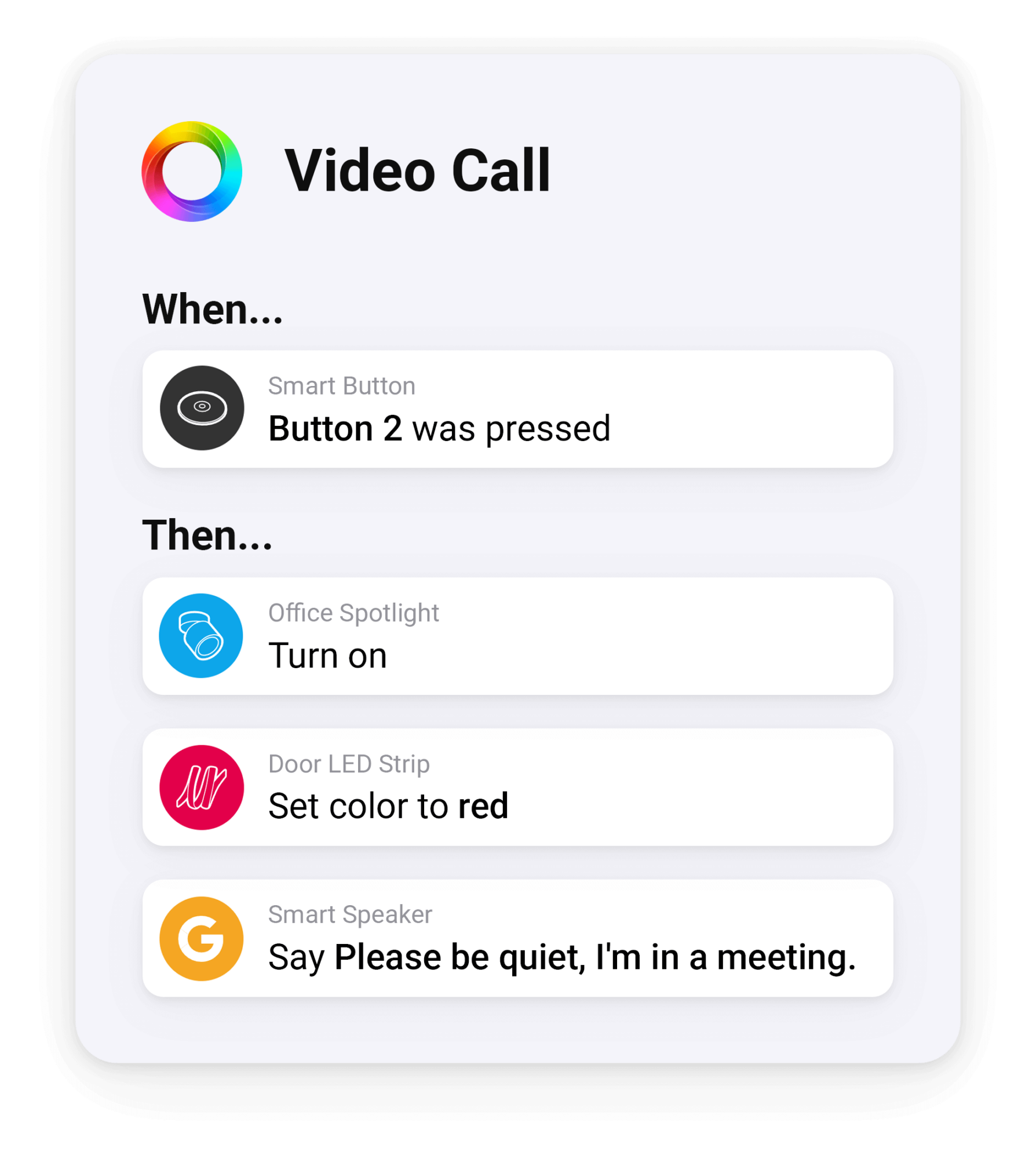
This Flow also creates your personal do-not-disturb system. Homey instantly changes a smart LED strip outside your office door to red, which tells your family not to interrupt. To make sure the message is clear, it also sends a spoken announcement to a speaker in the living room, saying "Please be quiet, I'm in a meeting."
Automated Productivity and Time Tracking
A truly ultimate office can help you understand your work habits without any extra effort. Homey connects to services like Google Sheets to automatically log your workday for you. You never have to remember to start or stop a manual timer again. The same "Work Mode" Flow you use to start your day becomes your automatic time clock.
When you activate your "Work Mode" Flow in the morning, Homey instantly adds a new row to a spreadsheet with the current date and start time. When you trigger your "End of Day" Flow, it also logs the end time. You can even press a smart button on your desk to log your breaks, adding pause and resume times for a truly accurate picture of your day. This simple automation becomes an incredibly powerful tool for freelancers who bill by the hour or for anyone who wants to analyze their work patterns to become more productive.
Winding Down at the End of the Workday
Disconnecting is just as important as focusing during the day. An "End of Day" Flow can help draw a clear line between work and home life. One tap on a smart button turns off your desk lamp and monitor light strip, signaling that work is done.
The same Flow can shift your office lighting to a warm, relaxed tone. It softens the space instead of leaving it in bright work mode. Your smart speaker can play a short calming sound to mark the transition.
This Flow also resets your door status LED back to its normal color. Your "do not disturb" signal turns off, letting your family know you're available again.
Get Started Today
Your home office should be a space that boosts your productivity, not one filled with distractions. With Homey, you automate your environment for deep focus, looking professional on every video call, and track your work hours automatically. Get started for free with Homey Cloud, or go full-on with Homey Pro.
FAQs
Can Homey remind me to take breaks during the workday?
Yes. A Flow can trigger at set intervals to flash a smart light or send a phone notification, prompting you to step away from your desk.
How does the smart LED strip signal that I'm in a meeting?
Pressing a smart button triggers a Flow that changes the LED strip outside your office door to red, giving your household a clear visual signal not to interrupt.
Does Homey track my work hours automatically?
Yes. By connecting to a service like Google Sheets, your "Work Mode" and "End of Day" Flows can log start and end times automatically, without a manual timer.
What does the "Work Mode" Flow adjust besides lighting?
It can also close smart blinds to cut glare and start a focus playlist on a nearby speaker, helping mask household noise while you settle into work.
Do I need Homey Pro to build these office Flows?
Homey Cloud can handle basic Flows for free, while Homey Pro adds local processing and broader device protocol support for more advanced office setups.
Glossary
Flow
A rule in Homey that links a trigger, like pressing a button or reaching a set time, to one or more actions on connected devices.
Smart Button
A small physical device that triggers a Flow with a single press, often used for quick actions like starting a meeting mode or logging a break.
Color Temperature
A measure of how warm or cool a light appears, ranging from soft yellow tones to bright, cool white, often adjusted to match focus or relaxation.
LED Strip
A flexible strip of connected lights that can change color, often placed near a doorway to signal status such as availability or do-not-disturb.
Integration
A connection between Homey and an external service, such as a spreadsheet app, that allows data or actions to pass between the two automatically.


