경고! 이 앱이 제대로 작동하지 않을 수 있습니다.
이 앱 버전은 현재 테스트 중이며 아직 검토되지 않았습니다. 기대한 대로 작동하지 않을 수 있습니다.
« 일반 버전으로 돌아가기
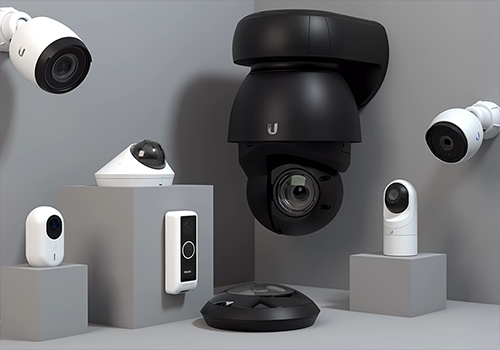
The Homey Unifi Protect App integrates your Ubiquiti Unifi Protect system with Homey, enabling you to monitor and control your Unifi cameras directly from your Homey environment. With this app, you can:
- View camera images within Homey.
- Trigger Homey flows based on motion detection or other camera events.
- Access snapshots and camera status for automation and security purposes.
- This integration helps you create a smarter, more secure home by combining the power of Unifi Protect with Homey’s automation capabilities.
Need help or want to share ideas? Join the discussion on the Homey Community Forum.
For professional assistance, troubleshooting, or custom integration services, click on Contact Developer to reach out to Monkeysoft.
More Apps from Monkeysoft
Explore our other Homey integrations for a complete smart home experience:
- Homey Unifi Access – Manage Unifi Access devices with Homey.
- Homey Unifi Network – Monitor and control your Unifi Network environment.
- Homey TvOverlay – Display useful overlays on your TV for notifications and status updates.
자세히 읽기 ›
지원되는 디바이스
AI 포트
FOB
Horn Speaker
NVR 알람 관리자
UniFi OS
UniFi Protect 날씨
릴레이
뷰포트
사이렌
센서
액세스 리더기
액세스 인터콤
액세스 잠금장치
액세스 차고문
액세스 허브
조명
차임벨
초인종
카메라
카메라 존 모션 센서
Flow 카드
위의 디바이스를 클릭하면 관련 Flow 카드만 표시됩니다.
언제...
FOB
FOB 버튼 [[ufp_fob_button]] ([[ufp_fob_press_type]])
FOB
FOB 버튼 [[ufp_fob_button]] 눌림
FOB
FOB 버튼 [[ufp_fob_button]] 길게 눌림
FOB
FOB 버튼 [[ufp_fob_button]] 두 번 눌림
FOB
ARM 버튼: [[ufp_fob_press_type]]
FOB
DISARM 버튼: [[ufp_fob_press_type]]
FOB
PANIC 버튼: [[ufp_fob_press_type]]
FOB
밤 버튼: [[ufp_fob_press_type]]
FOB
왼쪽 버튼: [[ufp_fob_press_type]]
FOB
오른쪽 버튼: [[ufp_fob_press_type]]
NVR 알람 관리자
홈 알람 상태가 변경되면 ...
NVR 알람 관리자
알람 상태가 [[state]]로 변경됨
NVR 알람 관리자
알람 무장됨 (외출 모드 활성화)
NVR 알람 관리자
알람 해제됨 (외출 모드 비활성화)
NVR 알람 관리자
알람 침해됨 (침입 감지됨)
NVR 알람 관리자
알람 허브 구역 [[event_type]] on [[zone_name]]
Ubiquiti UniFi Protect & Access
오디오 이벤트가 감지되었습니다
Ubiquiti UniFi Protect & Access
Connection status of camera has changed
Ubiquiti UniFi Protect & Access
A door acces event is detected
Ubiquiti UniFi Protect & Access
A doorbell is ringing
Ubiquiti UniFi Protect & Access
A fingerprint was identified
Ubiquiti UniFi Protect & Access
An unknown fingerprint was detected
Ubiquiti UniFi Protect & Access
A FOB button event was detected
Ubiquiti UniFi Protect & Access
A FOB button event for FOB was detected
Ubiquiti UniFi Protect & Access
A NFC card was scanned
Ubiquiti UniFi Protect & Access
An unknown NFC card was scanned
Ubiquiti UniFi Protect & Access
The NVR is accessed
Ubiquiti UniFi Protect & Access
A object was detected
Ubiquiti UniFi Protect & Access
A animal was detected
Ubiquiti UniFi Protect & Access
스마트 감지가 종료되었습니다
Ubiquiti UniFi Protect & Access
A face was detected
Ubiquiti UniFi Protect & Access
A license plate was detected
Ubiquiti UniFi Protect & Access
A package was detected
Ubiquiti UniFi Protect & Access
A person was detected
Ubiquiti UniFi Protect & Access
A vehicle was detected
Ubiquiti UniFi Protect & Access
A snapshot was created from the package camera
Ubiquiti UniFi Protect & Access
A snapshot was created
UniFi Protect 날씨
온도가 변경되면
UniFi Protect 날씨
[[location]] 날씨 업데이트됨
릴레이
Relay state changed to [[relay_state]]
액세스 잠금장치
문에서 키패드 / PIN 사용됨
액세스 차고문
차고문에서 키패드 / PIN 사용됨
액세스 차고문
차고문에서 올바른 PIN 입력됨
액세스 차고문
차고문에서 잘못된 PIN 입력됨
초인종
알 수 없는 NFC 카드가 스캔되었습니다
그리고...
NVR 알람 관리자
홈 알람 상태가 다음이면 ...
Ubiquiti UniFi Protect & Access
FOB button is Button
Ubiquiti UniFi Protect & Access
FOB press type is Press type
릴레이
Relay status is closed
그러면...
Horn Speaker
볼륨을 다음으로 설정 %
NVR 알람 관리자
홈 알람 상태 설정 ...
릴레이
Pulse relay for Pulse duration (ms) ms
뷰포트
뷰포트를 라이브뷰 라이브뷰 ID 로 설정
사이렌
Test siren sound (at Volume volume)
사이렌
Start siren for Duration seconds
액세스 리더기
리더 액세스 방법 Wave 활성화됨 설정
액세스 리더기
리더 액세스 방법 NFC 활성화됨 설정
액세스 리더기
리더 액세스 방법 Mobile Tap 활성화됨 설정
액세스 리더기
리더 액세스 방법 Mobile Button 활성화됨 설정
액세스 잠금장치
임시 문 잠금 규칙 활성화됨 을 간격(분) 분 동안 설정
액세스 차고문
차고 문 열림/닫힘 상태 전환하기
액세스 차고문
임시 문 잠금 규칙 활성화됨 을 간격(분) 분 동안 설정
차임벨
Set chime Enabled with volume Volume
초인종
Set doorbell status LED Enabled
초인종
Set doorbell status sound Enabled
초인종
Set LCD message Message
초인종
Set Night Vision mode Night Vision
초인종
Set recording mode Recording mode
초인종
Take a snapshot with an width from Width in pixels
초인종
Set doorbell status LED Enabled
초인종
Set doorbell status sound Enabled
초인종
Take a snapshot from the package camera with an width from Width in pixels
초인종
Set camera view to black Enabled
초인종
Test doorbell ringtone
초인종
도어벨 벨소리 볼륨을 볼륨 (0-100) 으로 설정
초인종
도어벨 스피커 볼륨을 볼륨 (0-100) 으로 설정
초인종
연결된 차임벨 볼륨을 볼륨 (0-100) 으로 설정
초인종
현재 카메라 이미지 가져오기, 분 분 동안 사용 가능
Advanced
카메라
Set camera status LED Enabled
카메라
Set Night Vision mode Night Vision
카메라
Set recording mode Recording mode
카메라
Take a snapshot with an width from Width in pixels
카메라
Set camera status LED Enabled
카메라
Set cameraview to black Enabled
카메라
Start camera patrol present Present
카메라
PTZ Reset to home position
카메라
PTZ Move to preset Present
카메라
Set color night vision Enabled
카메라
Set auto tracking person on Person and smart zoom on Smart zoom
카메라
Set face detection Enabled
새로운 기능
버전 1.13.5 — Camera and doorbell snapshots now use the V2 API first (higher resolution) and fall back to V1; the package camera snapshot uses the package channel. Add a 'Get the current camera image' action card for the doorbell that returns a frozen image tag, usable for 1-999 minutes (default 30).
업데이트 로그 보기










 선택하신 Homey에 Ubiquiti UniFi Protect & Access이(가) 호환되지 않습니다.
 Ubiquiti UniFi Protect & Access이(가) 곧 Homey에 설치됩니다.
 Belgium
 Bulgaria
 Croatia
 Cyprus
 Czech Republic
 Estonia
 Finland
 Greece
 Hungary
 Iceland
 Ireland
 Latvia
 Lithuania
 Malta
Malta
 Moldova
 The Netherlands
 Portugal
 Romania
 Slovakia
 Slovenia
 Türkiye
 Ukraine
 United Kingdom


