





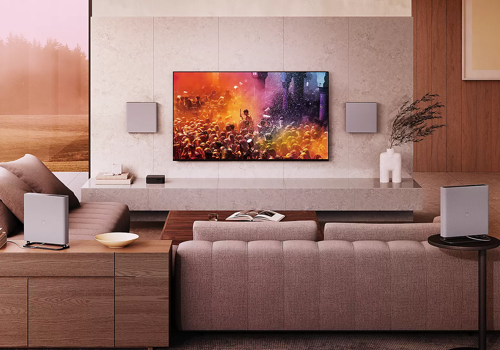
Bravia Theater Quad

Cinema sound, perfectly at home.

Read more ›

Supported devices

Flow cards

Click on a device above to show related Flow cards only.

When...

Bravia Theater Quad
Turned on
Bravia Theater Quad
Turned off
Bravia Theater Quad
The volume changed
Bravia Theater Quad
Input source changed
i
Fires when the active source switches, for example from TV to Spotify or Bluetooth.
Bravia Theater Quad
Volume limit was reached
i
Fires when someone tries to turn the volume above the configured maximum.
Bravia Theater Quad
Turned on
i
Fires when the soundbar turns on, for example by remote or TV.
Bravia Theater Quad
Turned off
i
Fires when the soundbar turns off.
Bravia Theater Quad
Night Mode turned on
i
Fires when quieter night-time sound is activated.
Bravia Theater Quad
Night Mode turned off
i
Fires when quieter night-time sound is deactivated.
Bravia Theater Quad
Voice Enhancer turned on
i
Fires when dialogue boosting is switched on.
Bravia Theater Quad
Voice Enhancer turned off
i
Fires when dialogue boosting is switched off.
Bravia Theater Quad
Sound Field turned on
i
Fires when the wider, more cinematic surround effect is switched on.
Bravia Theater Quad
Sound Field turned off
i
Fires when the wider surround effect is switched off.
Bravia Theater Quad
HDMI-CEC turned on
i
Fires when TV-remote control of the soundbar is enabled.
Bravia Theater Quad
HDMI-CEC turned off
i
Fires when TV-remote control of the soundbar is disabled.
Bravia Theater Quad
Auto Standby turned on
i
Fires when automatic power-off after inactivity is enabled.
Bravia Theater Quad
Auto Standby turned off
i
Fires when automatic power-off after inactivity is disabled.
Bravia Theater Quad
Auto Volume turned on
i
Fires when automatic volume leveling is switched on.
Bravia Theater Quad
Auto Volume turned off
i
Fires when automatic volume leveling is switched off.
Bravia Theater Quad
DRC mode changed
i
Fires when the loud/quiet balancing (DRC) setting changes.
Bravia Theater Quad
HDMI passthrough changed
i
Fires when HDMI passthrough behavior changes.
Bravia Theater Quad
Bluetooth mode changed
i
Fires when the Bluetooth role (receiving or transmitting) changes.
Bravia Theater Quad
Rear level changed
i
Fires whenever the rear-speaker level is adjusted.
Bravia Theater Quad
Bass level changed
i
Fires whenever the bass level is adjusted.

And...

Bravia Theater Quad
Is turned on
Bravia Theater Quad
Input source is ...
i
Check which source is currently playing through the soundbar.
Bravia Theater Quad
Power is on
i
Check whether the soundbar is currently on.
Bravia Theater Quad
Is muted
i
Check whether the soundbar is currently silenced.
Bravia Theater Quad
Night Mode is on
i
Check whether quieter night-time sound is currently active.
Bravia Theater Quad
Voice Enhancer is on
i
Check whether dialogue boosting is currently active.
Bravia Theater Quad
Sound Field is on
i
Check whether the wider surround effect is currently active.
Bravia Theater Quad
HDMI-CEC is on
i
Check whether TV-remote control of the soundbar is active.
Bravia Theater Quad
Auto Standby is on
i
Check whether the soundbar will auto-power-off after inactivity.
Bravia Theater Quad
Auto Volume is on
i
Check whether automatic volume leveling is active.
Bravia Theater Quad
DRC mode is ...
i
Check the current loud/quiet balancing (DRC) setting.
Bravia Theater Quad
HDMI passthrough is ...
i
Check the current HDMI passthrough behavior.
Bravia Theater Quad
Bluetooth mode is ...
i
Check whether Bluetooth is currently receiving from a phone or sending to headphones.

Then...

Bravia Theater Quad
Turn on
Bravia Theater Quad
Turn off
Bravia Theater Quad
Toggle on or off
Bravia Theater Quad
Set the volume to %
Bravia Theater Quad
Set relative volume %
i
Change the volume with respect to the device's current volume.
Bravia Theater Quad
Mute the volume
Bravia Theater Quad
Unmute the volume
Bravia Theater Quad
Toggle muted volume on or off
Bravia Theater Quad
Set volume limit mode to ...
i
Prevent the soundbar from playing louder than a chosen maximum. Useful for kids' rooms or night-time.
Bravia Theater Quad
Set maximum volume to ...
i
Set the maximum volume the soundbar will allow.
Bravia Theater Quad
Increase volume by ...
i
Turn the volume up by the given number of steps.
Bravia Theater Quad
Decrease volume by ...
i
Turn the volume down by the given number of steps.
Bravia Theater Quad
Set input source to ...
i
Switch which connected source (TV, HDMI, Spotify, Bluetooth, AirPlay) plays through the soundbar.
Bravia Theater Quad
Set dynamic range compressor to ...
i
Choose how strongly the soundbar evens out loud and quiet sounds. Useful for low-volume or late-night listening.
Bravia Theater Quad
Set HDMI passthrough to ...
i
Choose whether HDMI video keeps reaching the TV when the soundbar is off. Handy if a console or player is connected through the soundbar.
Bravia Theater Quad
Turn on Voice Enhancer
i
Boost speech so dialogue is easier to follow over music and sound effects.
Bravia Theater Quad
Turn off Voice Enhancer
i
Restore the normal balance between dialogue, music and effects.
Bravia Theater Quad
Turn on Sound Field
i
Spread sound around the room for a wider, more cinematic experience.
Bravia Theater Quad
Turn off Sound Field
i
Play audio in its original form without the wider surround effect.
Bravia Theater Quad
Turn on Night Mode
i
Soften loud sounds like explosions so you can watch late at night without disturbing others.
Bravia Theater Quad
Turn off Night Mode
i
Restore the full, dynamic sound.
Bravia Theater Quad
Turn on HDMI-CEC
i
Let the TV remote also control the soundbar, and let connected devices wake it automatically.
Bravia Theater Quad
Turn off HDMI-CEC
i
Stop the soundbar from reacting to the TV remote or connected devices.
Bravia Theater Quad
Turn on Auto Standby
i
Automatically power the soundbar off after a period of silence to save energy.
Bravia Theater Quad
Turn off Auto Standby
i
Keep the soundbar powered on even when there is no audio.
Bravia Theater Quad
Turn on Auto Volume
i
Keep the volume consistent between loud commercials, quiet shows and movies.
Bravia Theater Quad
Turn off Auto Volume
i
Let each source play at its own natural volume.
Bravia Theater Quad
Set rear level to ...
i
Fine-tune how prominent the rear speakers are. Higher = more surround feel, lower = more focused front sound.
Bravia Theater Quad
Set bass level to ...
i
Fine-tune how strong the deep bass and rumble feel.
Bravia Theater Quad
Set Bluetooth mode to ...
i
Choose whether the soundbar receives audio from a phone/tablet, or streams its own sound to wireless headphones/speakers.

Support

Having an issue with this app? Report issues via the developer issue tracker.

What’s new

Version 1.1.1 — add hint text with i18n support for all flow trigger, condition, and action cards

View changelog

Bravia Theater Quad

Bravia Theater Quad is not compatible with the selected Homey.

Bravia Theater Quad will install on Homey shortly.
Install App