








Introducing the “Ask a Question” Flow card
Decide what happens next. With the new “Ask a Question” Flow card, your Advanced Flows can pause and continue based on your input.
Unlike Yes/No actions, the “Ask a Question” Flow card lets your Advanced Flow receive real input — numbers, text, or codes — and continue using that value.
When a Flow reaches this card, Homey sends you a push notification with a question. You can reply directly from the notification, and the Flow continues as soon as you do.
Your response becomes available to the rest of the Flow, letting you make decisions based on your input rather than just sensors or timers.
Your Flow asks — you answer
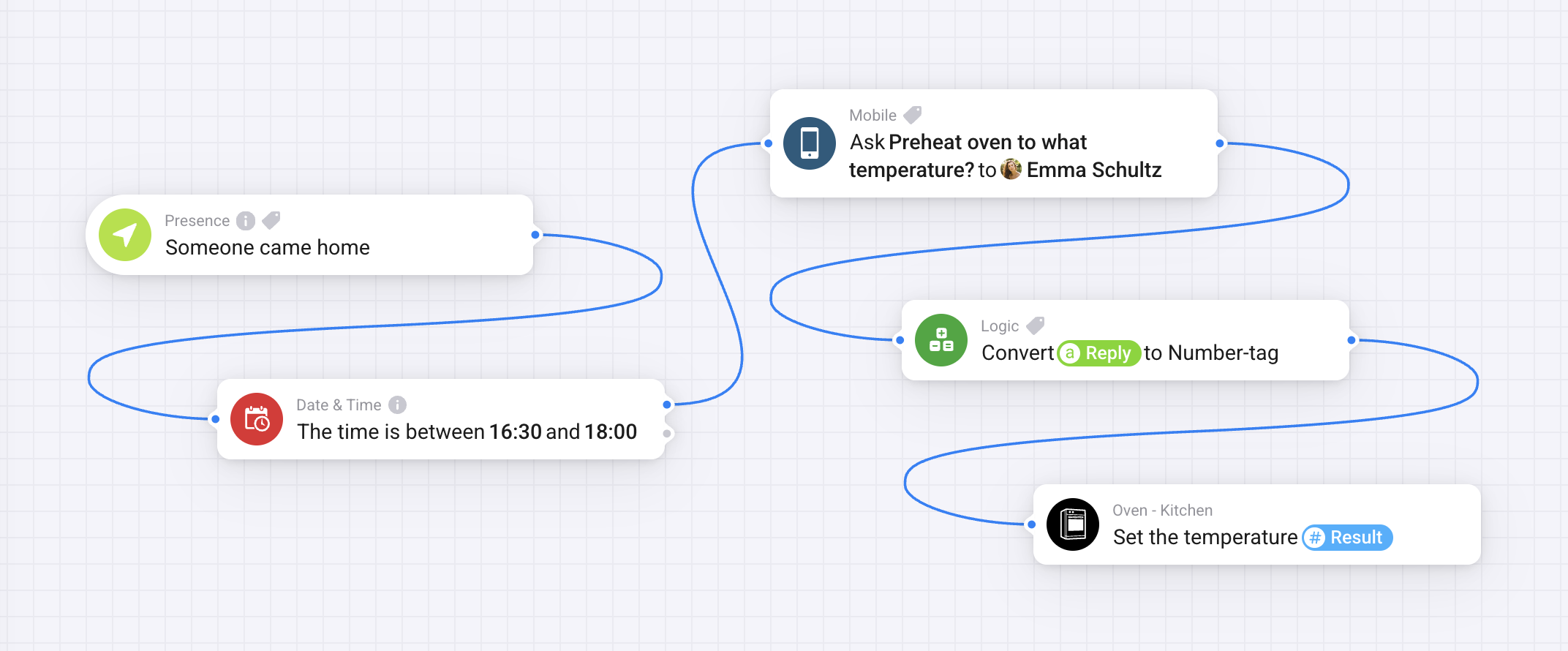
For example, someone arrives home. Homey sends you a notification asking what temperature the oven should be preheated to. You reply with a number, and your Flow sets the oven to that exact temperature.
Give it a try
You’ll find the “Ask a Question” Flow card under Add → Then… → Mobile in Advanced Flow. It’s available for Homey Pro (2023 — 2026), Homey Pro mini, and Homey Self-Hosted Server running v12.10.0 or later. For Homey Cloud, a Premium subscription is required.


