








Thread for Power Users: Roles, Partitions and Diagnostics in Homey
Why Bother with the Internals?
Most people never need to think about how Thread elects a mesh leader or handles network partitions. But if you run Homey, enjoy understanding how things work under the hood, and care about why a network behaves the way it does, a basic understanding pays off.
The good news is that you do not need to learn the full Thread specification. A small set of concepts is enough to reason about stability, placement, and odd behavior without overthinking how Thread works.
Thread Network Roles Explained
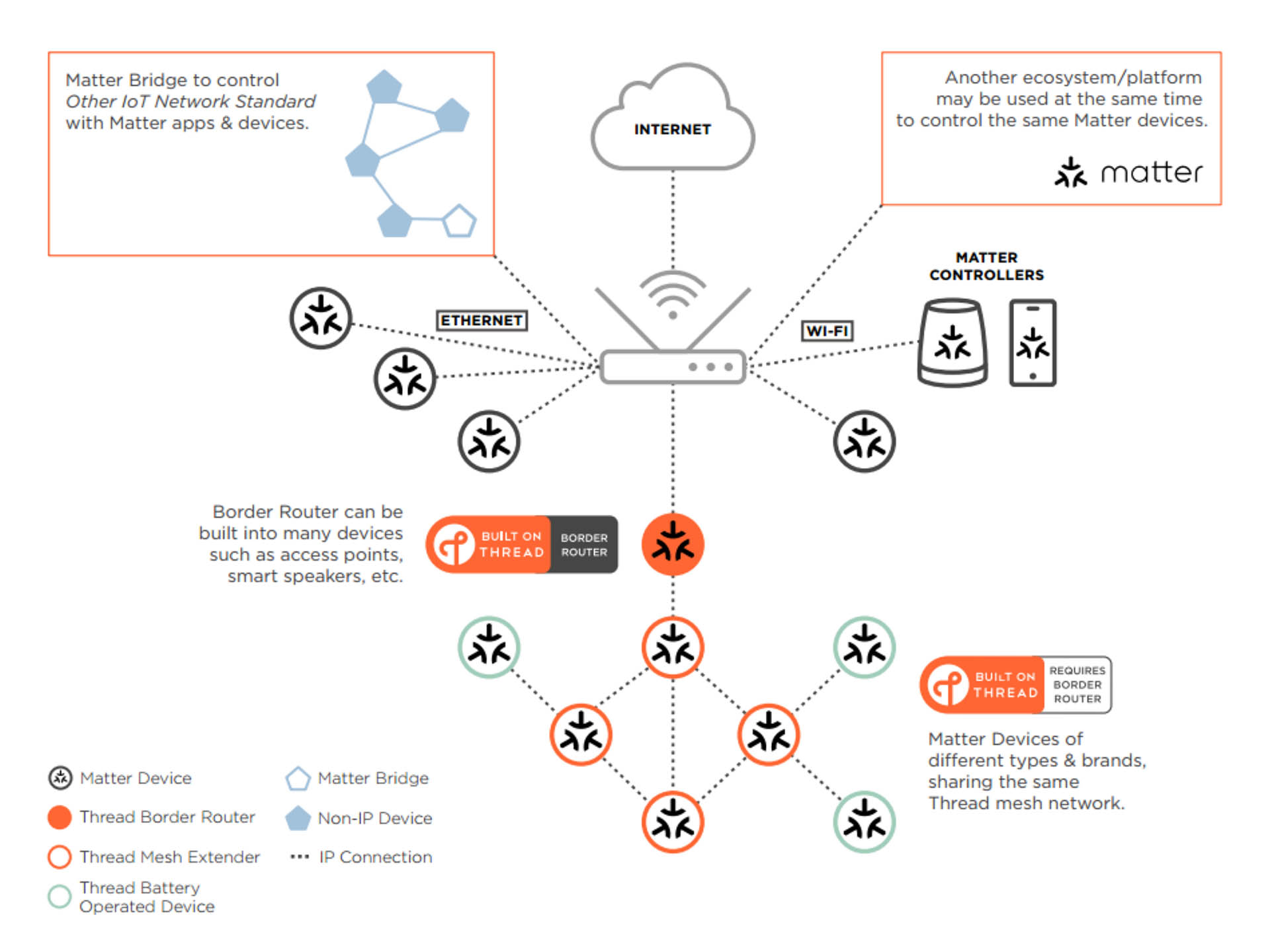
Thread roles are often described like job titles, but it helps to think of them as runtime states a device can take on depending on what the mesh needs. Some devices are capable of routing, others are not. The network then elects and promotes nodes automatically to keep routing stable and coverage strong.
Leader
A router that maintains network-wide data for its partition, such as router ID allocation and other network parameters. There is exactly one leader per partition, and if it disappears another router will be elected automatically.
Router
A node that forwards traffic for the mesh. Routers maintain routing information, keep neighbor relationships, and can act as a parent for end devices (children).
REED (Router-Eligible End Device)
A device that is capable of being a router (it has router-capable hardware and software) but is currently operating as an end device. If the network needs more routers, the Leader can promote a REED into a router role.
End Device
A non-routing node that communicates through a parent router. Many battery devices are end devices, including sleepy end devices that keep the radio off most of the time to save power and wake periodically to check in.
These roles are dynamic. Leaders can change, routers can appear or disappear as the network adjusts, and REEDs can be promoted when additional routing capacity is needed. For design, the practical takeaway is simple: good stability usually comes from having enough well-placed router-capable, mains-powered Thread devices, plus a capable Border Router like Homey Pro.
Partitions: Temporary Splits in the Mesh
A partition is what happens when a single Thread network briefly behaves like two separate ones. This can occur when parts of the mesh lose reliable radio connectivity with each other.
For example, you might have Thread routers in both your house and a detached garage. If the link between them drops due to interference, distance, or a powered-off router, each side can continue operating on its own. During that time, each side maintains its own leader and routing state.
When the connection is restored, Thread automatically reconciles the split and merges everything back into a single network. There is no user intervention involved.
You normally do not need to think about partitions at all. But knowing they exist helps explain why a device may suddenly feel less responsive, appear “far away”, or briefly behave differently when a marginal RF link goes unstable.
Addressing and Routing
Thread uses IPv6 for all addressing within the mesh. To make this practical on low-power radios, it relies on 6LoWPAN compression, which shrinks IPv6 headers so they can fit efficiently into small 802.15.4 frames without losing the benefits of IP networking.
Routing is handled in a fully distributed way. Router nodes maintain routing tables and keep track of their child devices, building a picture of the local topology. Routing decisions are proactive, meaning routers maintain knowledge of the network rather than discovering paths only when traffic appears. There is no central routing server coordinating the mesh.
Link quality plays an important role in how routes are chosen and adjusted over time. As radio conditions change, the mesh adapts by preferring better links or different paths. In spirit, this is similar to how Zigbee meshes behave, but Thread does it using standard IPv6 concepts rather than a custom network layer.
Diagnostics You Can Reason About Without Custom Tools
Homey does not currently expose low-level Thread diagnostics like routing tables or role assignments. Even so, you can often understand what is going on by applying a simple mental model:
- If a specific area of the house feels unreliable, look at router density and placement in that zone. Weak coverage usually points to too few router-capable devices or poor positioning.
- If issues appear when certain mains-powered devices go offline, those devices were likely acting as routers or critical links in the mesh.
- If only a single device misbehaves while others remain stable, the problem is more likely the device itself or its firmware rather than the Thread network as a whole.
For deeper inspection, some vendors offer Thread diagnostics tools, and OpenThread-based hardware can provide detailed visibility. In most Homey-centric setups, however, that level of analysis is rarely necessary as Homey does everything automatically for you.
Conclusion
Knowing that Thread has leaders, routers, REEDs, end devices and partitions lets you interpret strange behaviour without panicking. You can decide when to add routers, when to move Homey, and when to blame a device rather than the entire mesh.
You get to be the calm person in the room when someone says, “The Thread thing is flaky” – and you can answer with something more useful than “let’s reboot everything.”
FAQ – Thread Power-User Topics
Can I force a specific device to be a router?
Not directly in consumer devices. The network decides based on needs and the device’s capabilities.
Can I have more than one leader?
No. Each partition has exactly one leader. If you see behaviour that suggests otherwise, you likely have separate partitions.
Can I stop partitions from forming?
You can minimize them by ensuring consistent RF connectivity between all parts of the house, but you can’t disable the mechanism.
How do I tell if a device is a REED?
Most consumer UIs don’t show this. You infer from its behavior and power source: mains devices are usually routers or REEDs.
Does IPv6 mean my Thread devices are publicly reachable?
No. Thread uses IPv6 within its own mesh; Border Routers control reachability to the network and the wider internet.
Can I capture Thread packets with a normal Wi-Fi card?
No. Thread uses 802.15.4, not Wi-Fi. You need 802.15.4-capable hardware and tools like those built around OpenThread.
Does Thread support multicast or only unicast?
Thread supports multicast, which is useful for group commands in standards like Matter.
Glossary – Power-User Terms
REED (Router-Eligible End Device)
An end device that can be promoted to a router when the network needs more routing capacity.
Partition
A portion of a Thread network that is briefly separated from others and operates as an independent mesh with its own leader.
Routing Table
The internal structure that routers maintain to know where to forward packets based on destination addresses.
Child Table
A data structure in routers listing their associated end devices and REEDs.
Leader Data
Network-wide information held by the leader about router IDs, prefixes and other parameters.
Mesh Local Address
An IPv6 address valid only within a Thread mesh, used for internal communication.
OpenThread
An open-source implementation of Thread, useful for understanding internals and building diagnostic tools.


