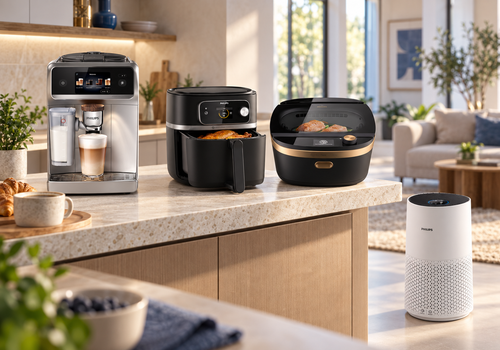
Bring compatible coffee machines, air fryers, multicookers and air purifiers into your daily routines. See appliance status, use supported controls and automate actions with Flows. The espresso dashboard widget shows brewing activity and maintenance information, with a button to turn the machine on or off.
Set up each appliance in the official Philips HomeID app first. Sign in with your Philips account for cloud-connected models; supported local models can communicate over your home network. Available features depend on the model, and cloud-connected devices need internet access. This independent app is not affiliated with Philips or Versuni.
Click on a device above to show related Flow cards only.
When...
Air Fryer
Turned on
Air Fryer
Turned off
Air Fryer
The target temperature changed
Air Fryer
The temperature changes
Air Fryer
Cooking status changed
Air Purifier
Turned on
Air Purifier
Turned off
Air Purifier
The PM2.5 value changed
Air Purifier
The temperature changes
Air Purifier
The humidity changed
Air Purifier
The generic alarm turned on
Air Purifier
The generic alarm turned off
Espresso Machine
Turned on
Espresso Machine
Turned off
Espresso Machine
Machine state changed
Multicooker
Turned on
Multicooker
Turned off
Multicooker
The target temperature changed
Multicooker
The temperature changes
Multicooker
The humidity changed
Multicooker
Cooking status changed
And...
Air Fryer
Is turned on
Air Fryer
Is cooking
Air Purifier
Is turned on
Air Purifier
The generic alarm is on
Espresso Machine
Is turned on
Multicooker
Is turned on
Multicooker
Is cooking
Then...
Air Fryer
Turn on
Air Fryer
Turn off
Air Fryer
Toggle on or off
Air Fryer
Set the temperature °C
Air Fryer
Keep warm for Minutes min
Air Fryer
Pause cooking
Air Fryer
Refresh [[device]]
Air Fryer
Set cooking method to Method
Air Fryer
Start cooking at Temperature°C for Minutes min (preheat: Preheat)
Air Fryer
Stop cooking
Air Purifier
Turn on
Air Purifier
Turn off
Air Purifier
Toggle on or off
Air Purifier
Refresh [[device]]
Espresso Machine
Turn on
Espresso Machine
Turn off
Espresso Machine
Toggle on or off
Espresso Machine
Abort the brew
Espresso Machine
Brew Drink with Profile
Espresso Machine
Brew Drink (Volume ml)
Espresso Machine
Brew hot water
Espresso Machine
Brew Saved recipe with Profile
Espresso Machine
Refresh [[device]]
Espresso Machine
Resume the brew
Espresso Machine
Set bean type to Bean type
Espresso Machine
Set roast level to Roast level
Espresso Machine
Skip the current brew step
Multicooker
Turn on
Multicooker
Turn off
Multicooker
Toggle on or off
Multicooker
Set the temperature °C
Multicooker
Keep warm for Minutes min
Multicooker
Pause cooking
Multicooker
Refresh [[device]]
Multicooker
Set cooking method to Method
Multicooker
Start cooking at Temperature°C for Minutes min (preheat: Preheat)
Multicooker
Stop cooking
Widgets
You can add this app’s widgets to your dashboard or homescreen in the mobile app.
Espresso Now
Support
Having an issue with this app?
Contact the developer via email.
What’s new
Version 1.0.5 — The Homey-specific PIN template is now used on the verification code screen. The firmware version is displayed as a read-only value in the device settings, rather than as a sensor. Model and connection information are now read-only. The Fahrenheit unit indicator is no longer added as a sensor on new devices. The preheat function has been changed to a button that also displays its current status. Existing devices remain compatible.