





Discover the new Homey Portal

Watts Vision+

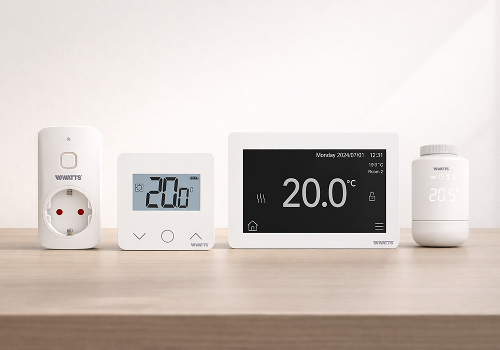
Smart heating and cooling control with Watts Vision+.

Read more ›

Supported devices

Flow cards

Click on a device above to show related Flow cards only.

When...

Smart Plug
Turned on
Smart Plug
Turned off
Thermostat
The target temperature changed
Thermostat
The temperature changes
Thermostat
The thermostat mode changed to ...
Thermostat
Cooling demand stopped
i
Triggers when the thermostat stops actively cooling.
Thermostat
Cooling demand started
i
Triggers when the thermostat starts actively cooling.
Thermostat
Heating demand stopped
i
Triggers when the thermostat stops actively heating.
Thermostat
Heating demand started
i
Triggers when the thermostat starts actively heating.
TRV
The target temperature changed
TRV
The temperature changes
TRV
The thermostat mode changed to ...
TRV
Cooling demand stopped
i
Triggers when the thermostat stops actively cooling.
TRV
Cooling demand started
i
Triggers when the thermostat starts actively cooling.
TRV
Heating demand stopped
i
Triggers when the thermostat stops actively heating.
TRV
Heating demand started
i
Triggers when the thermostat starts actively heating.

And...

Smart Plug
Is turned on
Thermostat
The thermostat mode is ...
Thermostat
Ambient temperature is above Temperature°C
i
True while the measured room temperature is strictly above the given value.
Thermostat
Ambient temperature is below Temperature°C
i
True while the measured room temperature is strictly below the given value.
Thermostat
Target temperature is above Setpoint°C
i
True while the thermostat setpoint is strictly above the given value.
Thermostat
Target temperature is below Setpoint°C
i
True while the thermostat setpoint is strictly below the given value.
Thermostat
Is requesting cooling
i
True while the thermostat is actively cooling.
Thermostat
Is requesting heat
i
True while the thermostat is actively heating.
TRV
The thermostat mode is ...
TRV
Ambient temperature is above Temperature°C
i
True while the measured room temperature is strictly above the given value.
TRV
Ambient temperature is below Temperature°C
i
True while the measured room temperature is strictly below the given value.
TRV
Target temperature is above Setpoint°C
i
True while the thermostat setpoint is strictly above the given value.
TRV
Target temperature is below Setpoint°C
i
True while the thermostat setpoint is strictly below the given value.
TRV
Is requesting cooling
i
True while the thermostat is actively cooling.
TRV
Is requesting heat
i
True while the thermostat is actively heating.

Then...

Smart Plug
Turn on
Smart Plug
Turn off
Smart Plug
Toggle on or off
Thermostat
Set the temperature °C
Thermostat
Set the thermostat mode to ...
Thermostat
Activate timer mode at Setpoint°C for Duration hours
TRV
Set the temperature °C
TRV
Set the thermostat mode to ...
TRV
Activate timer mode at Setpoint°C for Duration hours

Support

Having an issue with this app? Contact the developer via email.

What’s new

Version 1.0.7 — Added Flow conditions to check whether the ambient temperature or the target temperature is above or below a value

View changelog

Watts Vision+

Watts Vision+ is not compatible with the selected Homey.

Watts Vision+ will install on Homey shortly.
Install App